.svg)


.png)
.png)


.svg)





.png)

.png)
What Is EDMS? Electronic vs Engineering Guide (2026)
Learn what EDMS means, how it works, and the difference between electronic and engineering document management systems in AEC.


What Is EDMS? Electronic vs Engineering Document Management Systems Explained (2026)
- EDMS usually stands for electronic document management system, but engineering and construction teams often use it to mean engineering document management system.
- An EDMS goes beyond file storage by controlling versions, metadata, permissions, and approvals, and it records who touched each document and when.
- An engineering EDMS adds drawing revision cycles, transmittals, and review chains that cross company boundaries, which general office systems rarely handle well.
- In construction, an EDMS often sits inside a common data environment (CDE), which also coordinates models, information status, and handover records across the project.
- CUBE's CDE handles engineering EDMS work with automatic versioning, manual revision markers, multi-level Review Flows, and Transmittals that record exactly what each party received.
Ask a finance manager and a document controller what EDMS stands for, and you may get two different answers. Both would be right.
So, what is EDMS?
In most industries, it stands for electronic document management system. A software that captures, stores, secures, and tracks documents digitally. In engineering and construction, it often means an engineering document management system, built to control drawings, revisions, and transmittals.
That difference decides what the software has to do. This guide separates the two meanings, then follows one drawing through every EDMS stage. CUBE's Common Data Environment shows each step in practice.
What Does EDMS Stand For?
In most industries, EDMS stands for electronic document management system. The term covers software that replaces paper files and scattered drives with one governed, searchable repository.
In architecture, engineering, and construction (AEC), the same letters often mean engineering document management system. That version adds the controls technical documents need, such as drawing revision cycles and formal issue to other firms.
Common confusion: Vendors and searchers use both meanings interchangeably. Check which one a vendor means before comparing products, because an office-focused EDMS may lack drawing revision control and transmittals.
What is an electronic document management system in practice?
It is software that keeps documents in one central, searchable repository and applies governance controls to every file. Those controls decide who can open a file, which version is current, and what happened to it over time.
Control, not location, separates an EDMS from a filing cabinet or a shared drive. Files in an EDMS carry metadata, sit under permissions, and move through defined review steps instead of email threads.
What is EDMS software built for, then?
Its job is document lifecycle management. That means capturing a file, making it findable, controlling its changes, and keeping the record after the project team moves on.
Electronic vs Engineering EDMS: What's the Difference?
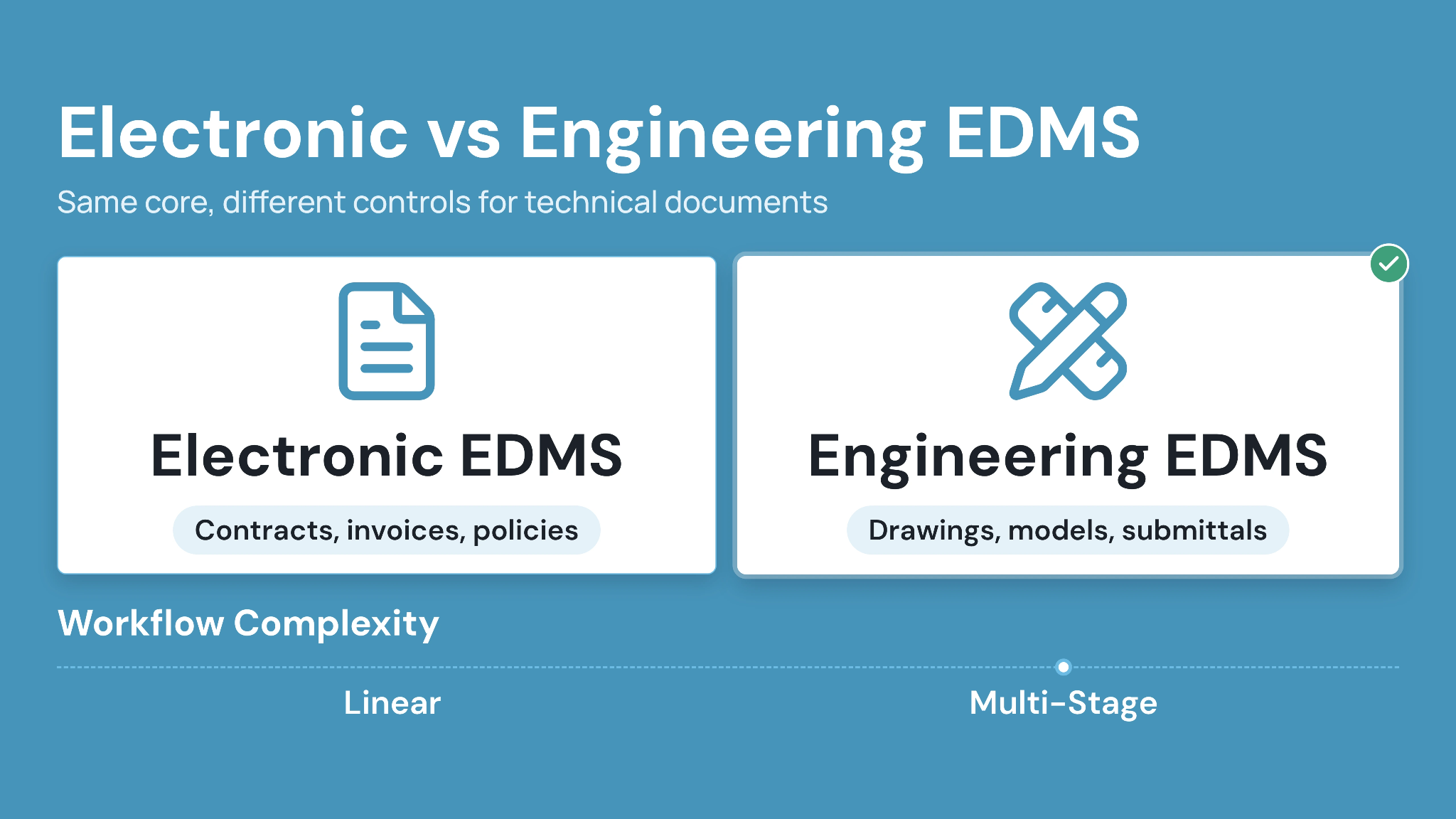
Both types share a core of controlled, searchable, secure documents. But what does an engineering document management system add on top of that? It adds the controls drawings and technical deliverables need once several organizations handle them.
Caption: How electronic and engineering EDMS differ across six attributes that matter for AEC teams.
The engineering additions matter most at the handoffs. A drawing may pass through three review rounds and two external firms before issue, and each step needs its own record.
Superseded sheets are the other pressure point. An engineering EDMS keeps old revisions retrievable while making sure nobody builds from them. Our guide to preventing outdated construction drawings covers the field side of that problem.
How Does an EDMS Work?
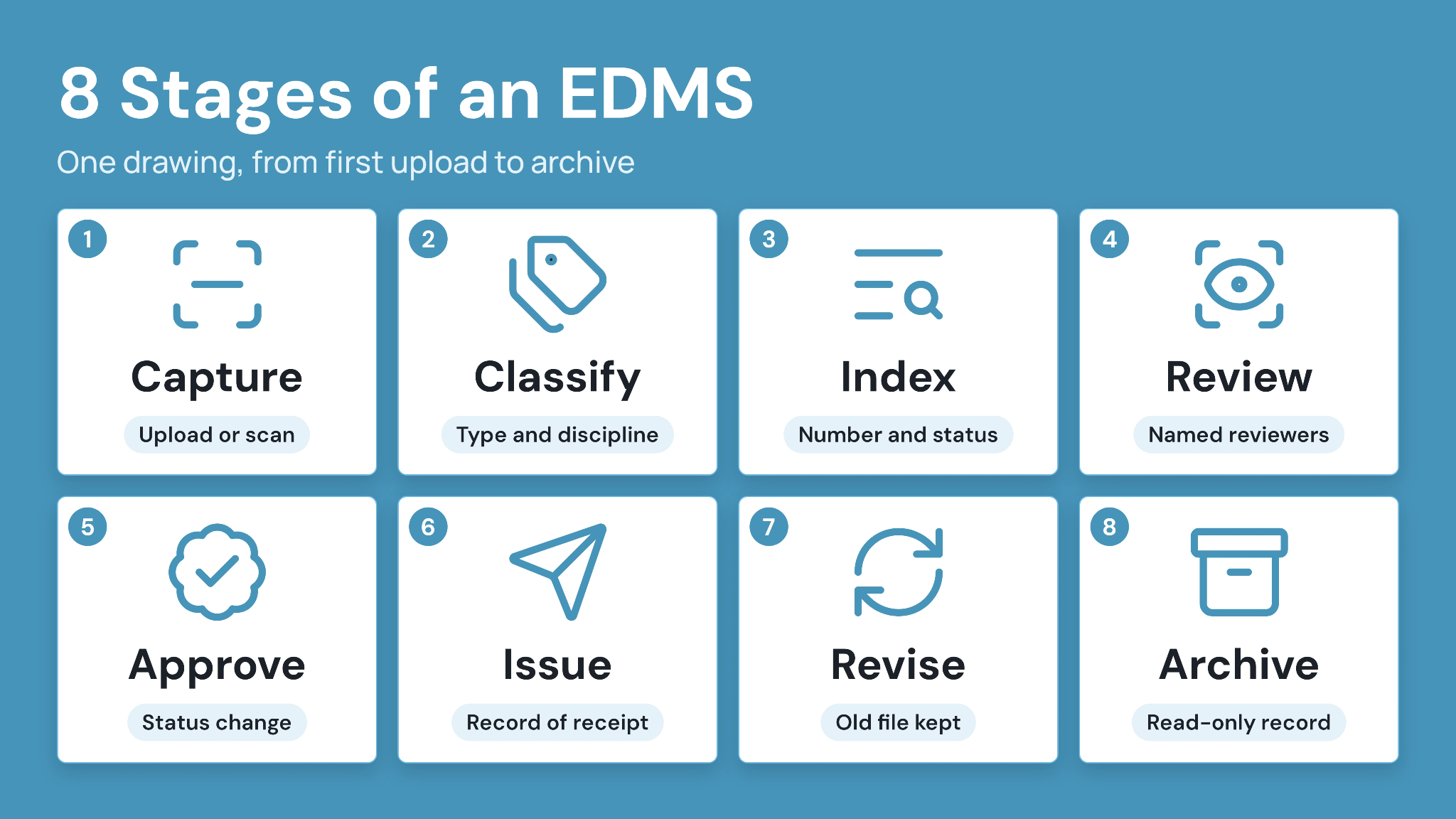
Every EDMS works by moving each document through a controlled lifecycle. The eight stages below follow one engineering drawing from first upload to archive.
- Capture: The file enters the system by upload, bulk import, or scanning of paper originals.
- Classify: The user or system assigns a document type, discipline, and project location.
- Index: Metadata such as document number, revision, and status makes the file searchable.
- Review: Named reviewers check the drawing in sequence, then mark it up or return it.
- Approve: An authorized approver changes its status, so the team can rely on it.
- Issue: The approved revision goes to named recipients, with a record of what each received.
- Revise: A new revision replaces the current one, while the superseded file stays retrievable.
- Archive: At closeout, the final record moves to read-only storage for handover and audit.
Metadata is what makes retrieval fast. A document controller can filter by discipline and status instead of opening folders one by one.
In CUBE, teams can bulk-import files and their metadata from an Excel template, including later versions. Every upload then creates a new version automatically, and a user applies Mark as Revision to the version being formally issued.
Review and approval run through Review Flows of up to 20 ordered levels. Approved files then go out through Transmittals, which record the version sent and its recipients.
Core Features of an EDMS
Eight features separate a working EDMS from organized storage. Each one below shows how it applies to engineering documents.
1. Centralized document repository
All project documents live in one governed location instead of personal drives and email attachments. In CUBE's Folders module, files sit in Spaces with nested folders, and the Desktop Connector syncs local folders with CUBE in both directions.
2. Version control and revision history
Every change creates a retrievable version, and formal revisions mark what was issued. CUBE keeps the two separate. In CUBE, the versions are automatic and can't be edited, while revisions follow configurable sequence rules set at folder level.
3. Metadata, indexing, and search
Metadata turns a file name into a record with a document number, discipline, revision, and status. CUBE's custom fields are inherited from the folder, appear as filterable columns, and support saved views for recurring searches.
4. Access control and permissions
Internal and external users need different rights on the same file. CUBE sets access per user at six levels, from Full Access to No Access, and a file-level setting overrides its folder.
5. Workflow automation and approvals
Approval routing replaces email chains with a defined sequence of reviewers and due dates. Each CUBE Review Flow level carries its own reviewers, minimum approvals, and rollback rules.
6. Audit trails and document status tracking
Audit trails show who changed, reviewed, and issued each file, and when. CUBE records file activity through each Review, while portal activity logs capture the user and timestamp behind each action.
7. Retention, archiving, and handover support
Closed projects still need retrievable records for warranty claims and operations. Agree on retention periods and handover formats early, so the archive reaches the owner in a usable structure. Any earlier version of a CUBE file stays downloadable.
8. Integrations with project information workflows
CUBE's Revit plugin syncs Issues with persistent element IDs, and CUBE dashboards can embed external reports such as Power BI. Check out CUBE’s Revit plugin and other new features for construction document management.
Why Is an EDMS More Than Basic File Storage?
File storage keeps files, while an EDMS controls them. File storage tools like OneDrive and Dropbox hold files well. Version authority, approval routing, and audit records still rely on manual habits, and the table shows where each option stands.
Caption: File storage, EDMS, and CDE compared across eight criteria, from primary purpose to best fit.
Rework usually starts in the first column. A site team opening yesterday's upload from a shared folder has no way to tell whether it cleared review.
When shared drives stop being enough:
Watch for teams asking which drawing is current, approvals tracked in email, and handover packages rebuilt by hand.
For a step-by-step migration path, see our guide to replacing email and shared drives for document sharing.
What Are the Benefits of an EDMS?
The benefits of an EDMS come from specific mechanisms, so each one below names the control that produces it.
- Faster retrieval: Metadata and saved views let users filter by document number or status instead of browsing folders.
- Less wrong-version rework: Revision control keeps the approved revision visible and the superseded one clearly marked.
- Stronger security: Permissions limit each user to the files and actions their role needs.
- Fewer approval bottlenecks: Defined review steps with due dates show exactly where a document is waiting.
- Audit-ready accountability: Audit trails show who approved what, and when, without rebuilding the story from email.
- Smoother handover: A complete, indexed record at closeout gives owners documents they can use.
For a wider look at why this matters on construction projects, read why construction document management is vital for success.
Who Uses EDMS in Engineering and Construction?
Each role on a project touches the EDMS for a different reason:
- Architects and design teams manage drawing sets and specifications through repeated revision rounds.
- Engineers and technical reviewers check calculations and drawings, then approve them or return them with comments.
- Contractors and subcontractors receive issued drawings, respond to requests for information (RFIs), and send submittals back for review.
- Owners and operations teams collect as-built drawings and operations and maintenance (O&M) manuals at handover.
- Document controllers and project administrators set numbering rules, route reviews, and issue transmittals.
EDMS vs DMS vs ECM vs CDE: What's the Difference?
What is the difference between DMS and EDMS? A document management system (DMS) is the broad category, while an EDMS is the digital form focused on control, retrieval, and workflow. Enterprise content management (ECM) and a CDE work at wider scopes.
Caption: DMS, EDMS, ECM, and CDE compared by scope, purpose, typical documents, and relevance to AEC work.
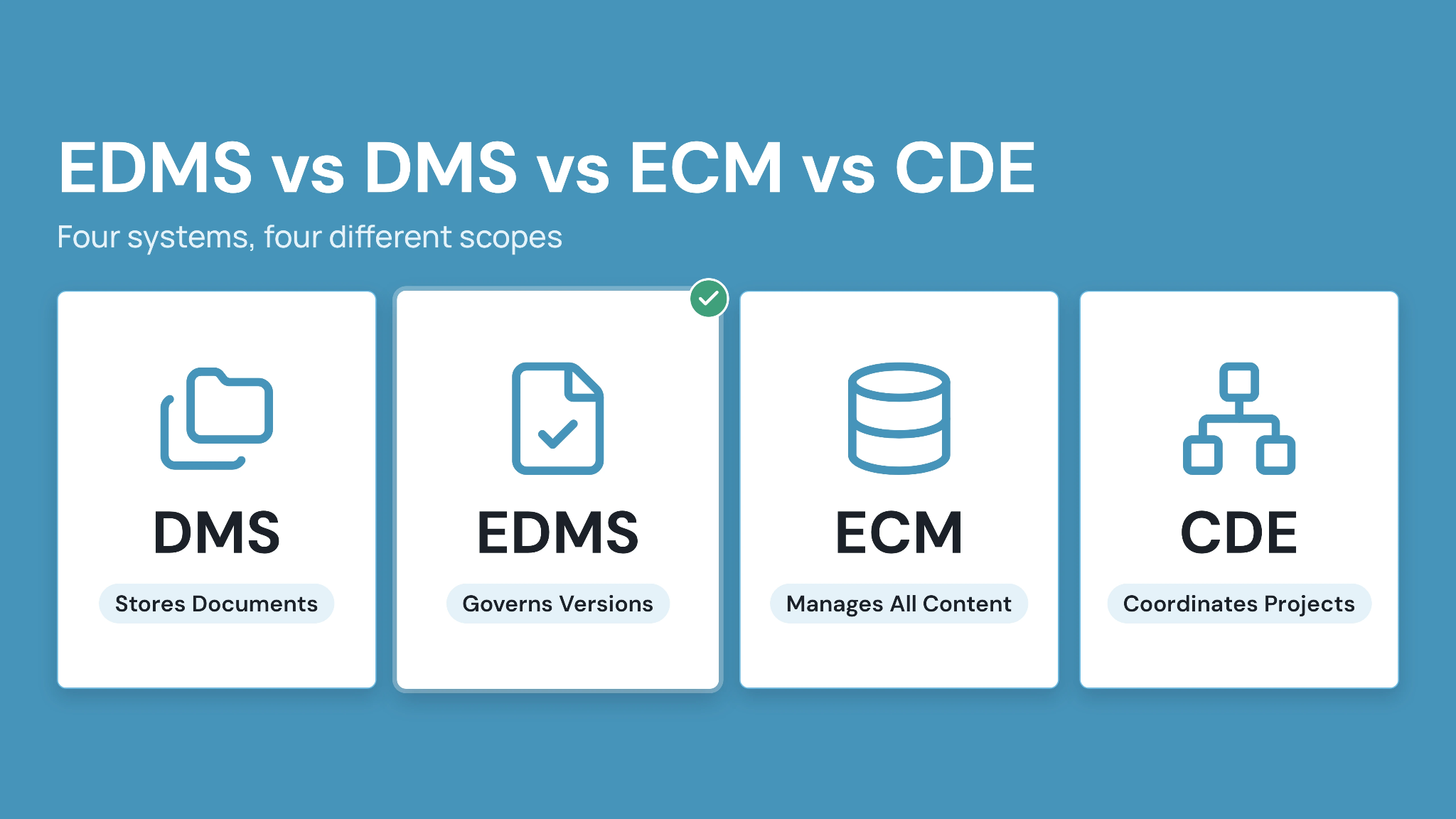
In construction, an EDMS works best as one layer of a CDE strategy. The CDE adds models and information states that a document-only system leaves out. For the CDE side in depth, read our guide to what a common data environment is.
CUBE's CDE combines the engineering EDMS layer with browser-based viewing of CAD and BIM formats. It also connects to Project Management when approved documents need to feed delivery work.
What to Look for in an EDMS for AEC Teams
Choose an EDMS for AEC work by testing it on one real drawing revision. Check for these capabilities:
- Revision control that separates working versions from issued revisions
- Approval workflows with named reviewers, due dates, and rollback
- Transmittals that record which revision each organization received
- Metadata and search built around document numbers and status
- External collaboration controls for consultants and trades
- An audit trail covering every change, review, and issue
- Handover exports the owner can read without platform access
- Clear answers on any AI feature, i.e., which task it performs and what a person approves
CUBE's CDE handles the revision, approval, and transmittal criteria directly. See current plans on the CUBE pricing page.
Case in point: Real estate developer, 15+ projects
A leading Indian real estate developer managing 15+ projects relied on fragmented local servers and manual document control. Its projects had no standardized file naming or structured approvals. CUBE's centralized CDE introduced consistent nomenclature and a three-level review and approval workflow across all projects. Read the full case study →
Answer "What Is EDMS?" for Your Projects With CUBE
What is EDMS for an AEC team in the end? It is the control layer that keeps drawings, revisions, and approvals traceable from design through handover.
CUBE brings that control into a connected CDE, with automatic versioning and multi-level Review Flows alongside Transmittals. Each approved revision reaches the right party with its record intact.
SIGN UP to run your next drawing revision through CUBE.
FAQs
1. Is SharePoint an EDMS?
SharePoint can work as a basic electronic document management system once it is configured with metadata, version history, and approval flows. Engineering teams usually need more, such as formal revision codes, transmittals, and review chains that include outside firms. Those features typically require custom configuration or a dedicated engineering EDMS. Test one drawing revision end to end before deciding which route fits your projects.
2. Can an EDMS manage paper documents?
Yes, once paper originals are scanned into the system. Scanning with optical character recognition (OCR) makes the text searchable. Each scanned file then gets the same metadata, permissions, and version control as a digital document. Set a scanning standard for resolution and naming first, so older records stay consistent with new ones and remain easy to retrieve.
3. Do external consultants need their own EDMS license?
Not always. Several platforms offer limited external roles, so consultants can review and receive documents without a full seat. Confirm what each external role can open, edit, and download before the project starts. CUBE's Guest seats give external participants access to CDE modules within one Space in one project, which suits consultants working on a single scope.
4. Can an EDMS open CAD and BIM files?
A general electronic EDMS usually stores computer-aided design (CAD) and Building Information Modeling (BIM) files without displaying them. An engineering EDMS should let reviewers open and mark up drawings and models in the system itself. CUBE's viewer opens DWG, RVT, and IFC files in the browser, and users can compare any two versions of a drawing or model.
5. How secure is an EDMS?
Security depends on the vendor's controls and certifications, and not just the category. Ask for independent evidence such as ISO 27001 certification and a SOC 2 Type II report. Then check two-factor authentication and how finely permissions can be set. CUBE holds ISO 27001 and SOC 2 Type II, and its user settings support two-factor authentication.
6. How long does it take to set up an EDMS?
Setup time depends on the number of projects, the migration volume, and how much workflow configuration is needed. Start with one pilot project and agree on naming and status rules first. Migrate closed records only after the live workflow works. Treat any vendor timeline as an estimate until it has been tested on your own documents.