.svg)


.png)
.png)


.svg)





.png)


.png)
What Are Shop Drawings in Construction? Definition, Process & Examples
Learn what shop drawings in construction are, who prepares them, how the submittal review workflow runs, and how cloud CDE platforms eliminate rework.


Key Takeaways
- Shop drawings translate architectural design intent into precise fabrication and installation instructions for trade contractors, suppliers, manufacturers, and field erection crews.
- Trade specialty subcontractors author these detailed documents using physical field measurements, verified manufacturer product data, and exact material fabrication specifications.
- Design professionals review shop drawings strictly for design intent conformance, but never for guaranteeing field dimensional accuracy.
- Standard review stamps categorize submissions into Approved, Approved as Noted, Revise and Resubmit, or Rejected, establishing strict liability boundaries.
- Modern Common Data Environments like CUBE unify revision control, link Requests for Information (RFIs) to drawings, and stop jobsite crews from fabricating against superseded sheets.
On a commercial jobsite, construction drawings establish what to build, while shop drawings dictate exactly how trade contractors fabricate and assemble every component. Architectural drawings show design intent, conceptual dimensions, and aesthetic assemblies.
In contrast, shop drawings specify precise weld sizes, anchor bolt placements, sheet metal gauges, expansion joints, and precast concrete embeds. Trade subcontractors, fabricators, and suppliers generate these working documents to guide off-site manufacturing and field installation.
Because architectural plans rarely provide shop-level fabrication measurements, trades must measure actual site conditions, coordinate with adjacent systems, and produce detailed submittals before cutting raw materials. Passing these detailed submittals through the formal architect and engineer review cycle protects project schedules, budgets, and jobsite safety.
This guide breaks down what shop drawings in construction represent, who prepares and reviews them, the step-by-step submittal workflow, real-world trade examples, and how modern digital platforms keep revision tracking bulletproof across project teams.
What Are Shop Drawings in Construction?
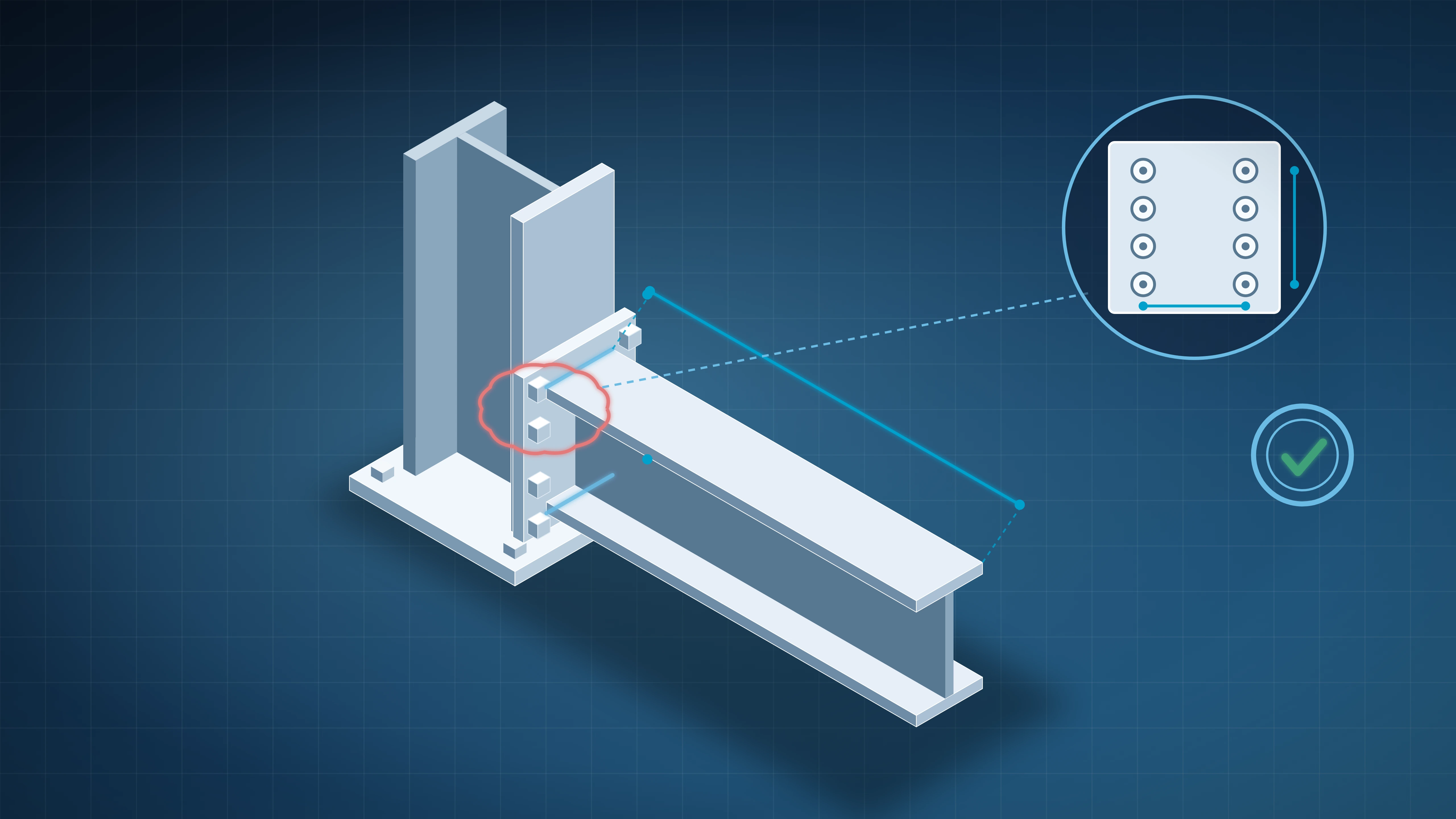
Shop drawings are detailed diagrams, schedules, and fabrication drawings prepared by specialty trade subcontractors, manufacturers, or suppliers to illustrate how specific building components will be fabricated, assembled, and installed. Standard design drawings focus on architectural concepts, but shop drawings focus on production mechanics.
Under standard US construction contract agreements, such as the American Institute of Architects (AIA) Document A201 General Conditions of the Contract for Construction, shop drawings do not constitute contract documents. Instead, they serve as contractor submittals demonstrating how the builder intends to implement the design intent established by the architect and structural engineer.
Key Characteristics of Shop Drawings
Shop drawings provide significantly more granular information than design packages:
- Exact Component Dimensions: They incorporate verified field dimensions as opposed to scaled architectural dimensions, accounting for actual jobsite tolerances and variances.
- Fabrication Details: They detail exact shop assembly techniques, including specific weld types, fasteners, seam locks, precast rebar clearances, and structural bolt torque ratings.
- Material Specifications: They specify exact product catalog numbers, metal alloy grades, structural steel finishes, paint systems, and thermal performance values aligned with Construction Specifications Institute (CSI) specifications.
- Installation and Erection Clearances: They provide field crews with step-by-step connection sequences, anchor points, crane pick points, and integration notes for adjacent building trades.
To understand where shop submittals sit within the wider project records structure, consult our guide on construction documents across project phases.
Shop Drawings vs. Design Drawings: Core Differences
Project teams frequently confuse architectural design drawings with trade shop drawings. Recognizing the division of responsibility between design professionals and trade contractors prevents disputes over changes, schedule delays, and rework claims.
Architects and consulting engineers prepare design drawings to communicate spatial layout, programmatic function, structural integrity, and aesthetic character to owners and regulatory agencies. Conversely, fabricators create shop drawings to construct building parts in an off-site shop or mill.
Designers specify the required performance criteria in the project manual through CSI specifications and MasterFormat divisions. Subcontractors then produce shop drawings showing the physical products chosen to meet those exact performance criteria.
The Shop Drawing Lifecycle: Step-by-Step Submittal Workflow
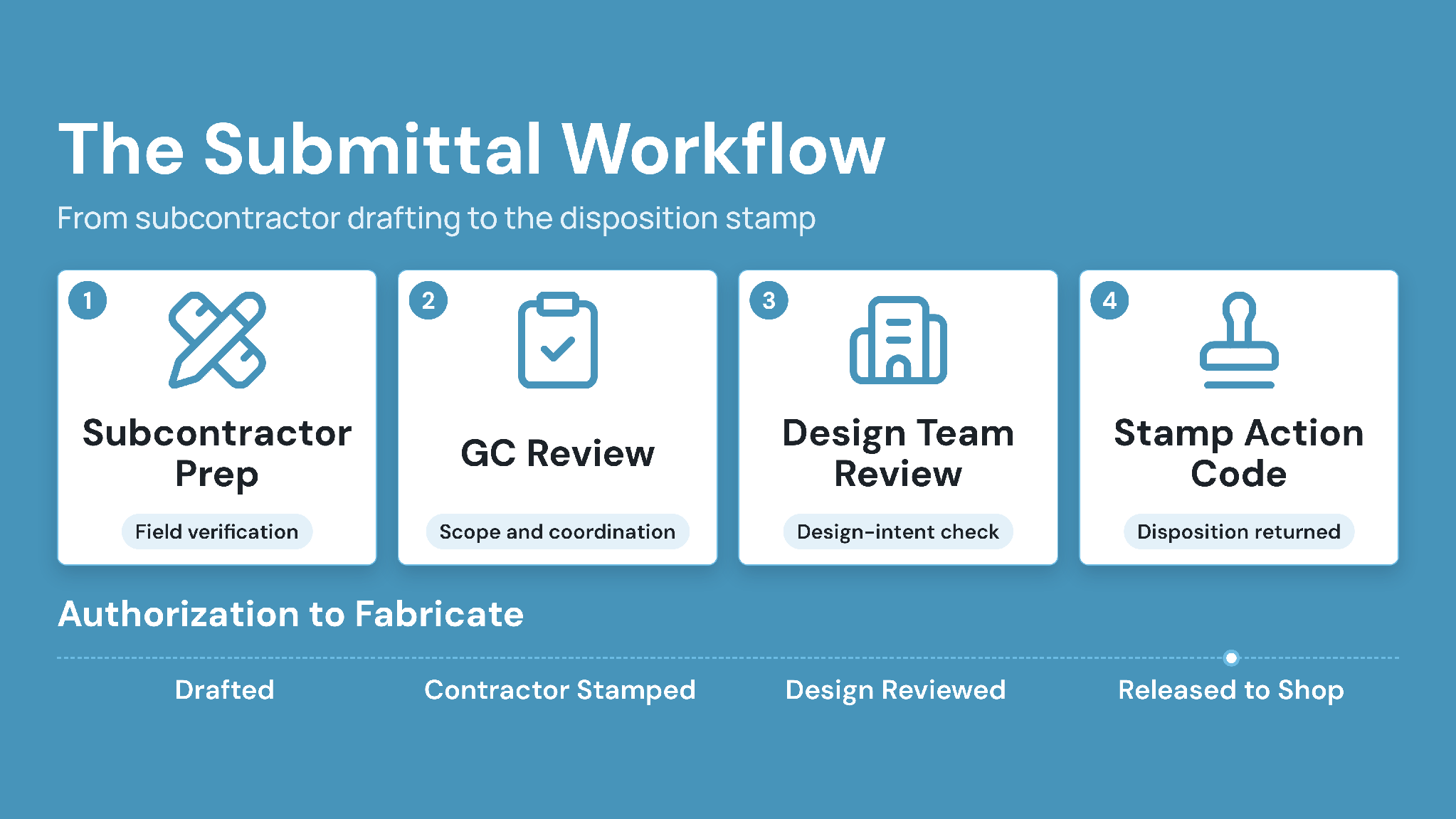
The path of a shop drawing from early drafting to final jobsite release follows a strict contractual chain of custody. Bypassing any step exposes trades and contractors to substantial financial liabilities if unapproved assemblies clash or fail structural inspection.
Step 1: Subcontractor Preparation and Field Verification
The specialty trade contractor begins drafting shop drawings after reviewing approved architectural plans, structural engineering sheets, and Division 01 general requirements. If existing construction is in place, the trade sends layout personnel to capture physical field measurements.
This field verification step ensures manufactured assemblies match true slab elevations, column alignments, and wall openings.
Step 2: General Contractor Quality and Coordination Review
Before sending drawings to the architect, the subcontractor submits the package to the general contractor. The general contractor reviews the drawings to confirm scope completeness, verify jobsite dimensions, and check inter-trade coordination against mechanical, plumbing, and structural layouts.
Under AIA A201 Section 3.12.5, general contractors must stamp and sign shop drawings before transmitting them downstream. This contractor stamp certifies that the builder has verified materials, field measurements, and jobsite criteria.
Step 3: Design Team Conformance Review
Upon receiving the contractor-stamped submittal package, the architect logs the submittal and forwards relevant sheets to consulting structural, MEP, or geotechnical engineers.
The design team examines the submission solely for general conformance with the design concept and contract documents. Design professionals explicitly avoid verifying field dimensions or evaluating installation safety protocols during this review window.
Step 4: Submittal Stamp Action Codes
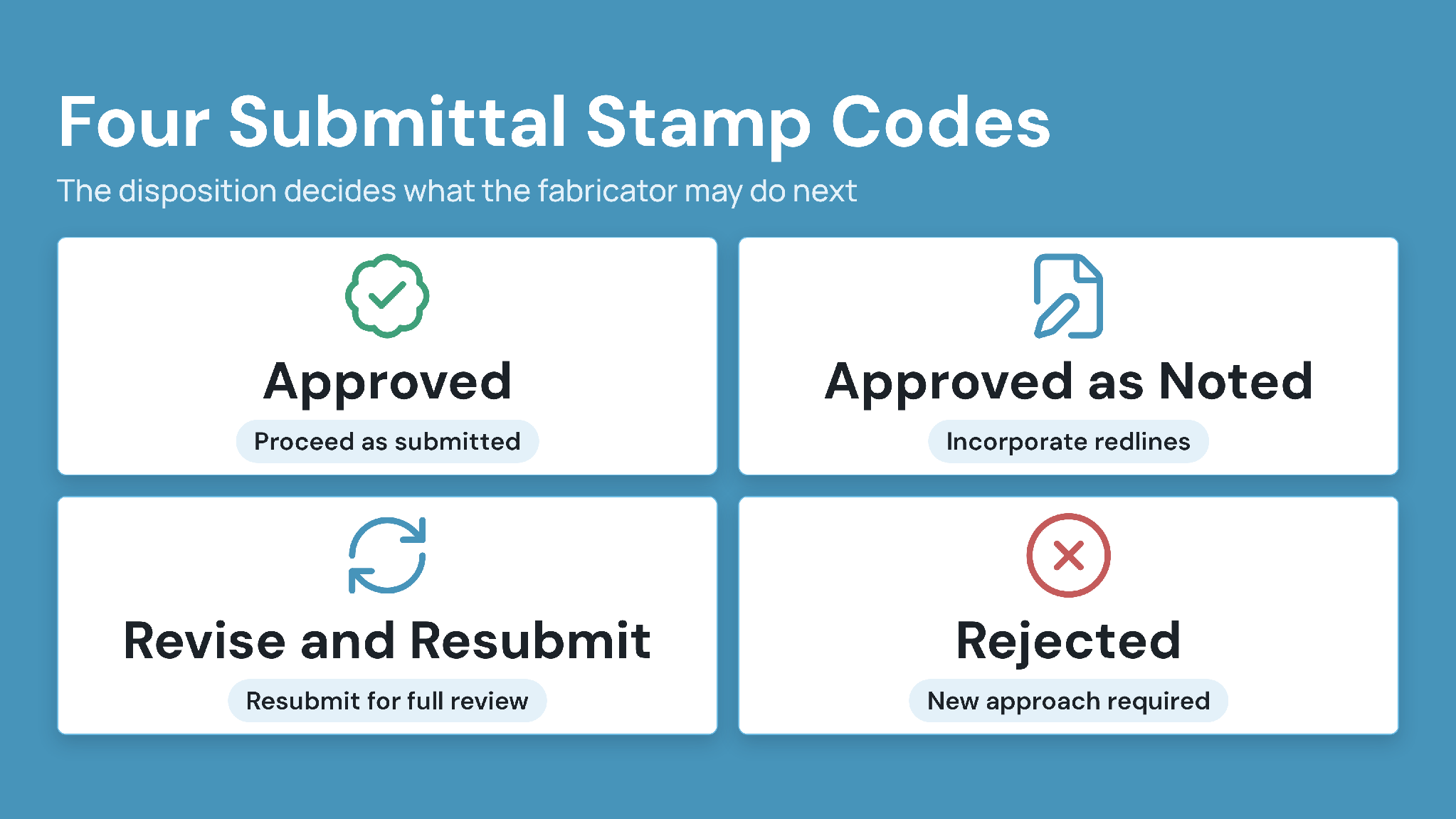
The reviewing engineer or architect returns the submittal marked with an official disposition stamp. Standard industry review actions follow standardized classifications:
- Approved/Furnish as Submitted: The contractor may immediately proceed with fabrication and installation without modifications.
- Approved as Noted/Furnish as Corrected: The fabricator may proceed with manufacturing, provided the team incorporates all annotated redline corrections into the work.
- Revise and Resubmit: The trade must modify the drawings to address design conflicts or missing calculations and resubmit the revised set for another full review.
- Rejected: The submittal fails to comply with contract specifications, requiring the contractor to submit a completely new product or assembly approach.
Legal and Liability Practice Note:
An architect's "Approved" stamp does not relieve the contractor of responsibility for dimensional errors, field interferences, or code non-compliance. Construction courts consistently hold that trades remain legally liable for field verification under standard commercial contracts.
Common Types and Examples of Shop Drawings
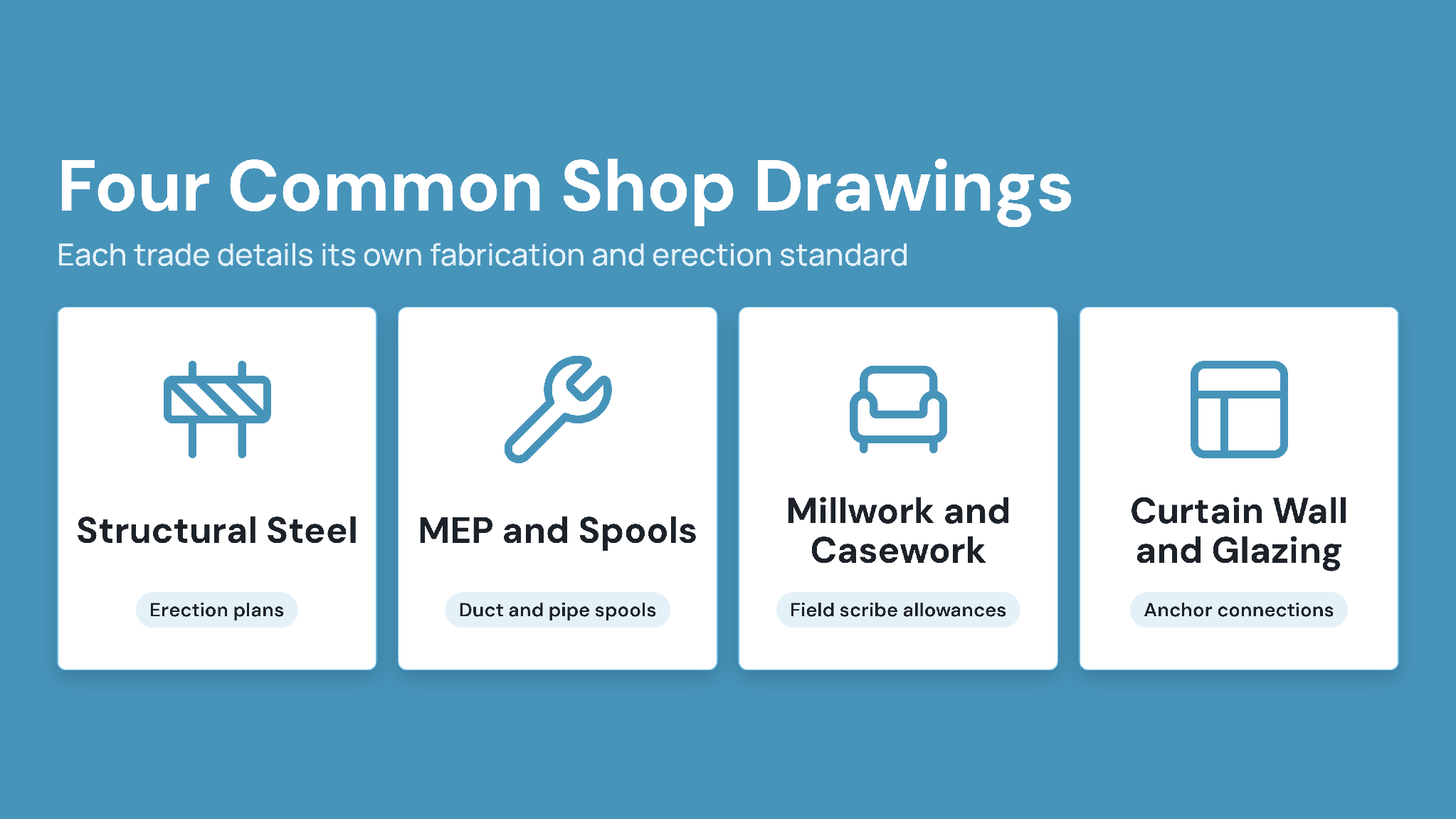
Every major specialty trade produces specialized shop drawings tailored to specific off-site manufacturing processes and field erection standards.
1. Structural Steel Fabrication and Erection Drawings
Structural steel detailers generate comprehensive shop drawings based on structural engineering frames:
- Erection Plans: Identify where each steel member sits in the three-dimensional building grid, displaying member marks, column centerlines, and safety cable attachment points.
- Piece Details (Shop Cut Sheets): Individual member drawings displaying exact mill cuts, cope cuts, camber dimensions, bolt hole spacing, and shop weld symbols according to American Institute of Steel Construction (AISC) standards.
2. MEP Coordination and Spool Drawings
Mechanical, electrical, and plumbing contractors translate engineered schematic drawings into workable physical routing layouts:
- Sheet Metal Fabrication Drawings: Show exact duct trunk transitions, turning vanes, damper placements, and hanging strap centers.
- Pipe Spool Drawings: Isolate pipe runs into discrete segments suitable for off-site welding and modular assembly, detailing flange classes, valve positions, and pitch angles.
3. Architectural Millwork and Casework
Custom casework fabricators produce submittals displaying wood grain directions, concealed hardware models, laminate selections, fastener types, and field scribe allowances for uneven drywall walls.
4. Curtain Wall and Glazing Assemblies
Glazing subcontractors generate shop drawings illustrating structural silicone bite dimensions, thermal breaks, pressure plate screw spacing, weep hole paths, and anchor connections to the primary concrete deck.
Critical Risks in Manual Shop Drawing Workflows
Relying on disconnected email threads, desktop folders, and paper binders to manage shop drawing reviews creates serious operational risks across construction projects.
- Fabricating from Superseded Revisions: When an architect issues a revision or an addendum, trades using unlinked file shares often fabricate steel or precast parts using outdated revision sheets, causing expensive scrap and delays.
- Extended Review Cycle Times: Submittals routed via static attachments frequently sit unreviewed in consultant inboxes. Missed contract review deadlines trigger project delay claims and disrupt long-lead material deliveries.
- Decoupled RFIs and Submittals: When a contractor submits a Request for Information (RFI) regarding a dimensional clash, manual systems fail to cross-reference the resulting clarification back to the active shop drawing package.
- Missing Chain of Custody Audit Trails: Project disputes routinely turn on proving when a drawing was submitted, which engineer reviewed it, and what comments accompanied the stamp. Unstructured file storage leaves contractors unable to defend against delay assessments.
Teams managing high-volume drawing packages frequently transition to standardized digital information standards, such as those outlined in our guide on ISO 19650 compliance and workflow stages.
How CUBE Modernizes Shop Drawing Management
Modern capital construction projects demand automated tracking, version control, and real-time model integration across every specialty submittal. CUBE provides general contractors, specialty trades, and engineering consultancies with a unified cloud Common Data Environment (CDE) built specifically for drawing control.
1. Automated Revision Control and Sheet Comparison
Upload a new version, and CUBE keeps the previous one in version history with its timestamp and uploader. A revision is a marker you apply to the version you actually issued, using a revision series configured for that folder, so Version and Revision show as separate columns in the grid.
Project foremen and shop personnel opening drawings on mobile tablets always access the latest approved release, eliminating rework caused by obsolete plans.
Furthermore, built-in digital overlay tools highlight drafting changes between two revisions in contrasting colors. Reviewers can verify whether a fabricator made requested corrections without inspecting every dimension manually.
2. Integrated Submittal and RFI Linking
CUBE has Dependencies,i.e., an explicit file-to-file link you add and view from the file details panel, so you can see which files rely on the one that changed. Add a Dependency from a shop drawing to the design sheet it relies on. When that sheet changes, the link appears in the file details panel, so reviewers can see which detailing packages need rechecking.
3. Role-Based Approval Workflows with Automated Audit Logging
Configurable review workflows inside CUBE route drawing sets to designated trade coordinators, project managers, and lead consultants automatically. Real-time dashboards highlight submittals approaching contractual review deadlines, helping project managers avoid delay claims.
Each review level carries its own due date, and the Take Action tab lists items overdue, due in 7 days, and due in 30 days across every project the user belongs to. Activity history records actions taken on project files with the user and timestamp, so a team can trace who reviewed what and when.
Best Practices for Controlling Shop Drawings in Construction and CUBE
Managing shop drawings efficiently requires disciplined team procedures combined with the right digital project management infrastructure. Applying these industry best practices keeps trades aligned and ensures error-free fabrication.
- Establish a Master Submittal Schedule Early: Before ground-breaking, the project team must build a comprehensive submittal register identifying every required shop drawing package, lead times, fabrication durations, and delivery dates.
- Standardize Naming and Title Blocks: Require all trade subcontractors to adhere to consistent drawing naming structures and clear title block layouts. Include project identifiers, trade codes, sheet numbers, and revision indices on every drawing border.
- Never Skip Field Measurements: Enforce strict field dimension checks whenever connecting new assemblies to existing concrete or steel frameworks. Document all jobsite measurement verifications directly within the drawing notes.
- Enforce Formal Transmittals: Avoid sharing draft submittals over informal messaging or untracked links. Formal digital transmittals generated through CUBE maintain contractual clarity regarding submittal dates and contents.
- Consolidate Drawing Management on CUBE: Replace fragmented desktop drives and disconnected review apps with CUBE. Unifying 2D drawings, 3D model coordination, RFI links, and approval stamps inside CUBE delivers seamless revision governance from the fabrication shop to the jobsite.
Frequently Asked Questions (FAQs)
1. Who is legally responsible for verifying shop drawing dimensions?
Under standard US AIA A201 contracts, specialty subcontractors and general contractors bear primary legal responsibility for verifying field dimensions. Architects review submittals exclusively for general design intent and do not confirm jobsite measurements, fabrication methods, or installation safety sequences.
2. Can trade contractors fabricate materials before shop drawing approval?
Fabricating components before securing an Approved or Approved as Noted stamp introduces significant financial risk. If the architect rejects the unapproved assembly or requires modifications, the contractor must absorb all replacement, scrap, and rework expenses without compensation.
3. How does CUBE prevent field crews from installing superseded shop drawings?
Crews scan the QR code on a printed sheet with the CUBE mobile app, which tells them whether that sheet is the latest version or has been superseded. If it isn't current, they pull the latest version from CUBE before starting work.
4. What is the difference between an as-built drawing and a shop drawing?
Shop drawings illustrate how trade contractors plan to manufacture and assemble components before installation. In contrast, as-built drawings record exact final installed conditions, field modifications, and deviations made during construction for the permanent building handover record.
5. What are Dependencies in CUBE?
Dependencies in CUBE are explicit file-to-file links that show how one file relies on another. For example, you can add a dependency from a shop drawing to the design sheet it was created from. If the design sheet changes, reviewers can open the file details panel to see which detailing packages may need to be rechecked.