.svg)


.png)
.png)


.svg)




.png)
.png)
Engineering Document Management Software Guide 2026
Compare engineering document management software in 2026. Learn EDMS vs DMS vs CDE, key features, workflows, and evaluation criteria.


Key takeaways
- Engineering document management software controls drawings and CAD/BIM files with audit trails and approvals attached, which generic file storage or office document tools cannot.
- Core capabilities to check span version control and audit trails, approval workflows and transmittals, plus metadata search and access permissions.
- EDMS, generic DMS, and CDE platforms overlap but solve different problems, and many AEC teams end up needing document control and collaboration together.
- Without specialized document control, teams risk outdated revisions and scattered files, which make audit trails weak and handover difficult.
- CUBE brings document control and approvals together with transmittals and handover, in one AECO environment for engineering teams.
The right EDMS should support more than basic document storage. Key considerations include version control, approval workflows, audit trails, collaboration, permissions, integrations, and support for the specific processes your engineering or AEC team relies on. The system should also make it easy to find the right document, understand its status, and maintain a clear record of changes throughout its lifecycle.
A poor fit can create problems across the document control process. Teams can struggle with outdated drawings, unclear revision histories, manual approval steps, duplicate files, or limited visibility into who changed or approved a document. These issues can slow reviews, create rework, and make it harder to maintain consistent documentation across projects.
This buyer’s guide covers the key EDMS features to evaluate, questions to ask vendors, and practical considerations for choosing a system that fits your document control requirements.
What Is Engineering Document Management Software?
Engineering document management software (EDMS) is purpose-built software that controls and versions engineering drawings and CAD/BIM files, revision by revision. It adds audit trails and approval-backed transmittals on top of storage, so engineering and AEC teams keep one controlled record instead of scattered folders.
EDMS differs from generic file storage in one key way: it enforces version control beyond just backup. For instance, a shared drive holds thousands of files, but rarely shows a reviewer which revision is current, who approved it, or when it was superseded.
EDMS solves that by attaching a controlled status to every drawing, spec, and model, built for the way engineering teams actually work. EDMS functionalities matter most for technical, drawing-heavy work involving CAD files and BIM models that move through review and redline, then approval, before they reach the field.
Two features set EDMS apart from a basic document management system:
- Audit trails
- Transmittal management
An audit trail records who changed a file and when. A transmittal formally issues that file to another party, with a dated, traceable record attached. Engineering and construction teams need both. Similarly, a design consultancy handing drawings to a contractor needs proof of what was sent.
Why Engineering Teams Need Specialized Document Control
Generic storage feels adequate until a project scales past a few reviewers. Specialized document control earns its cost back in four concrete ways.
- Faster drawing retrieval: a document controller finds the current revision by drawing number, discipline, or status, instead of guessing a folder name.
- Fewer revision mix-ups: controlled status fields stop a superseded drawing from looking active, so field teams work from the version marked current.
- Cleaner external issuance: formal transmittals give consultants, contractors, and owners a dated record of what was sent, instead of an email chain nobody can search later.
- Smoother handover: a controlled document trail carries into closeout, so the as-built package reflects what the project actually built.
Worth knowing:
Construction teams regularly lose real working time each week to non-productive activity, such as searching for information and resolving mistakes tied to outdated or conflicting project data. Document control is one of the more direct ways to reduce that drag.
A Deloitte survey ‘State of Data Capabilities in Construction’, surveyed 1,275 construction professionals across 12 countries and found that construction managers and executives spend an average of 11.5 hours per week researching and analyzing data. BIM/VDC and preconstruction roles reported even higher figures at 12.3 and 13.4 hours per week, respectively.
Core Capabilities of Engineering Document Management Software
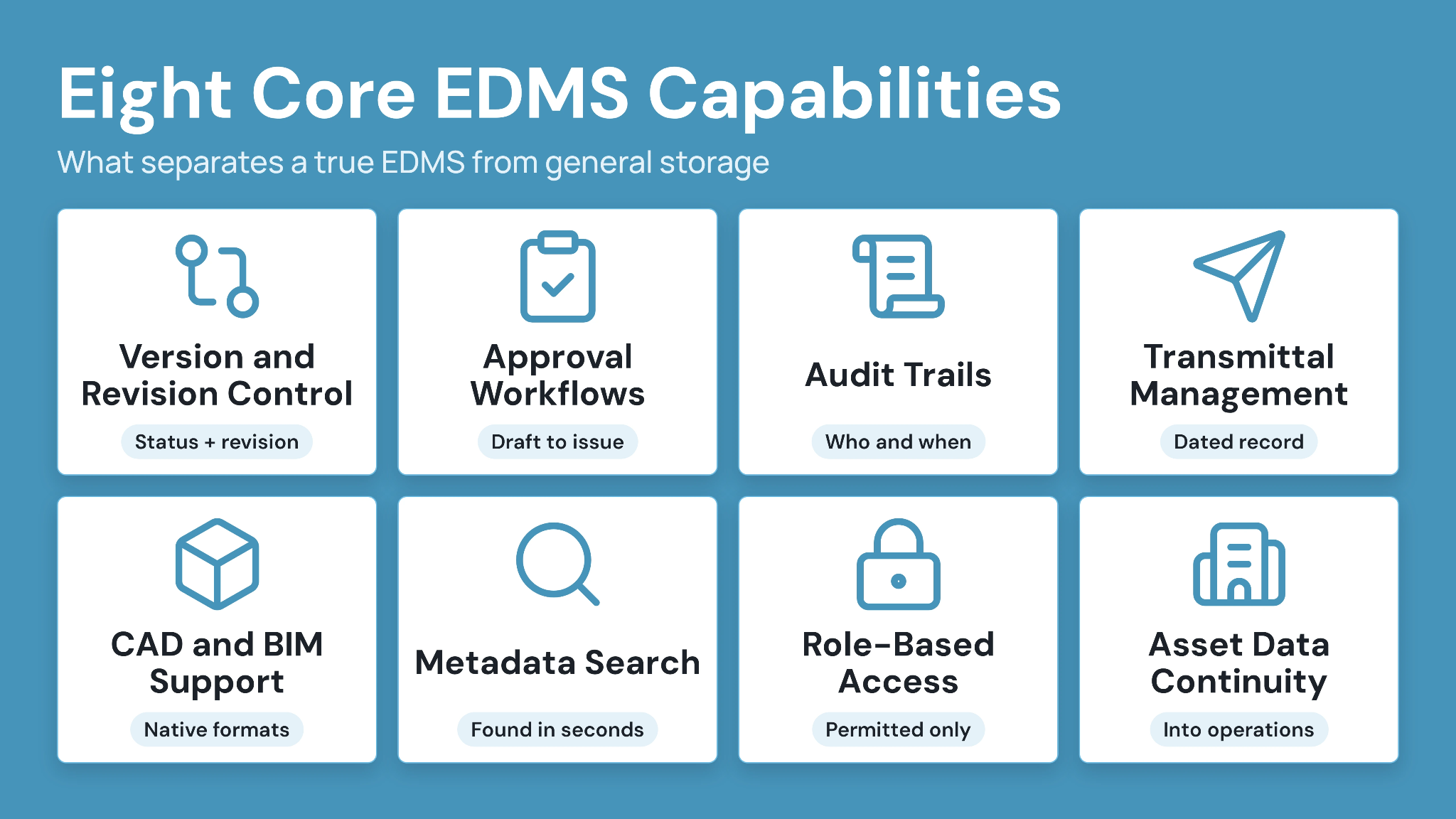
A document platform has to earn its place on your shortlist. The capabilities below separate a true EDMS from general storage or collaboration tools, and each one maps to a real engineering workflow.
- Version and revision control: every drawing carries a status and revision number, so reviewers work from the current version and a superseded file never looks active.
- Approval and review workflows: files move through a defined path, draft to review to redline to approval to issue, tracked at every stage.
- Audit trails: a complete log shows who changed a file, when, and what changed, supporting compliance and dispute resolution.
- Transmittal management: formal transmittal packages and track issuance to clients and contractors, connecting each sent file to a dated, traceable record.
- CAD and BIM support: native handling of CAD and BIM file formats keeps model-based work inside the controlled environment. CUBE's Revit plugin syncs Issues back with persistent element IDs and can clean up CAD pulled from Revit.
- Metadata tagging and search: discipline, project, and status fields make a specific drawing findable in seconds, not minutes of folder browsing.
- Role-based access and permissions: internal teams and external parties see only what they are permitted to see, protecting sensitive information across a multi-company project.
- Asset and facilities data continuity: In CUBE's Digital Twins product, the Assets module keeps a structured asset register linked to project Spaces, with asset types, tags and custom fields such as manufacturer, installation date and warranty expiry. Engineering data then carries into operations instead of being archived at project close.
Key metadata fields engineering teams typically track: Discipline and document number, revision and status, plus originator and issue purpose.
EDMS vs Generic DMS vs CDE: How They Differ
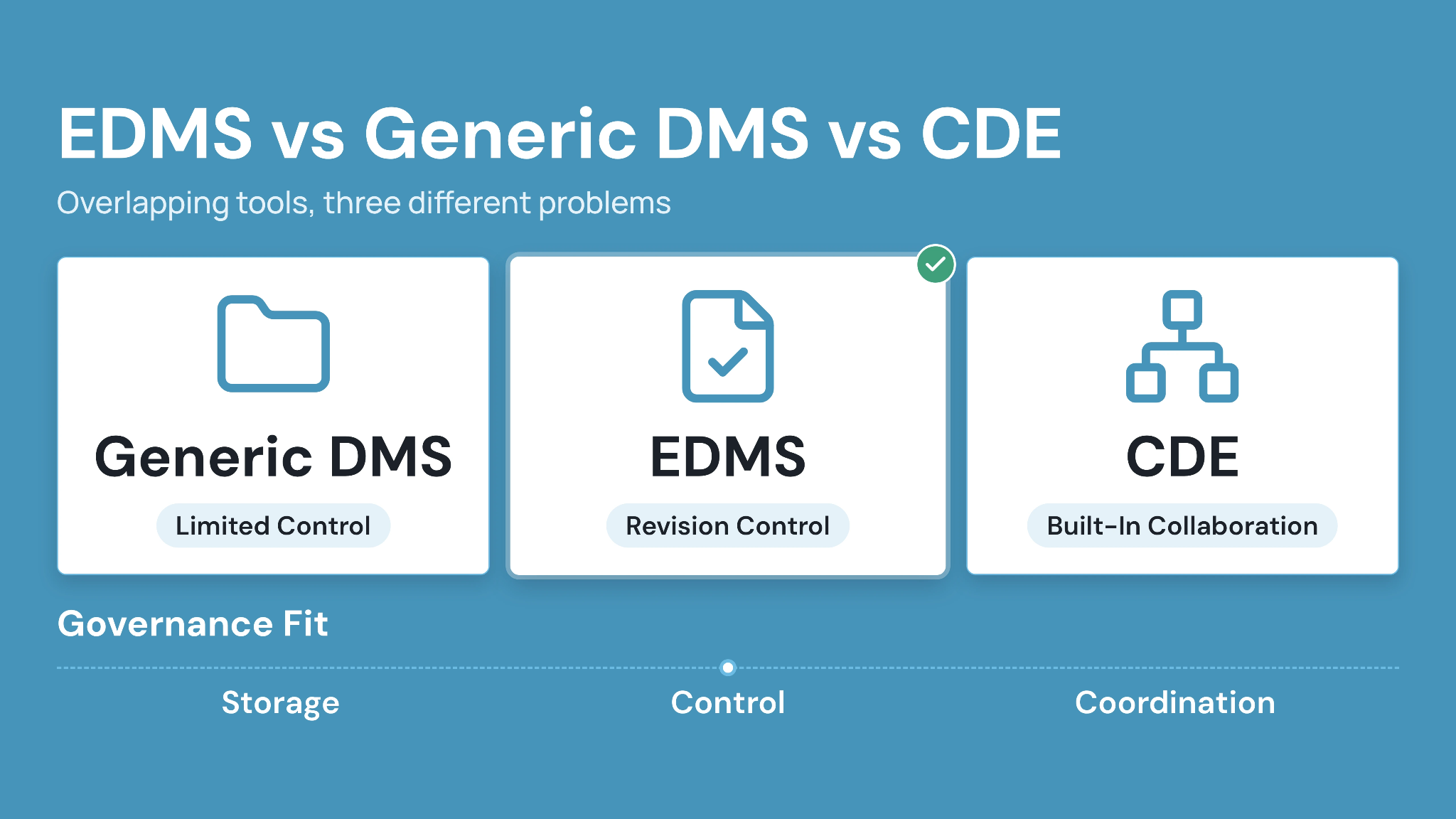
A generic document management system (DMS), a purpose-built EDMS, and a common data environment (CDE) sound similar, but each solves a different problem.
A generic DMS stores and shares files well. It rarely enforces engineering-specific revision status, CAD and BIM handling, or transmittal-based issuance. SharePoint is a common example: it supports storage and collaboration, but it is not an EDMS on its own. It becomes closer to one only when you configure engineering-specific controls and workflows on top of it.
A common data environment (CDE) governs the broader multi-party information environment for a project, of which controlled documents are one part. Many AEC teams need both: EDMS-grade document control, inside a CDE that also manages coordination and issues across the wider project team.
Table 1: How EDMS, generic DMS, and CDE platforms compare.
How Revision Control, Approvals, and Transmittals Work in Practice
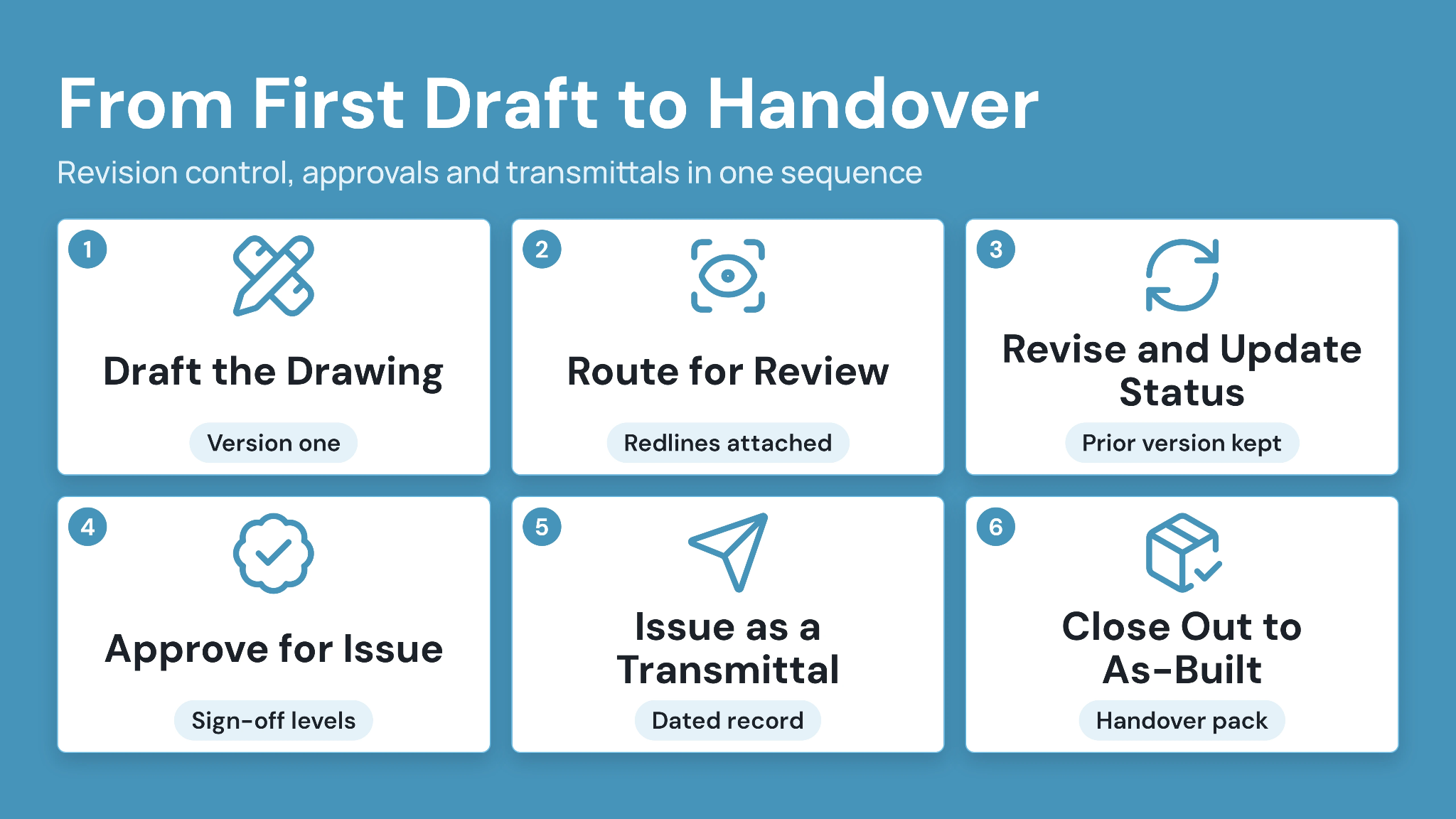
In a working EDMS, revision control, approvals, and transmittals run as one connected sequence, from the first draft to handover.
1. Draft the drawing
An engineer or designer produces the initial drawing, model, or specification inside the controlled environment. Inside CUBE, that file lands in a defined Space for its discipline, with version one captured automatically the moment it's uploaded to Files.
2. Route for review and redline
Reviewers mark up the file with comments, and the system tracks the review against a defined workflow level. CUBE's Reviews module carries this natively. Redlines stay attached to the exact revision they were made on, and review status is visible across every discipline in one view.
3. Revise and update status
The originator updates the file based on redlines, and the revision status moves forward, without overwriting the prior version. Every change lands in CUBE's item-level audit trail, with the earlier version still one click away, so the history behind a revision is provable rather than assumed.
4. Approve for issue
A designated approver signs off, moving the file from review to an approved, issue-ready state. CUBE's approval workflows support as many sign-off levels as the project actually needs, from a single approver to a multi-party chain. Routing mirrors how the team really works.
5. Issue as a transmittal
The approved file goes out as a formal transmittal, with named recipients, a subject and message stating its purpose, and the referenced files attached. CUBE keeps a complete record of every transmittal, including sender, recipients, timestamps and files, so who received what, and when, still holds up months later.
6. Close out to as-built
At project close, the final approved revisions carry forward into the as-built and handover package. Because every version and approval already sit inside the same audit trail, compiling that package means pulling the marked-current revisions, not rebuilding one from scratch.
This sequence holds even when a consultant, a contractor, and an owner sit on different systems. A common data environment keeps it intact across companies, since CUBE lets each external organization join the same project on its own permissioned seat. That file, once redlined, approved, and transmitted, stays the one everyone is looking at, not a copy sitting in someone else's folder structure.
Handover and As-Built Documentation Continuity
Day-to-day document control gets most of the attention, but handover is where weak practices show up first.
A project's final revisions and transmittal history must survive the move from construction to operations. That means a searchable as-built record. A folder of loosely named PDFs handed over at closeout can never bring a clear document control process.
A useful turnover package includes:
- Final approved drawings and models, clearly marked as current
- A complete transmittal history for external issuance
- Closed-out reviews and approvals tied to each document
- Metadata intact, so the receiving team can search instead of reopening every file
Handover carries design and construction work into operations. A document trail that breaks at closeout undermines everything built before it.
Best Engineering Document Management Software in 2026
The tools below appear most often in 2026 evaluations. CUBE is included with deeper coverage, since it addresses the full AECO document lifecycle instead of one slice of it.
- CUBE: best for mid-market AEC and engineering teams that want document control and approvals together with transmittals and handover, in one connected environment instead of several stitched-together tools. CUBE's common data environment covers the Folders module, which holds each project's Spaces, along with Reviews and a dedicated Transmittals module. A Revit plugin syncs Issues back with persistent element IDs and cleans up CAD pulled from Revit.
- Autodesk Vault: best for product and mechanical engineers who need CAD data management tightly integrated with Autodesk's design tools.
- Oracle Aconex: best for large-scale infrastructure programs and multi-company capital projects that need enterprise-grade document control at scale.
- Accruent Meridian: best for plant and manufacturing teams with strict compliance requirements around engineering and maintenance documentation.
- OpenText Content Management for Engineering: best for asset-intensive enterprises that need engineering data connected to ERP systems such as SAP.
- Bentley ProjectWise: best for large infrastructure design collaboration and engineering project delivery at an enterprise scale.
- eQuorum: best for engineering teams that want a web-based EDMS with straightforward drawing and workflow control.
How to Evaluate Engineering Document Management Software
Match the platform to how the team actually works. Never go for a generic feature checklist.
Table 2: Questions to ask when evaluating engineering document management software.
Teams typically get more value from a short virtual demo than from a feature list alone. A live walkthrough shows how revision control and approvals connect to transmittals inside a real project. See also: how to select the right construction management software.
Take Control of Your Engineering Document Management with CUBE
Engineering document management software should do more than store files. It should keep every drawing and model controlled, with revisions tracked and approvals connected to formal transmittals. That trail should carry cleanly into handover.
CUBE brings document control and transmittals into one AECO environment, alongside structured reviews, so engineering and AEC teams manage the full document lifecycle in a single, controlled space instead of stitching together separate tools.
Ready to see how controlled document management works on a real project? Sign up for CUBE and run one revision through review, approval and transmittal with your own drawings.
Frequently Asked Questions
1. What is an engineering document management system (EDMS)?
An EDMS is software built to store, version, and track engineering drawings and CAD/BIM files. It adds audit trails and approval-backed transmittals on top of storage, so teams always know which version is current and who approved it. That combination matters most on drawing-heavy, multi-party projects where an outdated file causes real rework.
2. How is EDMS different from a general document management system?
A general DMS focuses on storage, sharing, and basic collaboration. An EDMS adds engineering-specific controls beyond that: revision status and audit trails, plus CAD/BIM handling and transmittal issuance. A general DMS can hold a file. An EDMS can show whether that file is the current, approved revision, and who is accountable for it.
3. What is the difference between EDMS and a CDE?
An EDMS focuses on controlled technical documents: drawings, models, specifications, and their revisions. A common data environment (CDE) governs the broader multi-party project information environment, including coordination and issue management alongside documents. Many AEC teams need both. CUBE combines document control with CDE capabilities in one connected environment, instead of requiring separate platforms for each.
4. Can engineering document management software integrate with CAD and BIM tools?
At the category level, yes. EDMS platforms generally support common CAD and BIM file formats, and some offer plugins for tools like Revit. CUBE's Revit plugin, for example, syncs Issues back with persistent element IDs and can clean up CAD pulled from Revit. Confirm supported formats and any native plugins directly with a vendor before shortlisting, since integration depth varies across platforms.
5. What is transmittal management in engineering document control?
A transmittal is a formal, dated record showing that a file moved between project parties, including who sent it and why. Transmittal management connects that record to the file's revision and approval history, so nobody has to reconstruct a delivery from an email thread. CUBE's Transmittals module keeps this connected inside controlled project spaces, so a sent file always traces back to its approved revision.
6. Is SharePoint an engineering document management system?
SharePoint supports file storage and general collaboration well. Turning it into true engineering document control means layering on revision rules and transmittal issuance, plus CAD or BIM handling. That takes real, ongoing configuration and discipline to maintain. A purpose-built EDMS reaches the same level of control with far less custom setup.
7. What does engineering document management software cost in 2026?
Pricing varies by vendor, seat count, deployment model, and the depth of CAD, BIM, and compliance features included. CUBE, for example, prices each product per user per month, with a lower rate for annual billing, and lists current rates for the Common Data Environment, Project Management and add-ons on its pricing page. A scoped quote or a virtual demo serves most buyers better than comparing list prices alone, since real pricing depends heavily on project scale and seat mix.