.svg)


.png)
.png)


.svg)





.png)

.png)
How to Choose Construction Document Management Software: A 2026 Buyer's Guide
Learn how to choose construction document management software with a practical 2026 framework covering features, demos, rollout, and vendor fit.


TL;DR
- Document management, document control, and a Common Data Environment solve related but different problems; know which one your team actually needs.
- A seven-step evaluation, from mapping workflows to checking migration support, catches gaps that a feature list alone will miss.
- Version history, access permissions, and audit trails matter more than interface polish once a project reaches multiple reviewers.
- Vendor demos reveal more when you bring your own file types, naming conventions, and approval chain instead of a generic script.
- CUBE combines document control, transmittals, and reviews in one Common Data Environment, giving teams a single source of truth for drawings.
All construction document management software tools aren’t the same. Some store files. Some add version control and approval routing. A smaller group works as a full Common Data Environment, coordinating drawings, transmittals, and reviews across every trade on a project.
Confusing these categories gets expensive fast. A storage tool bought to fix a document-control problem leaves the same superseded-drawing risk in place. It just gets organized under a new interface.
This guide sets out how to choose construction document management software that matches your team's actual workflow. It covers a seven-step evaluation process, the checklist of features that separate a real CDE from a glorified shared drive, and the questions worth bringing into a vendor demo.
What Construction Document Management Software Is (and Is Not)
Construction document management software stores, versions, and routes project files, drawings, and records so teams work from current information. It is not a general file-sharing tool, and it is not a substitute for the project's design or contract review process.
1. What the category actually covers
A true construction file management software platform handles version control, access permissions, and searchable metadata across drawings, RFIs, submittals, and specifications. It also records who uploaded, reviewed, or approved a file, and when.
General cloud storage lacks that structure. A shared drive can hold a PDF, but it cannot tell a document controller which version a subcontractor last downloaded or whether a review is still pending.
2. Where the confusion usually starts
Teams often shop for document management software when the real issue is the process. Renaming files by hand or emailing PDFs around a project team creates the same superseded-drawing risk regardless of which folder holds the files.
Software helps once the team agrees on naming rules, review stages, and who can edit or approve. A platform enforces that structure. But it does not invent one for you.
Buying tip:
Before comparing vendors, write down your current file-naming convention and approval chain on one page. If you cannot describe it in ten minutes, fix the process first. The software should enforce a workflow your team already understands.
Document Management vs Document Control vs CDE vs PMIS
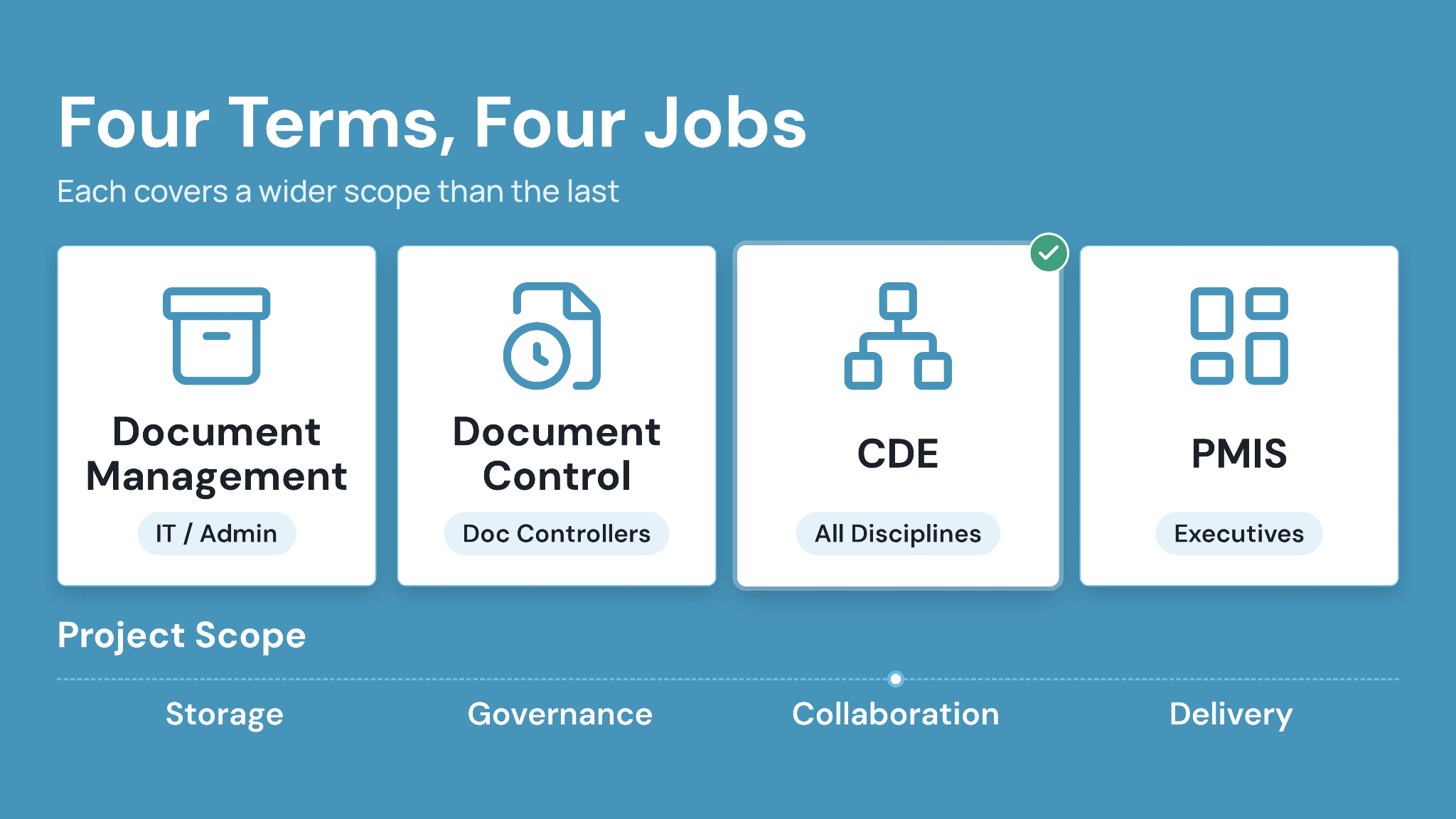
Each of these terms gets used interchangeably, but each solves a distinct problem in construction project document management. Knowing the difference helps you evaluate the right category of tool.
1. Document management handles storage and retrieval
Document management is the baseline. Teams can store files, organize them, and let people search and download. Most generic cloud tools operate at this level.
2. Document control adds governance
Document control layers version history, revision numbering, and approval status on top of storage. This is where superseded-drawing risk gets addressed directly, since every file carries a status and a traceable history.
3. A common data environment centralizes multi-party collaboration
A CDE extends document control across every party on a project: owner, architect, engineer, and contractor. CUBE's Common Data Environment manages documents, revisions, reviews, approvals, and transmittals in one shared space, so teams stop reconciling separate copies.
4. PMIS adds broader project delivery workflows
A project management information system, or PMIS, extends past documents into scheduling, cost, and contract administration. Teams typically add PMIS capability once document control is stable, since delivery workflows depend on trustworthy underlying records.
Caption: Each term covers a wider scope than the last; most buyers start with document control and grow into a CDE.
When Your Team Needs Dedicated Software
Project teams don't need to buy dedicated software straight away. A few signals show when the switch has become necessary.
1. Signals that shared drives have stopped working
Watch for a rising count of RFIs (Requests for Information) caused by outdated drawings, subcontractors asking which version is current, or a document controller manually renaming files each week. When RFIs increase, teams need a system beyond just more storage. When shared drives stop working, a good document control software for construction is what teams need.
2. Contractual or compliance triggers
BIM Execution Plans and ISO 19650 requirements often specify a managed CDE, which shared drives cannot satisfy. A new client mandate, an incumbent renewal, or a growing subcontractor list are common triggers for evaluating document management software for construction companies.
3. Team size and coordination volume
Specialty and MEP subcontractors with high drawing and RFI volume, and mid-sized general contractors outgrowing informal file sharing, are the teams most likely to need a dedicated platform. Smaller residential builders with a handful of active drawings may not see the same return yet.
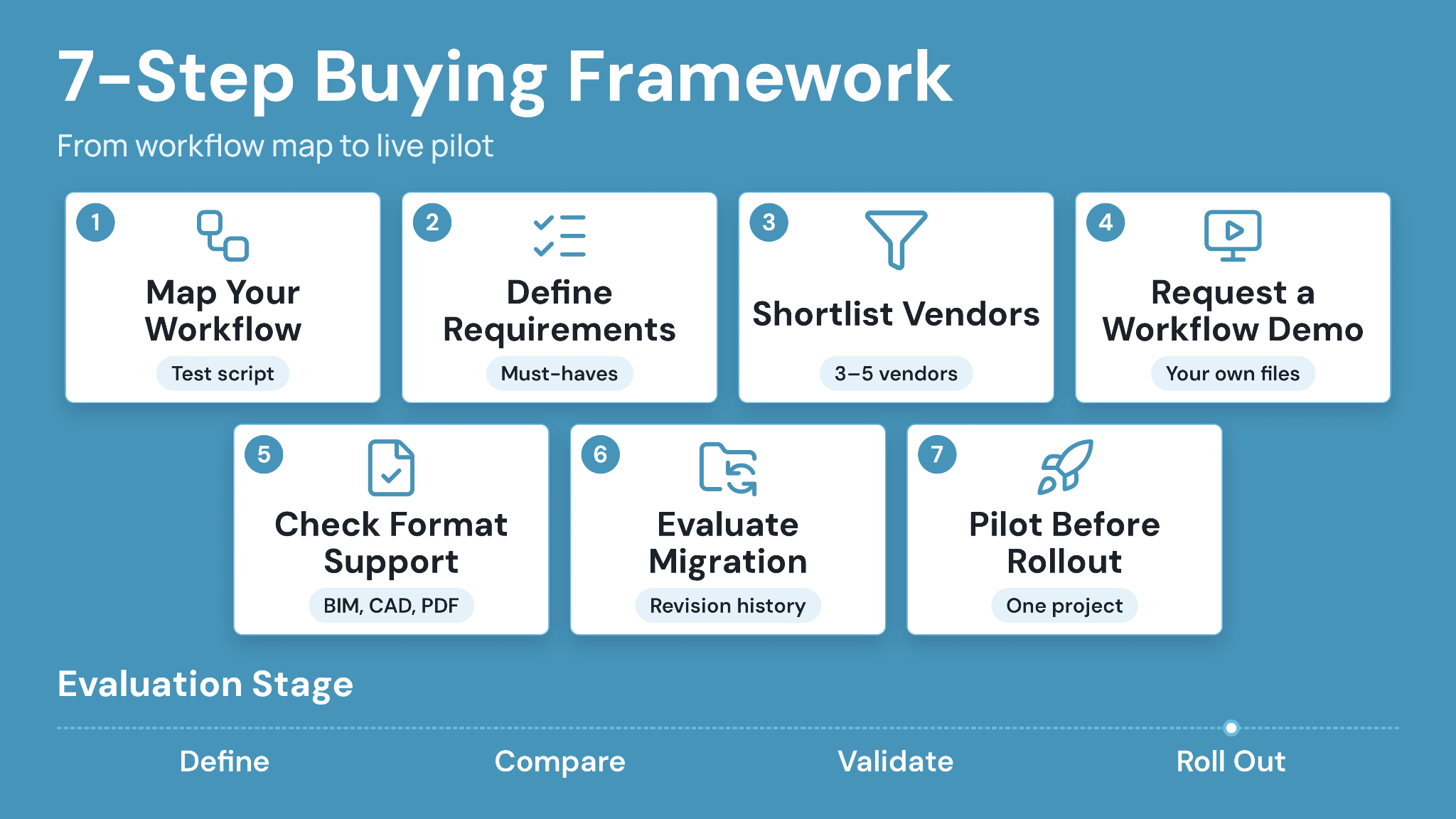
How to Choose Construction Document Management Software: A 7-Step Buying Framework
Use this sequence to keep the evaluation grounded in your actual workflow rather than a vendor's feature checklist.
1. Map your current document workflow
Write out how a drawing moves today: who uploads it, who reviews it, who approves it, and who receives the final version. This map becomes your test script for every demo.
2. Define non-negotiable requirements
Separate must-have capabilities, such as version history and access control, from nice-to-have extras. Vague requirements produce vague comparisons.
3. Shortlist three to five vendors
Include at least one platform built specifically for construction and one broader project-management suite. That range clarifies which capabilities are construction-specific and which are generic.
4. Request a workflow-specific demo
Bring your own file types, naming conventions, and approval chain into the demo instead of accepting a generic script. A vendor that struggles with your actual files reveals more than a polished canned walkthrough.
5. Check integration and format support
Confirm the platform opens your BIM, CAD, and PDF files natively, and ask how it handles model coordination if that applies to your projects.
6. Evaluate migration and rollout support
Ask what happens to existing files, folder structures, and revision history during migration. A platform with no clear migration path adds risk during your busiest season.
7. Pilot before committing to the full team
Run a live pilot with one project and a mix of internal staff and at least one subcontractor. Real project files surface problems a sales demo cannot. Work through the framework in order; skipping the workflow map is the most common reason a pilot fails.
Feature Checklist: What Matters Most
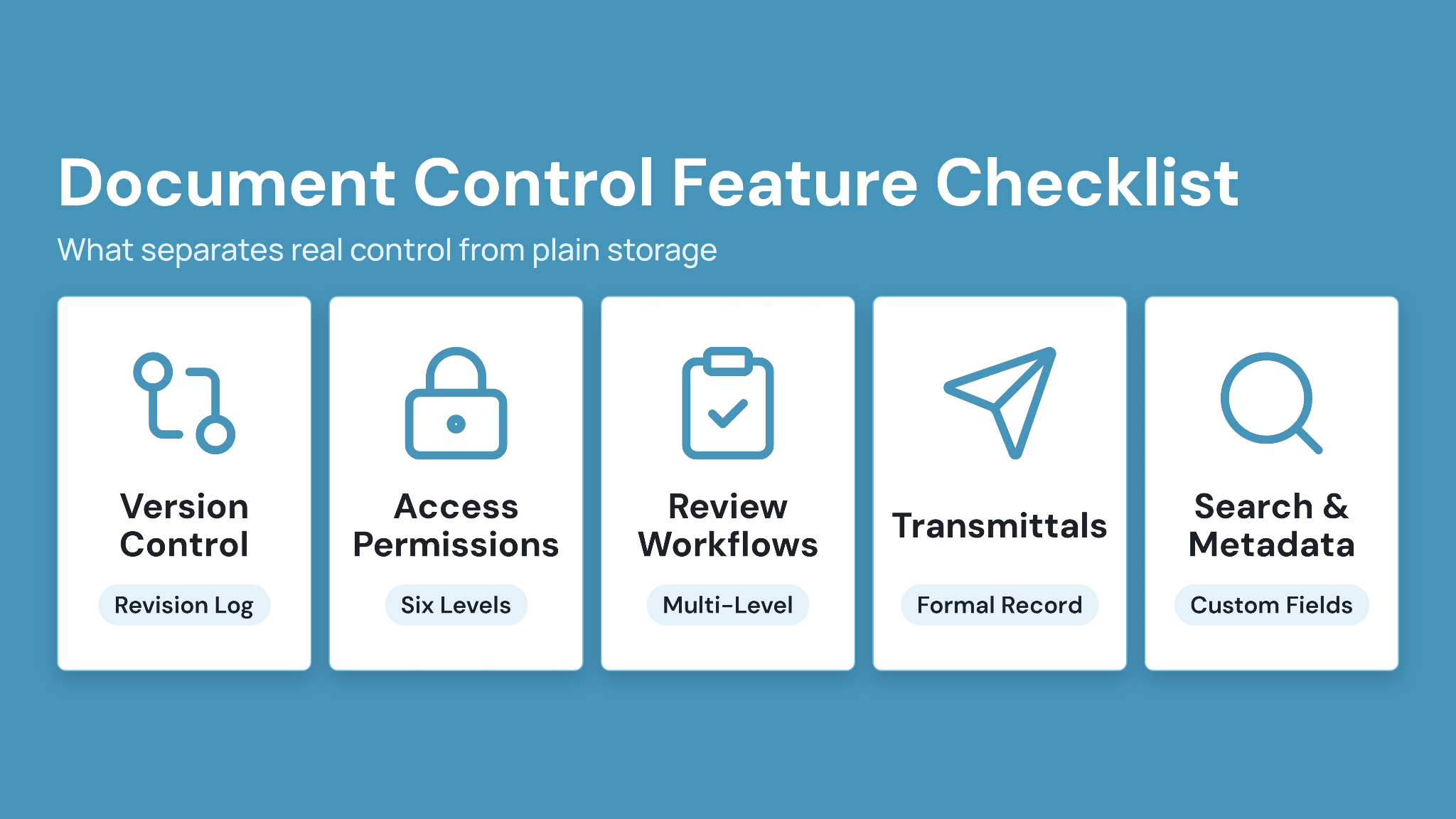
A feature list only helps if it maps to the risks your team is actually managing. Here is the checklist that separates general storage from real construction document control software.
1. Version and revision control
Every file needs a visible version history, with the ability to view and download prior versions. In CUBE's Folders module, every upload creates a new version automatically. Teams then mark the versions they formally issue as revisions, with a full revision log and configurable sequence rules that keep numbering consistent.
2. Access permissions by role
Check for granular access levels, and not just admin-versus-everyone-else. CUBE sets access per user at six levels on every folder and file: Full Access, Can Create or Update Version (Can Update Version on a file), Can Update, Can Download, Can View, and No Access. A file-level setting overrides its folder, and a folder-level setting overrides its Space.
3. Review and approval workflows
Confirm the platform supports multi-level review flows with configurable reviewers at each level. CUBE's Reviews module lets teams bypass or roll back a review level, track which level is waiting on action, and export the full review history to Excel.
4. Transmittals and formal issue tracking
A formal record of what was sent, to whom, and when protects both sides of a document exchange. CUBE's Transmittals module generates a dedicated page per transmittal showing sender, recipient, subject, and every referenced file with its version.
5. Search, metadata, and custom fields
Search should work across file names, folders, and custom metadata fields. Confirm the platform supports custom fields tied to your naming conventions.
Caption: Test each feature with a real file from your own project rather than the vendor's sample data.
Questions to Ask in Vendor Demos
Good questions expose how a platform behaves under real project conditions, not just its marketing claims.
1. Questions about version history
Ask how many prior versions the platform retains and whether that limit changes by plan tier. Confirm whether reviewers can compare two versions side by side.
2. Questions about access and security
Ask which access levels exist and whether permissions can be set at the folder or file level. Ask what security certifications the vendor holds and what each certification actually covers.
3. Questions about migration and support
Ask what a typical migration timeline looks like for a project of your size, and whether support is available during business hours or around the clock.
4. Questions about pricing structure
Ask whether pricing is per seat, per project, or a flat platform fee, and what happens to guest or field-only users. Ask what is included at each tier versus billed as an add-on.
Comparison: How Leading Construction Document Tools Differ
The table below compares platforms commonly evaluated alongside CUBE. Pricing and ratings change frequently; confirm current terms directly with each vendor before a purchase decision.
Caption: Comparison of document control platforms commonly evaluated alongside CUBE, by primary focus, document control depth, and pricing model
CUBE's published pricing includes unlimited projects, Spaces, and version history at every tier, with ten free guest seats for every ten paid CDE seats. CUBE prices each product per user per month, with a lower rate for annual billing, and lists current rates for the Common Data Environment, Project Management and add-ons on its pricing page.
Best-Fit Software by Team Type and Use Case
Team size, project complexity, and where document control currently sits in the workflow all shape which platform is the right fit.
1. Specialty and MEP subcontractors
Teams handling high drawing, RFI, and revision volume benefit most from strong version control and fast search, since coordination conflicts show up early and often.
2. Mid-sized general contractors
GCs outgrowing shared drives but wary of enterprise-platform complexity should prioritize a platform that scales without requiring a dedicated administrator. This is often where the search for best document management software for contractors begins in earnest.
3. BIM and VDC consultancies
Teams coordinating across client-mandated environments need strong format support for BIM and CAD files, plus clash detection and model versioning alongside standard document control.
Implementation, Migration, and Adoption
Rollout quality determines whether the new platform actually replaces the old habits or just adds another tool to check.
1. Plan the migration in phases
Migrate one active project first rather than the entire portfolio at once. This limits risk and gives the team a working reference before a full rollout.
2. Set naming and revision rules before go-live
Agree on nomenclature and revision numbering before uploading files, since retrofitting naming conventions after go-live creates duplicate effort. A document control system for contractors only pays off once everyone follows the same rules.
3. Train reviewers and document controllers first
Get the people who will run reviews and approvals comfortable with the platform before wider rollout. Their confidence sets the tone for how the rest of the team adopts the change.
Pricing Models and Total Cost of Ownership
Most construction document management platforms charge per user seat, though some price by project or storage volume instead.
Look past the base seat price to guest or field-seat allowances, storage caps, and support tiers, since these often separate the advertised price from the real cost. CUBE, for example, publishes per-seat pricing with unlimited storage and version history included at every tier, plus free guest seats bundled with paid CDE seats.
Budget time and internal hours for migration and training as part of total cost, not as a one-time afterthought. A platform that looks cheaper per seat can cost more once migration support and add-on modules are factored in.
How to Choose Construction Document Management Software With CUBE
Choosing the right platform comes down to matching your actual workflow against what a vendor can prove in a live demo. Map your process, test version control and access permissions with real files, and confirm migration support before committing.
CUBE brings document control, transmittals, and reviews together in one Common Data Environment, so drawings, approvals, and revision history stay connected instead of scattered across separate tools. See how CUBE supports construction document management software decisions for your team: SIGN UP.
Frequently Asked Questions
1. What is the difference between document management and document control in construction?
Document management covers storing and retrieving files. Document control adds version history, revision numbering, and approval status on top, so every file carries a traceable record of its current status.
2. How long does it take to implement construction document management software?
Timelines vary by team size and file volume. A single-project pilot can go live in days, while a full portfolio migration with training typically takes several weeks.
3. Can construction document management software integrate with BIM tools?
Many platforms support BIM file formats natively rather than through a separate integration. CUBE's Design Viewer opens RVT, IFC, and other BIM formats directly, alongside CAD, PDF, and spreadsheet files, in one interface.
4. Do subcontractors need their own document management software, or can they use the GC's platform?
Most subcontractors work inside the general contractor's chosen platform using a guest or partial seat. CUBE offers free guest seats bundled with paid CDE seats for this reason.
5. What happens to project records if I switch software vendors?
Ask any vendor how records export during offboarding, including version history and metadata. Confirm the format and completeness of the export before signing, so historical revisions remain usable after a switch.