.svg)


.png)
.png)


.svg)




.png)

.png)

How to Choose Common Data Environment Software for Mid-Market Construction Teams (2026 Guide)
Learn how to choose common data environment software for a mid-market construction team: must-have features, demo workflows, and a 2026 buyer's checklist.


Key Takeaways
- A common data environment (CDE) governs revisions, approvals, and audit trails as a single source of truth. It is distinct from cloud storage, a DMS, or a broader PMIS.
- Mid-market teams should prioritize workflow depth and low admin overhead over enterprise feature bloat they'll rarely fully adopt or maintain.
- Test real workflows live in every demo, including revision control, submittal routing, transmittals, and model coordination.
- Field and external-partner adoption, plus focused phase-1 integrations, ultimately decide whether a CDE investment pays off within 90 days.
- CUBE combines CDE-grade document control for revisions, approvals, transmittals, and model coordination, with room to add project management as teams scale.
Construction professionals lose roughly 14 hours per week to non-productive work such as searching for information, resolving conflicts, and redoing tasks already done. Most of that waste traces back to one root cause. There’s no single, governed source of project information.
A common data environment directly fixes that root cause. This guide breaks down what a CDE actually does, how it differs from a DMS, cloud storage, or a full PMIS, and what a mid-market team should test before signing a contract.
What is a CDE and why does it matter for mid-market teams?
A common data environment (CDE) is the agreed source of information for a project. It is the single place where documents, drawings, models, and non-graphical data are collected, managed, and disseminated through a controlled process.
ISO 19650 defines CDE as the agreed source of information for any given project or asset, for collecting, managing, and disseminating each information container through a managed process.
A CDE enforces revision and version control, status and suitability codes (Work in Progress, Shared, Published, Archived), role-based permissions, and audit trails. The single source of truth helps ensure the correct, approved revision is used on site, and lets you reconstruct who saw what, when, and why.
Also Read: What is a common data environment (CDE), and why it is essential for construction
CDEs are significant for mid-market teams because fragmented tools produce measurable waste. FMI reported that construction professionals waste considerable time on non-productive activities such as searching for information, resolving conflicts, and rework.
Centralizing data reduces version confusion, strengthens approval visibility for claims and disputes, and improves handover readiness because information moves through traceable states and outcomes, which is especially valuable for contractors without staff dedicated to chasing documents.
CUBE in practice: CUBE is built as a Common Data Environment first, bringing drawings, RFIs, submittals, models, and supporting documentation into one governed environment rather than a patchwork of drives and inboxes.
CDE vs. DMS vs. PMIS vs. cloud storage: know what you're actually buying
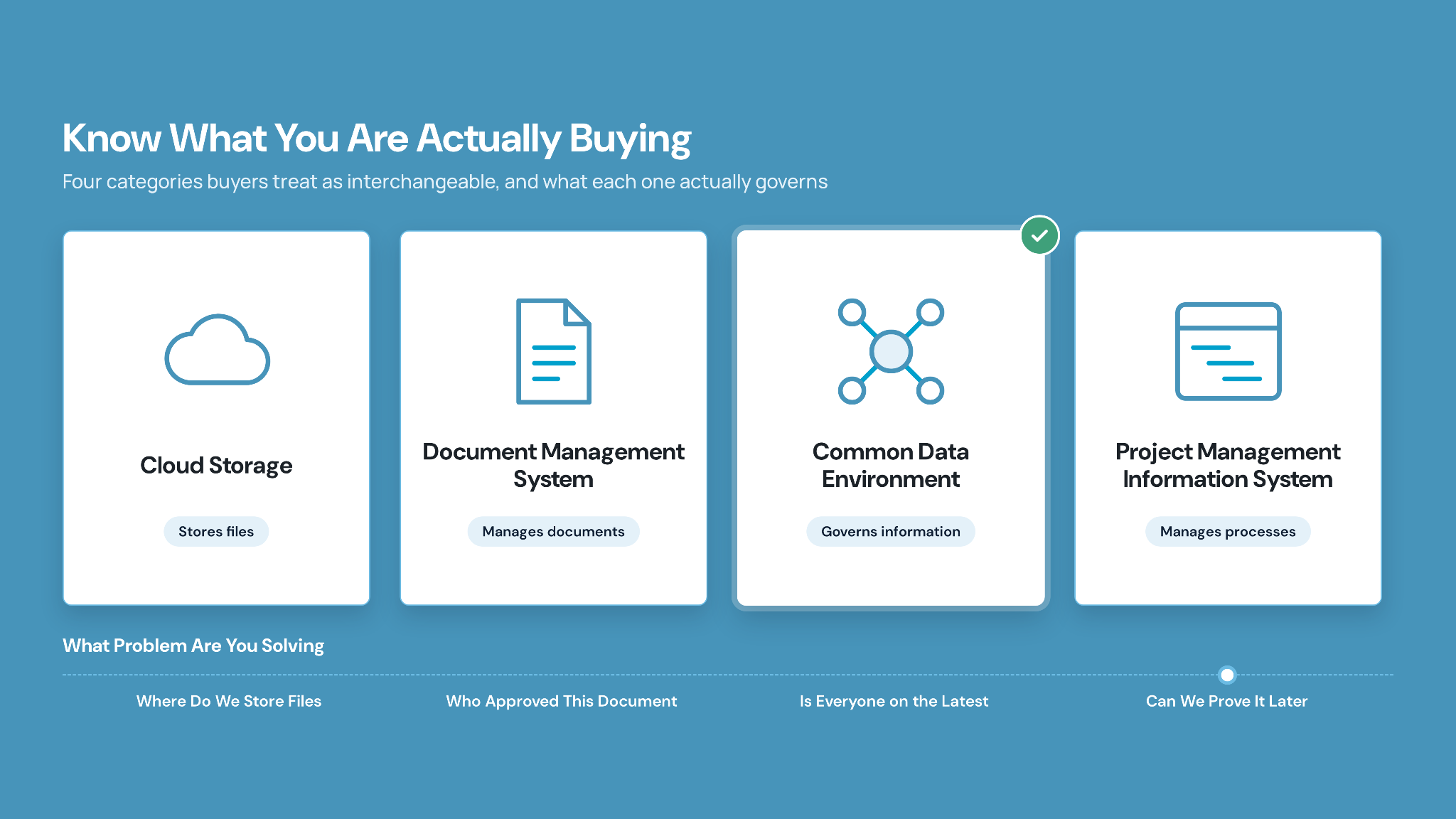
The biggest buyer confusion arises when teams treat these four categories as interchangeable. However, each category differs from the others in various respects.
- Cloud storage stores files but enforces no construction-specific workflows, revision states, or approvals.
- A document management system (DMS) manages a document lifecycle, consisting of creation, review, approval, and archiving, with version control and audit trails, but seldom implements full ISO 19650 workflows or multi-party project delivery.
- A CDE governs all project information (documents, drawings, models, non-graphical data) with gated states, structured approvals, and cross-stakeholder collaboration.
- A PMIS sits above these to manage project processes, including budgets, schedules, RFIs, submittals, and change orders, often using a CDE or DMS as its document store.
Selection implication: if your problem is "where do we store files," a DMS or standardized cloud storage may suffice. If your problem is "how do we ensure everyone works from the latest approved information and prove it later," you need CDE-level governance, standalone or inside a broader platform. This is where a platform spanning CDE and project management gives mid-market teams room to grow without re-platforming.
How to know your mid-market construction team actually needs a CDE
You don't need to fear-shop for a CDE. Instead, watch for recurring trigger signals that document-control friction is now costing real money:
- Version drift and rework from outdated drawings: superseded revisions stay active in inboxes and local drives, and crews build from the wrong versions.
- Approvals lost in email threads: RFIs, submittals, and change orders scatter across emails and PDFs with no linked chain from question to approved shop drawing to field installation.
- Weak audit trails and claims risk: manual spreadsheet logs fail to prove who held which revision when, undermining dispute positions.
- Shadow systems: shared drives, personal folders, printed binders, and messaging apps hold conflicting versions.
- Closeout and handover gaps: photos, deficiency lists, and permitting documents are not centralized, so owners receive incomplete record sets.
If you recognize several of these, a CDE stops being a nice-to-have and becomes critical infrastructure, ensuring field teams have current information, creating defensible audit trails, and cutting the non-productive time spent hunting for data.
CUBE in practice: Each trigger maps to a specific CUBE module rather than a generic promise — Files for version control, Transmittals for tracking who received which revision, and Issues for closing the loop on field problems before they become closeout gaps.
Must-have vs. nice-to-have CDE features: a mid-market evaluation matrix
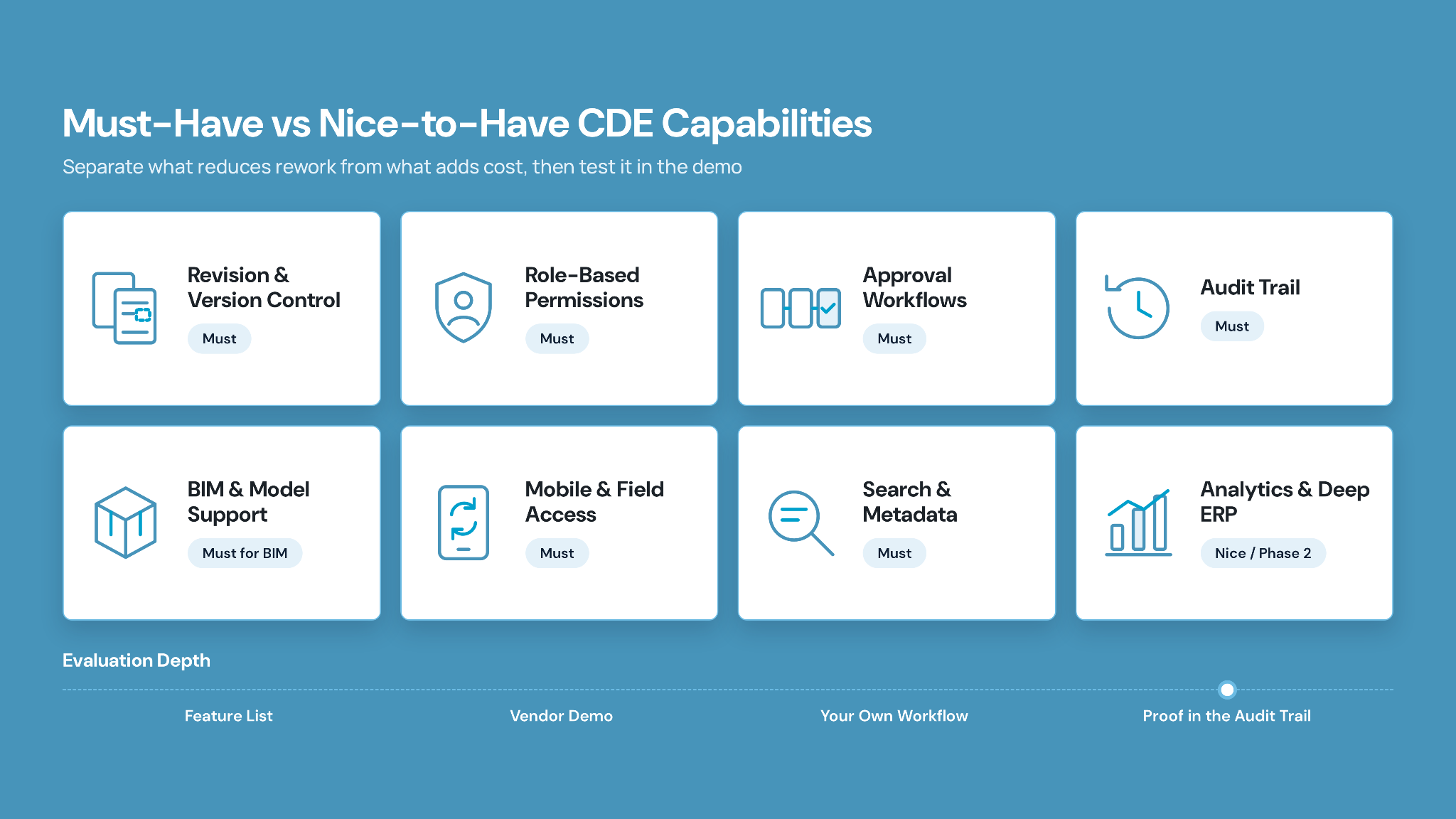
Before booking demos, separate the capabilities that directly reduce rework and non-productive time from those that add cost without daily payoff. ISO 19650-aligned practice commonly treats a core set as must-have:
- Revision and version control,
- Role-based permissions and access control,
- Approval workflows with gated states (WIP → Shared → Published → Archived),
- Audit trails,
- Structured metadata and naming conventions,
- Reliable search,
- Support for BIM models and non-graphical data,
- Mobile field access, and
- Issue tracking linked to information.
Nice-to-haves for lean teams typically include advanced analytics dashboards, deep portfolio and capital program views, highly configurable automation, and emerging AI-assisted document control features. These can matter later, but they should not drive a mid-market selection or overwhelm a small admin team.
Prioritize the must-haves first, and explore analytics and portfolio breadth only after the fundamentals fit. In CUBE, approval routing runs through the Reviews module, and teams on BIM projects can add the Clash Tests add-on for model coordination.
Also Read: How to choose construction management software: A 2026 buyer’s guide
The construction workflows you should test in every CDE demo
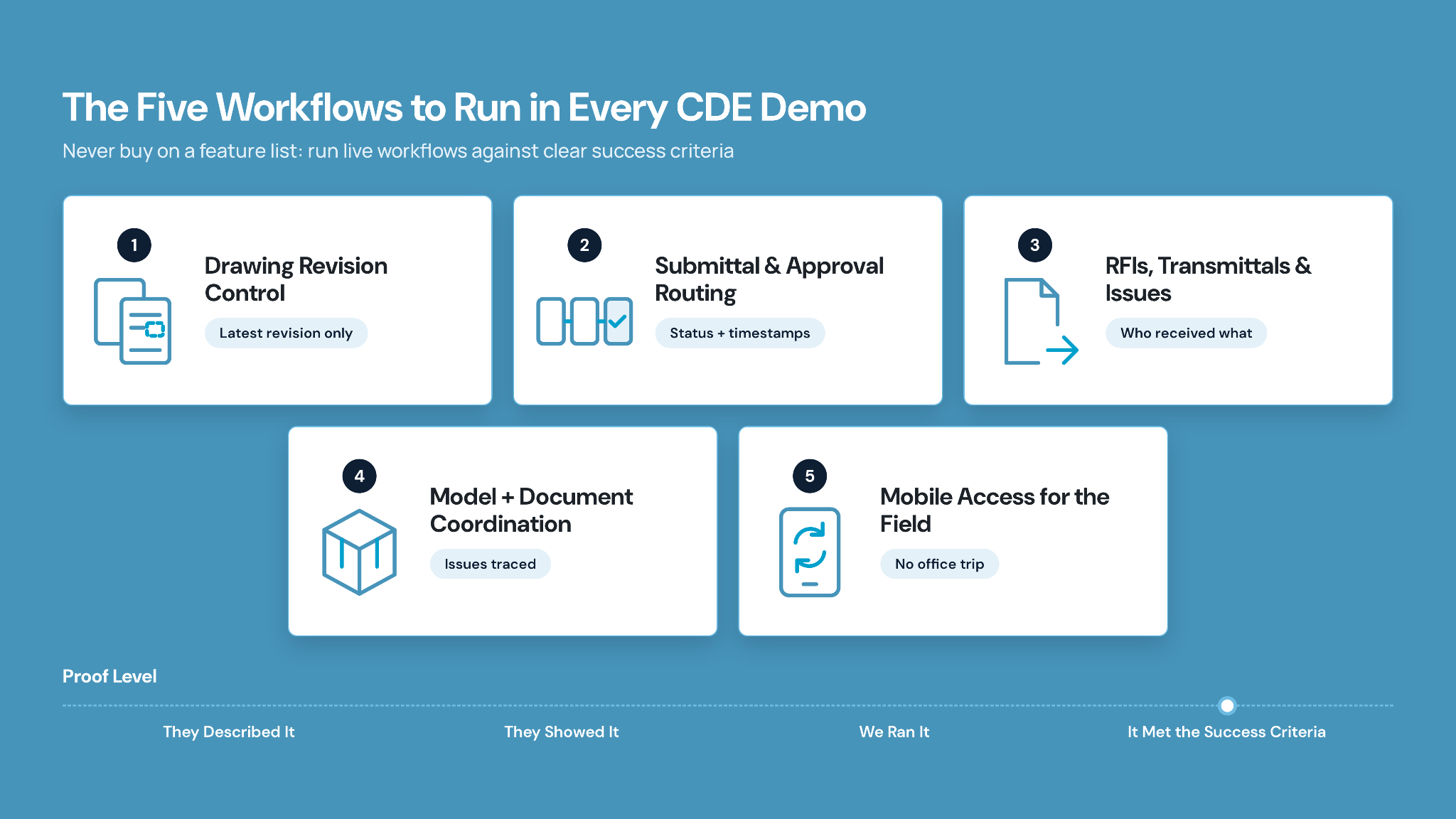
Never buy on a feature list. Run live workflows in the demo and hold each to concrete success criteria. Below are the five workflows that most reliably show whether a CDE truly governs your information.
1. What to test in drawing revision control
Upload a revised drawing, apply naming and metadata, set status, distribute, and supersede the old revision.
Success: only the latest approved revision is usable; superseded versions remain in history, clearly marked; and the audit trail shows the issuer and approver.
Ask: "Show me how the latest approved record is identified." CUBE's Files module is the natural place to run this exact test.
2. What to test in submittal & approval routing
Create a material submittal, route it through reviewers, capture comments, and record approval.
Success: clear status, timestamps, responsible parties, notifications, and links back to specs surfaced at closeout.
Ask: "Walk a submittal from contractor upload to final approval, including who is notified." Ask a CUBE demo team to run this through the Reviews module.
3. What to test in RFIs, transmittals & issue tracking
Generate an RFI from a sheet or model, route it, capture responses, link it to drawing changes, and issue transmittals to subs.
Success: RFIs reference affected drawings, and transmittals show who received which revision, when.
Ask: "Show how an RFI links to a drawing and what each sub received." This is precisely the job of CUBE's Transmittals and Mailbox modules.
4. What to test in model + document coordination
Upload models, align them with document sets, navigate from a model element to related details, and log coordination issues.
Success: models and documents share one environment, and issues trace to resolution and document updates.
Ask: "Show how a model issue triggers traceable document changes." CUBE's Clash Tests add-on, used alongside the Issues module, supports this workflow on BIM projects.
5. What to test on mobile for field users
Open the CDE on a phone, access current drawings, search, log an issue, and confirm version status.
Success: field teams reliably identify current revisions without returning to the office.
Ask: "Show how a superintendent confirms the latest approved drawing and logs an issue on a device."
In CUBE, a superintendent can scan the QR code on a printed drawing with the CUBE mobile app and see straight away whether that sheet is the latest version or has been superseded.
How document control, PM, BIM/VDC, field, and owners should each evaluate a CDE
Different roles carry different deal-breakers, and a PM's focus on schedules should never overshadow document control or owner needs around traceability. Evaluate through each lens separately.
- Document control/information manager: Prioritize checking for register integrity, revision control, transmittals, audit trail, naming, ISO 19650 alignment. No clear WIP/Shared/Published/Archived states or inability to prove who received which revision are clear deal breakers.
- Project manager/project engineer: Check first for approvals, RFI and submittal tracking, change-order documentation, status dashboards, closeout readiness. Avoid going for the CDE software if RFIs and submittals are not linked to drawings or specs.
- BIM/VDC manager/design lead: Model-document integration, coordination workflows, suitability statuses, and version control for models should matter the most here. Models handled as plain files with no linkage to issues are deal breakers.
- Field teams/superintendents/subcontractors: Here, priority should be checking for simple mobile access to current drawings, specs, RFIs, and issues. Avoid if there are slow or confusing interfaces that push crews back to email and PDFs.
- Owners/asset managers: Look for long-term access to as-builts, complete record sets, clear data ownership and export, and handover packages. If there is no archival strategy or difficult exports from proprietary formats, give it a pass.
CUBE in practice: CUBE organizes buyer resources by role. See how the platform is positioned for contractors, architects, engineers, and owners. It is a useful cross-check when each stakeholder in your evaluation has a different deal-breaker.
Integrations and implementation: what lean teams should plan for
Lean teams succeed by phasing adoption. Attempting a big-bang rollout leaves you with another underused platform. Sequence integrations around core value first, then expand.
Phase 1 (first 60–90 days)
Configure the CDE structure for folders, naming standards, permissions, and basic workflows; run core workflows (drawing review, issues, RFIs, submittals) on a pilot project; drive mobile adoption with field crews; add only light integrations such as email notifications and simple import/export.
Phase 2 (after adoption)
Add deep ERP and accounting integration, portfolio analytics, and advanced automation.
Independent analyses of mid-market construction software deployments suggest roughly two to four months to a first live project and three to six months to comfortable office-and-field adoption. A 30/60/90-day cadence, consisting of configure and pilot, roll out and train, and then expand workflows and integrations, keeps the effort realistic.
Vendor questions and red flags before you shortlist
Probe vendors on lifecycle and governance, not just features, especially closeout and data ownership, which competitors gloss over.
Questions to ask vendors
- How do you enforce revision control and stop field teams using outdated documents?
- What approval workflows ship out of the box for RFIs, submittals, and change orders?
- How is the audit trail surfaced for a dispute: who saw which revision, when?
- What implementation timeline and internal roles do mid-market customers need?
- At closeout, how do we export a complete record set, and in what formats?
- Who owns the data, and what happens to access if we leave?
Red flags
- Too heavy: needs a dedicated full-time admin, complex configuration, specialist integration teams.
- Too light: no gated states, weak or missing audit trail, poor RFI/submittal support, or a mobile experience so weak that field teams revert to email and PDFs.
Choosing Common Data Environment Software for Your Mid-Market Team Starts and Ends with CUBE
For a mid-market construction team, the strongest CDE choice fits your real workflows and capacity. Don’t go for the one with the longest feature list. If a platform can control revisions, route approvals, tie RFIs and submittals to drawings and models, support field use, govern access across partners, and roll out over a realistic 30/60/90-day plan without a large admin bench, it deserves a closer look.
CUBE applies exactly that lens. You get a Common Data Environment built for document control, revisions, approvals, transmittals, and multi-party collaboration, with room to expand into project management as your teams grow. Run your own revision-control, submittal, and RFI tests against it, then decide.
Frequently asked questions
1. What does CDE software typically cost for a mid-market construction team?
Pricing varies by seats, storage, and modules rather than a flat fee. Compare CDE-only entry tiers against bundled project-management add-ons. CUBE, for example, lets teams start with document control and expand modules as needs grow.
2. What happens to your document history and audit trail if you switch CDE vendors later?
Ask before you buy: request a full data-export path, including revision history, metadata, and audit logs, in an open format. A vendor that can't guarantee a clean exit is a governance risk, not just an inconvenience.
3. Does a mid-market team in the US or Canada need ISO 19650 alignment without a formal mandate?
Not always mandated, but ISO 19650-aligned states, including Work in Progress, Shared, Published, and Archived, still reduce rework and strengthen audit trails. CUBE structures its workflows around these same states even for teams without a formal ISO requirement.
Suggested Read:
4. What security certifications should you verify before trusting a CDE vendor with project data?
Look for independent attestations such as SOC 2 Type II and ISO 27001, plus data-hosting and access-control documentation. CUBE has published certifications covering data security, quality, and safety governance. Verify current scope directly with any vendor.
5. How many projects or users should a pilot include before a company-wide CDE rollout?
Start narrow: one active project, its core document-control team, and a handful of field users and external partners. Prove the core workflows before expanding company-wide across additional projects and disciplines.