.svg)


.png)
.png)


.svg)





.png)


.png)
.png)
What Are Transmittals in Construction? Track Design Submissions and Accountability (2026)
Understand construction transmittals, including their purpose, required fields, status tracking, common mistakes, and differences from submittals, RFIs, and email.


Construction teams exchange drawings, specifications, reports, and other project information every day. A file attachment alone cannot always provide a dependable record of that exchange.
A construction transmittal is a formal cover record for information sent between project parties. It identifies what was issued, who sent it, who received it, when it moved, and why. That record helps teams trace distribution, confirm current revisions, and follow outstanding responses. It also supports fact-finding when delivery or timing is disputed.
This guide discusses what are transmittals in construction, and how teams can track design submissions and accountability.
Key Takeaways
- A construction transmittal records exactly what project information was sent, who issued it, who received it, when, and for which stated purpose.
- Transmittals support accountability by connecting each issued file or package with recipients, revisions, dates, status, and any required response or acknowledgment.
- A transmittal differs from a submittal, RFI, drawing register, or email because it documents distribution rather than creating technical project content.
- Effective workflows verify revisions, define the issue purpose, control recipients, capture receipt, monitor responses, and preserve a searchable transmittal register.
- CUBE adds context by linking controlled file sharing, permissions, transmittal records, version updates, and audit history within shared project spaces.
What is a transmittal in construction?
A transmittal in construction is a dated record that accompanies a formal exchange of project information. It acts as the package's cover sheet and distribution record. The AIA G810 Transmittal Letter describes it as a written record and checklist for what is sent, how, and why.
The transmittal usually carries administrative information instead of technical design content. The attached drawing, specification, report, or sample contains the substantive material.
1. What information does a construction transmittal record?
A useful transmittal answers several basic questions without requiring recipients to search through messages or folder histories.
A precise issue purpose matters because the same drawing may move through several controlled stages. A review copy should not be treated as a construction release.
Revision data deserves equal care. Each listed file should include its identifier and revision so recipients can verify the intended version. Recipient details should reflect the approved distribution matrix. Broad circulation can expose sensitive information or create uncertainty about who must act.
Document control note:
A transmittal records delivery facts. It does not, by itself, approve the attached content or change contractual responsibilities.
Why are Transmittals Important in Construction?
Transmittals turn a file exchange into a traceable project event. Their value comes from the context preserved around the issued information.
1. They establish who received which information
Project disagreements often involve simple factual questions. Teams may need to know when a revised sheet reached a subcontractor or whether a consultant received a report.
A numbered transmittal and register provide a direct place to check. AIA notes that its transmittal form can serve as a reference when origin or receipt is disputed.
2. They connect revisions with distribution
Version control shows how a document changed. A transmittal shows where a specific version went and the purpose attached to that issue.
That connection helps prevent a superseded drawing from remaining active in the field. CUBE's construction drawing revision control guide explains how formal issuance supports a wider revision process.
3. They make follow-up measurable
Some issues require acknowledgment, review, approval, or another response. A transmittal can record the expected action and due date.
The register then becomes a working control tool. Document controllers can filter overdue responses and contact the responsible party before the delay affects downstream work.
4. They preserve accountability across organizations
Construction information moves among companies with different systems and responsibilities. A controlled transmittal creates a shared reference for each formal exchange.
This record is especially useful during handover, audits, and claims research. Teams can reconstruct the sequence without relying on one person's inbox or memory.
What is the Difference Between Transmittals, Submittals, RFIs, and Email?
A transmittal documents distribution. Related records create, review, question, or catalog project information, so teams should keep their purposes distinct.
- A submittal package can be issued with a transmittal. The submittal is the material under review, while the transmittal records its delivery.
- An RFI response may also be transmitted formally. The RFI remains the question-and-answer record, and the transmittal records distribution of the response or resulting documents.
- Email can notify recipients that a package is available. However, an unstructured message may omit document numbers, revisions, issue purpose, or required acknowledgment.
Practical rule: Use the transmittal to record the exchange, then keep the related submittal, RFI, drawing, or report in its proper workflow.
When Should a Construction Team Use a Transmittal?
Use a transmittal whenever the project needs a formal, traceable record of information moving from one party or controlled space to another.
1. Design drawing issues
Architects and engineers can transmit coordinated drawing packages for review, pricing, permitting, information, or construction. The record should list every sheet and revision.
2. Specifications and addenda
Specifications, addenda, and clarifications affect how work is priced or performed. Formal issue records help recipients identify the applicable package and release date.
3. Submittal and shop drawing packages
Contractors and specialty trades often send product data or shop drawings for design review. A transmittal identifies the enclosed items and expected response.
4. Reports, schedules, and meeting records
Teams may formally issue inspection reports, updated schedules, test results, or approved meeting records. The transmittal preserves the distribution event without changing each record's function.
5. Samples, models, or physical media
Transmittals can accompany physical samples, storage devices, or other materials. The delivery method and quantity become important when the package is not entirely digital.
How Does the Construction Transmittal Process work?
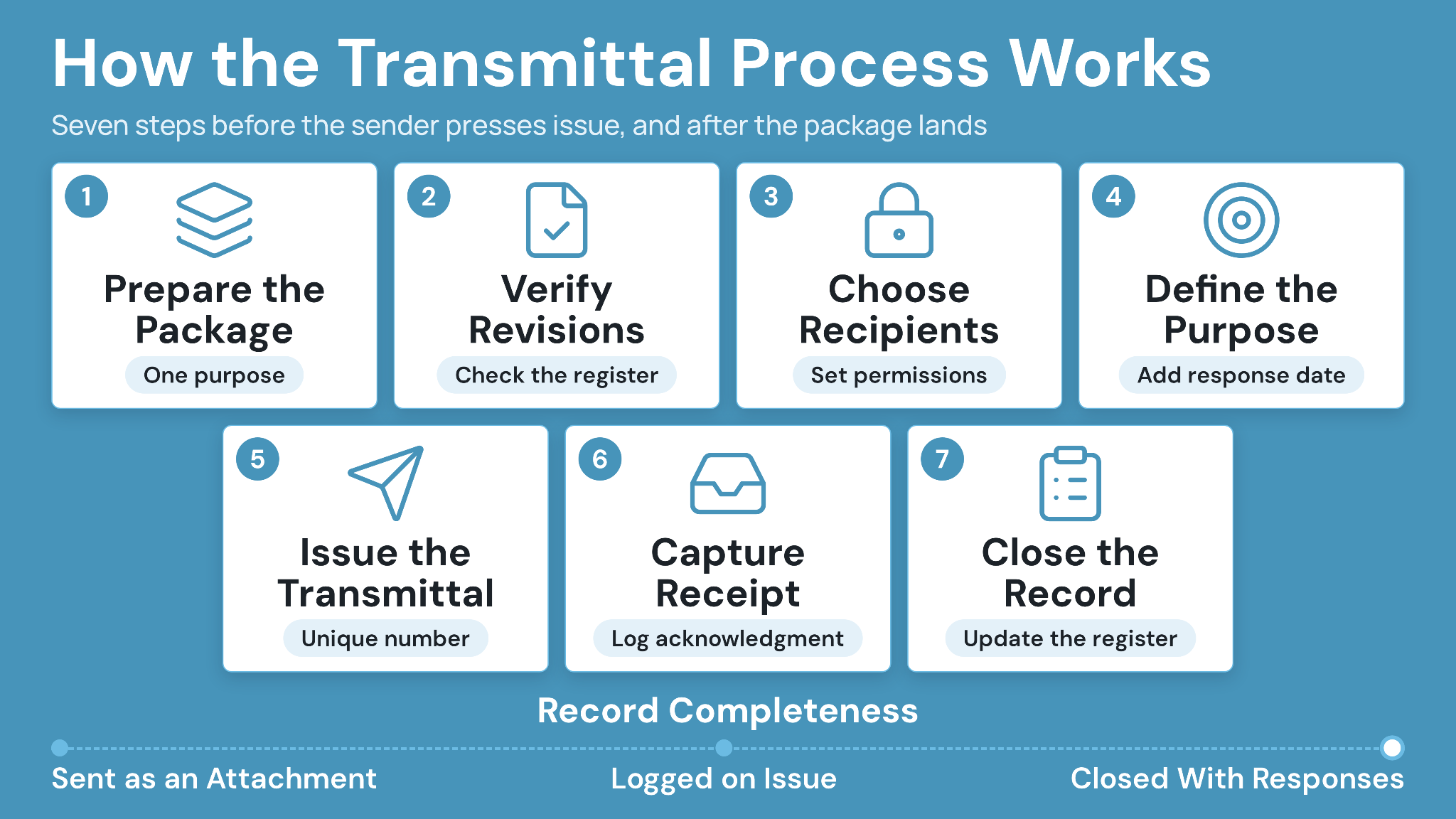
A reliable process begins before the sender presses issue. First, check the package, metadata, recipients, and required response.
Step 1: Prepare the package
Collect the documents that share one purpose and distribution group. Avoid combining unrelated records merely because they are ready at the same time.
Step 2: Verify document numbers and revisions
Compare every file against the drawing or document register. Confirm status, revision, title, and any superseded predecessor before release.
Step 3: Choose recipients and permissions
Select recipients from the project's distribution rules. Confirm that each person has appropriate access to the package and its destination.
CUBE supports granular access to transmittals within designated project spaces. Its data security in construction document management guide covers broader access-control practices.
Step 4: Define the purpose and required action
State whether the package is for review, approval, information, pricing, construction, or another defined use. Add a response date when action is required.
Clear language prevents recipients from inferring status from the file name. It also gives the sender a measurable follow-up point.
Step 5: Issue the transmittal
Assign a unique number and record the issue date. Send the package through the project's approved channel, then preserve the issued record without silent replacement.
Issue check: Confirm document revisions, recipients, permissions, purpose, response date, and superseded information before releasing the package.
Step 6: Capture receipt and responses
Record delivery, receipt, or acknowledgment according to the contract and project procedure. An acknowledgment confirms receipt, while approval addresses the content.
Step 7: Update the register and close the record
Keep the transmittal open until required responses are received or follow-up is resolved. Record final status so the register remains useful throughout the project.
How Should Teams Track Construction Transmittals?
A transmittal register should show every formal issue and its current status. It must remain searchable, consistent, and connected to the issued documents.
1. Use a consistent numbering convention
Choose a structure that supports unique records across organizations or disciplines. For example, a code might combine originator, discipline, and sequential number. Document the convention before major information exchange begins. Avoid changing it midway unless the project team records a controlled migration.
2. Define standard statuses
Keep the status list short enough for consistent use. Typical values include draft, issued, received, response due, closed, and canceled. Status definitions should explain who changes each value and what evidence is required. A received status may require system delivery confirmation or explicit acknowledgment.
3. Monitor dates and exceptions
Track issue dates, response dates, receipt dates, and closure dates. Views for overdue responses or failed delivery help controllers focus on exceptions.
The register should point to the exact issued package. Storing a later replacement under the same record weakens the historical trail. Teams should also control who can view or download sensitive packages. Distribution records can contain commercial, contractual, or personal information.
Periodic reviews reveal inconsistent status use, missing acknowledgments, and open records. They also help teams correct process drift before handover.
Audit check:
Select a sample of closed transmittals and confirm that the register, issued files, recipients, dates, and responses tell the same story.
What Common Transmittal Mistakes Create Project Risk?
Transmittal failures come from incomplete context or inconsistent follow-through. The document exists, but the team cannot rely on it later.
1. Sending the wrong revision
A correct transmittal cannot repair an incorrect package. Verify each file against the controlled register before issue.
2. Using vague purposes
Phrases such as “please see attached” leave the recipient's permitted use unclear. Use the project's defined purpose codes and explain any special instructions.
3. Treating receipt as approval
Delivery confirmation shows that information arrived. It does not establish acceptance, technical approval, or authorization to proceed.
4. Omitting external recipients from the register
A complete internal log can still fail if outside distribution occurs separately. Capture every formal project issue through the approved process.
5. Replacing issued files silently
Changing a file after issue breaks the connection between the register and the recipient's package. Issue a new revision and transmittal instead.
6. Leaving responses open
An unmonitored due date provides little control. Assign responsibility for follow-up and define how overdue items escalate.
How CUBE Supports Contextual Construction Transmittals
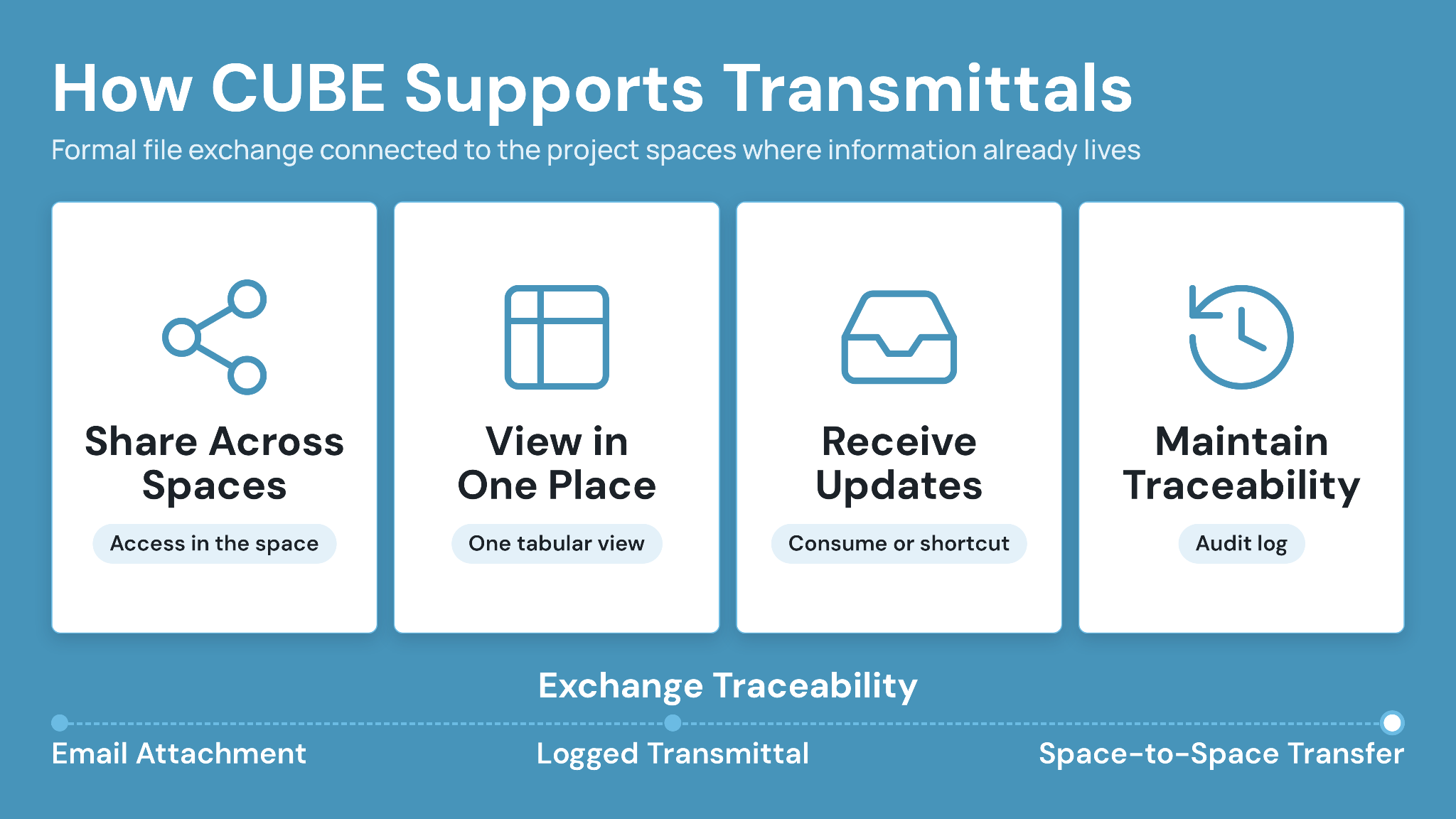
CUBE connects formal file exchange with the project spaces where teams manage information. Its verified transmittal module supports controlled sharing and traceable records.
1. Share files across controlled spaces
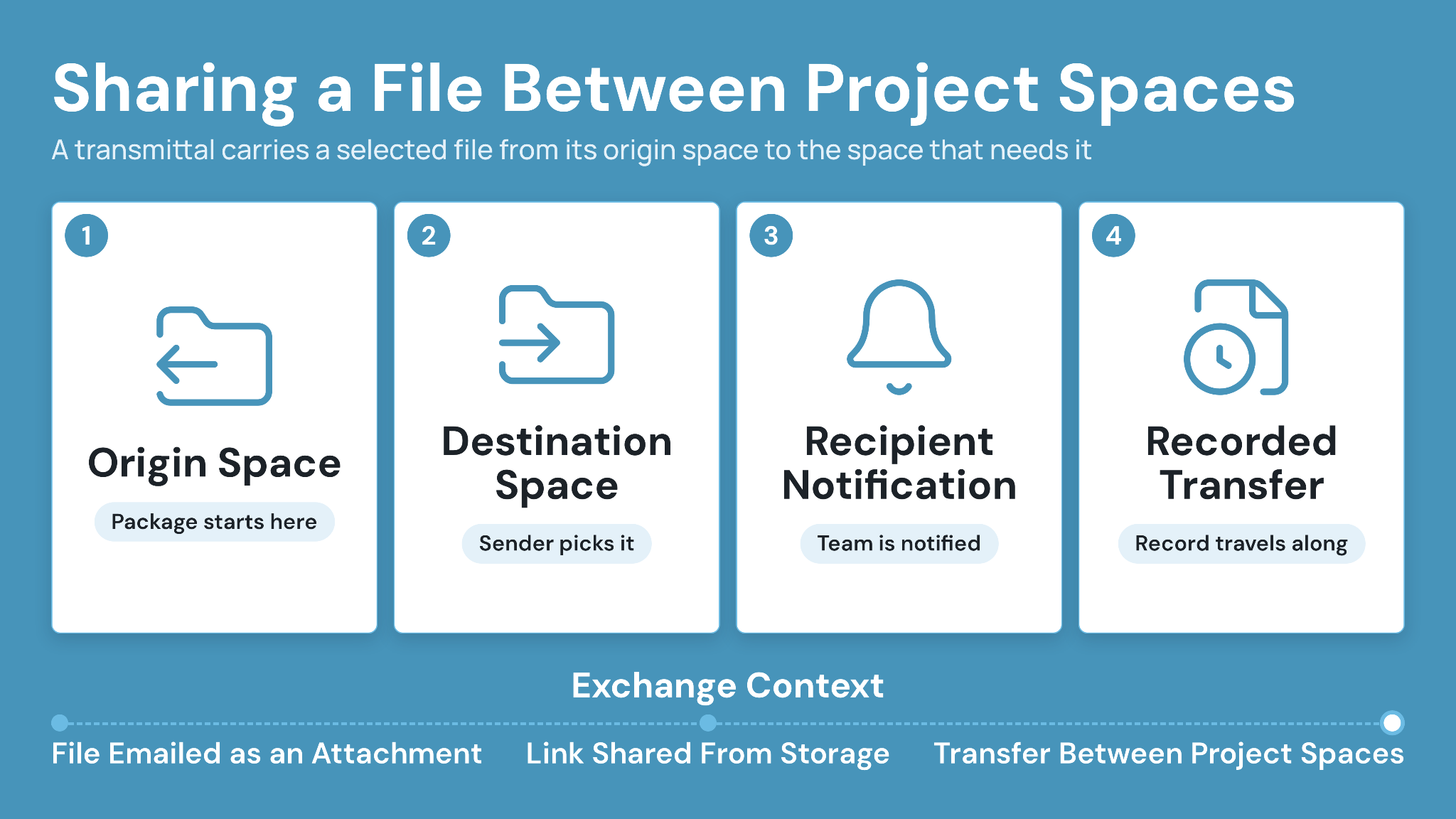
Teams can share selected files between project spaces rather than separating the package from its project context. Access can be regulated within the designated space.
A CUBE transmittal cannot be sent without attached reference files, so the record and the package never come apart. The transmittals list can be filtered, saved as a custom view, and exported to Excel for reporting.
2. View transmittals in one place
CUBE provides a consolidated tabular view of transmittals. That view helps teams manage the flow of issued and received files.
3. Receive updates and consume files
Recipients get a notification, open the transmittal, and either consume the files into a folder in their own Space or create a shortcut to them, for clearer revision continuity.
4. Maintain transfer traceability
CUBE's Common Data Environment records file transfers and maintains an audit log of transmittals. Its Transmittals module provides the focused workflow.
These functions support document control, but project teams still need agreed naming, purpose codes, responsibilities, and retention rules. Technology works best when the underlying procedure is explicit.
Build Accountability with CUBE
Construction transmittals provide a formal record of project information moving between parties. They connect the package with its sender, recipients, revisions, issue purpose, and date.
Strong practice requires more than a cover sheet. Teams must verify the package, control distribution, capture receipt, monitor responses, and preserve the final record.
CUBE brings these activities into controlled project spaces with transmittal views, access settings, version updates, and transfer history. That context helps teams trace what moved without relying on detached messages.
Ready to manage construction transmittals with clearer project context? Sign up today.
Frequently Asked Questions (FAQs)
1. Does a transmittal prove that a recipient approved the documents?
A transmittal proves that a defined package was issued to named recipients on a recorded date. It does not prove that recipients accepted the technical content, unless the workflow also captures review decisions, approvals, or explicit acknowledgments.
2. How long should construction transmittals be retained?
Keep transmittals for the period required by the contract, company policy, applicable law, and insurer guidance. Since retention duties vary by project and jurisdiction, confirm the schedule with qualified legal or records-management advisers before disposal.
3. Can CUBE replace emailed transmittal attachments?
CUBE can keep shared files and transmittals within controlled project spaces, with access settings and a consolidated transmittal view. Teams can also consume received files straight into their own Space, or create a shortcut to them, keeping clearer context than detached email attachments provide.
4. Should every document in a package use the same transmittal?
Use separate transmittals when packages have different purposes, recipients, response dates, confidentiality needs, or contractual status. Smaller, purpose-specific packages make receipt, review, and follow-up easier to track than one large issue covering unrelated information.
5. Can a transmittal replace an RFI response?
A transmittal can issue an RFI response, but it does not replace the RFI record. In CUBE, teams can share resulting documents through controlled spaces while retaining the related revision and transfer context for later reference.

.png)
.png)