.svg)


.png)
.png)


.svg)




.png)

.png)

Best Construction Document Control Software (2026 Comparison)
Compare the 8 best construction document control software platforms in 2026, including CUBE, Procore, Autodesk Forma, Aconex, Trimble Connect, and more.


Key Takeaways
- The choice for the best construction document control platform depends on whether your priority is CDE governance, BIM coordination, field access, PDF review, engineering workflows, or broader construction management.
- CUBE is best suited to teams seeking a CDE-led workflow for controlled revisions, reviews, approvals, transmittals, permissions, naming, and activity history.
- Procore fits teams that want document control within a broader construction-management platform, while Autodesk Forma and Trimble Connect are strong options for design- and BIM-focused workflows.
- Oracle Aconex is designed for formal project records and enterprise governance; Fieldwire prioritizes field-first drawing access; Bentley ProjectWise serves engineering and infrastructure teams; and Bluebeam focuses on PDF review and markups.
- Before choosing a platform, test one real drawing package through upload, revision, review, approval, transmittal, field access, and archive.
The choice of construction document control software affects how your team manages revisions, approvals, transmittals, and field access throughout every project. A wrong choice can cost you much more in lost revenue and repute, besides the time your document controller spends reconciling duplicate revisions and rework from a crew building to a superseded drawing.
The right choice would be the platform that matches your document-control model and has ample scope for drawing and model coordination, formal project correspondence, field access, PDF review, engineering information management, or a broader construction-management system.
This guide compares eight options by the workflows buyers should test before signing, and answers four important questions:
- Which construction document control platform is best for my team's specific workflow?
- What features should I evaluate beyond file storage and revision history?
- How do the top platforms compare on pricing, permissions, and auditability?
- What questions should I ask in a demo before making a decision?
8 Best Construction Document Control Software Platforms in 2026 and Why We Shortlisted Them
Table 1: Construction document control software compared by best-fit workflow and publicly stated capabilities. Pricing and feature availability can vary by plan, contract, region, and product edition.
How We Compared Construction Document Control Software
Construction document control software should do more than store files. It should help your team identify the current revision, route information to the right people, preserve a usable record of decisions, and make project information available where work happens.
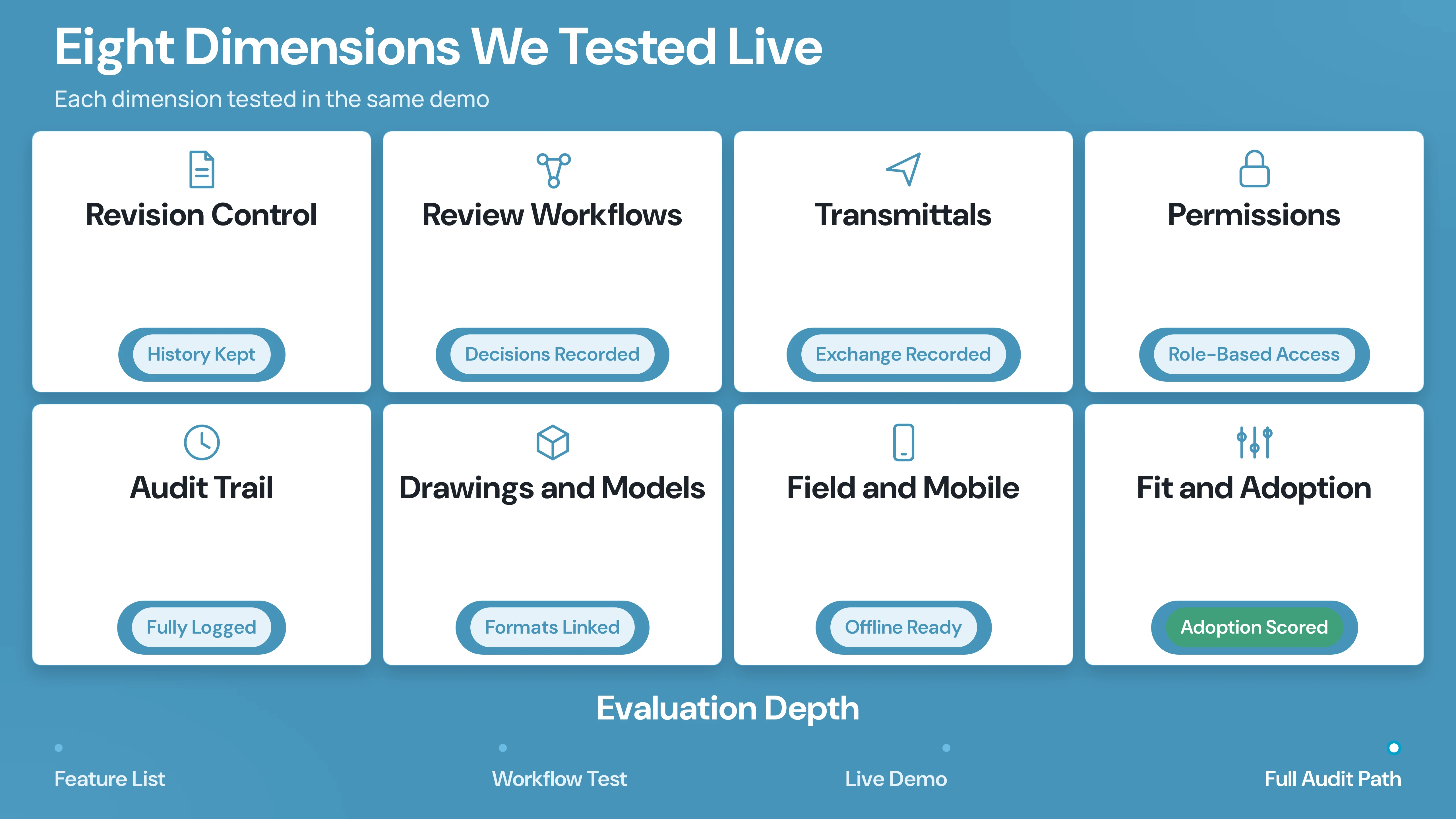
We compared the platforms across eight buyer-facing dimensions:
The comparison separates document control from broader construction management. A platform may be excellent at one workflow without being the right replacement for your entire project system.
The 8 Best Construction Document Control Software Platforms in 2026
The eight platforms that follow represent the strongest options in construction document control, each purpose-built for a distinct workflow. CUBE serves teams that need a CDE-led environment. Procore and Autodesk Forma address broader construction management and design-BIM coordination, respectively. Oracle, Aconex, Trimble Connect, Bentley, ProjectWise, and Bluebeam are the other shortlisted software.
Use the best-fit description to decide which platforms belong on your shortlist, then test each against your real workflows before making a decision.
1. CUBE: Best CDE-Led Option for Controlled Revisions, Reviews, Approvals, and Transmittals
CUBE is best for
Mid-market owners, contractors, specialty and MEP subcontractors, BIM/VDC teams, and document controllers that need a Common Data Environment (CDE) to control project information without splitting revisions, reviews, transmittals, and collaboration across disconnected tools.
CUBE’s Common Data Environment is a collaborative digital hub for storing, managing, and sharing project information. Its document-control workflow centers on controlled revisions, automated revision tracking, structured approvals, activity history, role-based access, detailed permissions, and formal transmittals.
The CDE product page lists support for CAD, BIM, PDF, documents, spreadsheets, and image files. CUBE’s public product material also describes centralized information, cloud-based deployment, review-and-approval workflows, transmittals, naming, collaboration, and audit/activity history.
CUBE’s construction document control features
- Controlled document and drawing revisions with revision tracking
- Structured approval workflows for drawing and model reviews
- Series or parallel approval paths, conditional branching, and revision rollbacks
- Formal transmittals for controlled information exchange
- Activity history for traceability and accountability
- Role-based access and detailed permission management
- Naming rules and centralized project information
- Support for CAD, BIM, PDF, documents, spreadsheets, and images
- Review notifications and checklist control by review level and file in V3.3
- Custom grid views and default views for transmittals in V3.3
- Collaboration across project stakeholders in a shared operational workspace
Why choose CUBE for document control?
A document controller or VDC manager needs to answer more than “where is the file?” They also need to answer who issued it, which revision is current, who reviewed it, what decision was made, and what information can be shared with each stakeholder. That’s where CUBE functionalities come in.
CUBE fits buyers who view document control as a project operating workflow. The CDE approach connects information management with reviews, approvals, transmittals, and stakeholder collaboration.
CUBE’s public pricing page lists the Common Data Environment at $399 per user, with unlimited projects, storage, version history, and business-hours support. Enterprise-level pricing and customized plans are available through the company. Confirm billing cadence, user definitions, implementation services, and any commercial conditions with CUBE before purchase.
CUBE’s strengths
- CDE-led document control rather than storage alone
- Revision tracking, approvals, transmittals, naming, and activity history in one workflow
- Support for both project documents and CAD/BIM information
- Publicly listed pricing for the Common Data Environment plan
- Product updates focused on review, transmittal, mailbox, schedule, and coordination workflows
CUBE’s tradeoffs
- Buyers should validate integrations, permission details, hosting, data residency, and deployment requirements against their project and IT checklists.
- Teams primarily looking for field task management, estimating, or financial controls may need to evaluate CUBE’s broader Project Management offering alongside the CDE.
Case in Point: Dosti Realty
A leading Indian real estate developer managing 15+ projects was relying on fragmented local servers and manual processes for document control. There was no standardized file naming, no structured approval workflows, and limited visibility across teams. CUBE's centralized CDE introduced ISO-aligned file structures, consistent nomenclature across all projects, and a three-level review and approval workflow. The result: improved traceability, reduced manual follow-ups, and stronger governance across the project lifecycle.
"CUBE's solution streamlined our project coordination remarkably." — Dosti Realty
CUBE verdict
Choose CUBE when you want a controlled CDE workflow across revisions, approvals, transmittals, project information, and stakeholder access. It is particularly relevant to mid-market AEC teams that are outgrowing shared drives and want a document-control system that is tied to how project information moves.
2. Procore: Best for All-in-One Construction Project Management With Document Control
Procore is best for
General contractors, subcontractors, and construction managers who want document control within a broader construction-management platform.
A team evaluating Procore is usually looking beyond files and revisions to the surrounding project workflows. That can reduce the number of systems administrators and project teams need to coordinate. Still, it also means buyers should test whether they will use the wider platform enough to justify its implementation and commercial model.
Procore’s construction document control features
- Automatic revision control
- Document archiving
- Drawing management
- RFI workflows
- Project workflows and permissions
- Integrations with other project systems
- Mobile and offline access
Procore’s strengths
- Document control sits inside a broader construction-management platform.
- Automatic revision control and archiving address two core document-governance needs.
- RFIs and drawings are part of the public document-management positioning.
- Mobile/offline access supports teams that need project information in the field.
Procore’s tradeoffs
- Teams with non-standard project procedures, ISO 19650 requirements, or complex naming conventions may find the platform's rigidity a barrier.
- Procore deployments typically require dedicated administrators, structured training programs, and ongoing configuration support.
- Teams that need a focused CDE rather than a broad construction platform should carefully compare administrative effort and total cost.
Procore verdict
Choose Procore when document control is part of a broader construction management system. It is a practical shortlist option for teams that want to connect documents with drawings, RFIs, project workflows, and field access.
3. Autodesk Forma: Best for Design, BIM, and Document Distribution Workflows
Autodesk Forma is best for:
Design-build teams, contractors, owners, and project participants whose document-control workflow is closely tied to design coordination, models, markups, and Autodesk’s construction ecosystem.
The current Autodesk construction document-management page is branded under Autodesk Forma. It describes a connected construction document-management platform and publicly lists version/revision control, review and approval workflows, document distribution, permissions, issue and markup workflows, and mobile/offline support.
This makes Autodesk Forma a strong candidate for teams that need to control documents before publishing and distributing them to project participants. The main buying question is not whether Autodesk fits a BIM-heavy environment; it is how well the proposed configuration fits your specific document register, review gates, field process, and existing Autodesk subscriptions.
Autodesk Forma’s construction document control features
- Version and revision control
- Review and approval workflows
- Document distribution
- Permissions
- Issue and markup workflows
- Mobile/offline support
Autodesk Forma’s strengths
- Strong alignment with design and BIM-related document workflows.
- Review, approval, and distribution are treated as part of the document management process.
- Markup and issue workflows support coordination beyond basic file storage.
- Mobile/offline support helps extend controlled information beyond the office.
Autodesk Forma’s tradeoffs
- Teams that use non-Autodesk authoring tools may find the platform less adaptable than a CDE-neutral alternative like CUBE.
- Autodesk product naming and packaging have changed, so confirm the current product, module, and contract language.
- Buyers should test how the platform handles the exact transmittal, naming, approval, and audit requirements in their project procedures.
Autodesk Forma verdict
Choose Autodesk Forma when your document-control decision is inseparable from BIM, design coordination, markups, and controlled distribution. It is less compelling if you need only a lightweight document repository or a narrowly focused PDF review tool.
4. Oracle Aconex: Best for Formal Project Records and Enterprise Document Governance
Oracle Aconex is best for
Complex construction, engineering, and infrastructure projects that need a formal project record and controlled information processes across many organizations.
Oracle’s official Aconex page describes a platform that connects teams and processes across the project lifecycle while capturing a complete project record. The reviewed page publicly identifies a document register, version control, workflows, review and approval, and audit trails.
Aconex should be evaluated as a governance-led platform. Its fit depends on how much formality your project requires in correspondence, document registers, review stages, and the long-term project record. That makes it a natural candidate for complex multi-party projects, but potentially more than a smaller contractor needs for basic drawing access and revision tracking.
Oracle Aconex’s construction document control features
- Document register
- Version control
- Workflows
- Review and approval
- Audit trails
- Project-lifecycle record keeping
Oracle Aconex’s strengths
- Clear emphasis on a complete project record.
- Document register and audit trails support formal governance.
- Workflow and approval controls fit projects with multiple organizations and decision gates.
- Enterprise positioning suits complex project requirements.
Oracle Aconex’s tradeoffs
- Governance model requires significant upfront configuration of document registers, workflows, permissions, and correspondence rules.
- Buyers should validate the day-to-day user experience for project teams, not only the governance model.
- Smaller contractors and mid-market GCs may find Aconex administratively heavy.
Oracle Aconex verdict
Choose Aconex when the project record, formal workflows, auditability, and multi-party governance carry more weight than a lightweight rollout. It is a strong candidate for large, complex, and highly controlled project environments.
5. Trimble Connect: Best for BIM Collaboration and Model Coordination
Trimble Connect is best for
Teams that need a cloud-based collaboration environment for files, models, coordination, sharing, and access across project participants.
Trimble’s official product page describes Trimble Connect as a cloud-based environment and single source of truth. The reviewed page lists file and version management, model coordination, sharing, permissions, integrations, and mobile/offline access. It also publicly lists annual prices of $149 for Core Pro and $349 for Innovate, plus a trial price of $0.
Trimble Connect is a natural fit when model coordination and information sharing lead the buying decision. Buyers should still test the detail of formal approval, transmittal, and audit workflows if those are central to document-control compliance.
Trimble Connect’s construction document control features
- Cloud-based collaboration environment
- File and version management
- Model coordination
- Sharing
- Permissions
- Integrations
- Mobile/offline access
- Trial and paid plan options listed publicly
Trimble Connect’s strengths
- Strong fit for model-centric collaboration and coordination.
- Cloud access supports distributed project teams.
- File/version management and permissions address core information-control needs.
- Public pricing and trial information provide an accessible starting point for evaluation.
Trimble Connect’s tradeoffs
- Not suitable for teams whose primary need is controlled document revisions, formal transmittals, and audit-ready activity history.
- Buyers should confirm whether the selected plan supports the project’s required governance model.
- Teams that need broader project controls may need Trimble products or integrations beyond Connect.
Trimble Connect verdict
Choose Trimble Connect when BIM collaboration, model coordination, and controlled file sharing are the center of the workflow. It is a particularly relevant comparison for teams whose document-control problem is closely connected to models and design coordination.
6. Fieldwire: Best for Field-First Drawing and Document Access
Fieldwire is best for
Small and growing contractors, specialty trades, and field teams that need current plans, markups, tasks, and project information where work happens.
Fieldwire’s official site positions the product as a jobsite management tool. It publicly lists plans, drawing versioning, markups, RFIs and submittals, document access, mobile/offline use, integrations, and unlimited sheets and projects on all paid plans.
Fieldwire is a different type of document-control choice from Aconex or ProjectWise. Its strength is the field workflow: getting drawings and project information to the people coordinating work onsite. If your primary need is a formal document register, multi-stage approval process, or enterprise engineering information model, test those workflows directly rather than assuming jobsite access covers them.
Fieldwire’s construction document control features
- Plans and drawing management
- Drawing versioning
- Markups
- RFIs and submittals
- Document access
- Mobile and offline use
- Integrations
- Unlimited sheets and unlimited projects on paid plans, according to the reviewed page
Fieldwire’s strengths
- Strong field and jobsite orientation.
- Drawing versioning and markups support day-to-day plan coordination.
- RFIs and submittals connect documents with field questions and information exchange.
- Mobile/offline access supports site conditions.
Fieldwire’s tradeoffs
- Fieldwire is not built for granular role-based document control.
- Buyers should compare formal approvals, transmittals, and audit trails with their document-control requirements.
- It may be a better fit for field execution than for organization-wide engineering information management.
- It is not suitable for tams managing multiple projects with formal document registers, ISO 19650 requirements, or complex approval chains.
Fieldwire verdict
Choose Fieldwire when field access to current plans, markups, tasks, RFIs, and submittals is the immediate problem. Put it through a deeper governance test if document control must support formal project records or complex multi-party approvals.
7. Bentley ProjectWise: Best for Engineering Information Management and Infrastructure Delivery
Bentley ProjectWise is best for
Infrastructure owners, engineering organizations, and project teams managing engineering work-in-progress, models, design reviews, contractual deliverables, and multidisciplinary coordination.
Bentley’s official ProjectWise page lists document and model access from the office or field, controlled workspaces, application integration, reference-file management, project-document permissions, review and approval processes, clash detection workflows, design and constructibility reviews, 2D/3D markups, and 4D model collaboration.
ProjectWise is suited to teams whose document-control requirements are inseparable from engineering applications, design coordination, and infrastructure delivery. It may be unnecessarily specialized for a contractor that primarily needs drawing distribution, simple approvals, and field access.
ProjectWise’s construction document control features
- Document and model access from office or field
- Engineering work-in-progress management
- Controlled workspaces
- Application integration
- Reference-file management
- Document and model permissions
- Review and approval processes
- Contractual deliverable management
- Clash detection and design/constructibility reviews
- 2D/3D markups and 4D model collaboration
- AI-powered search that can find files and flag document revisions, according to the reviewed page
ProjectWise’s public pricing
Bentley’s reviewed page lists starting prices of $312 for Bentley Infrastructure Cloud Connect, $960 for Bentley Infrastructure Cloud ProjectWise, and $10,440 for the ProjectWise Bundle. Confirm currency, billing period, edition, user scope, and current product packaging before using these figures in a purchasing decision.
ProjectWise’s strengths
- Deep fit for engineering and infrastructure information workflows.
- Controlled workspaces and application integration support work-in-progress management.
- Design reviews, clash detection, model collaboration, and markups extend beyond basic document storage.
- Permissions and contractual deliverable workflows support complex project environments.
ProjectWise’s tradeoffs
- Its infrastructure and engineering focus may be more than a mid-market contractor needs.
- Public starting prices are not directly comparable to per-user construction-platform pricing without understanding the commercial model.
- Buyers should validate implementation requirements and the specific ProjectWise configuration being proposed.
ProjectWise verdict
Choose ProjectWise when engineering information management, design coordination, and infrastructure delivery are the core buying criteria. It is a specialist option, not simply a file repository.
8. Bluebeam: Best for PDF Markups, Comparison, and Design Review
Bluebeam is best for
Architects, engineers, contractors, and project teams whose document-control workflow is centered on PDF review, markups, comparison, collaboration, and construction documentation.
Bluebeam’s reviewed construction page publicly lists PDF review, markups, comparison, collaboration, workflows, permissions, mobile access, and integrations. That makes it a focused option for teams that spend much of the day reviewing drawings, adding markups, comparing revisions, and coordinating comments in PDFs.
Bluebeam should not be evaluated as a direct replacement for every CDE or construction-management platform. Its strongest fit is the review layer. Buyers that also need formal transmittals, organization-wide document registers, project correspondence, or broad project controls should test how Bluebeam fits with the rest of the information workflow.
Bluebeam’s construction document control features
- PDF review
- Markups
- Drawing and document comparison
- Collaboration
- Workflows
- Permissions
- Mobile access
- Integrations
Bluebeam’s strengths
- Focused fit for PDF-heavy drawing review and coordination.
- Markups and comparison support revision conversations at the document level.
- Collaboration and workflows extend beyond opening and annotating files.
- Mobile access supports review away from the desktop.
Bluebeam’s tradeoffs
- It does not provide a document register, revision series, formal transmittals, or project-level audit trails.
- Bluebeam does not handle BIM models, CAD files, spreadsheets, or other document types that construction teams manage daily.
- Buyers should test how review outputs, approvals, and final records move into the project’s controlled information environment.
Bluebeam verdict
Choose Bluebeam when PDF review and markup work is the bottleneck. Pair it with a wider document-control environment when your team also needs formal distribution, transmittals, audit trails, or lifecycle information management.
Construction Document Control Software Compared: Features, Pricing, and Best Fit
7 Questions to Ask Before You Buy Construction Document Control Software
A polished demo is not enough. Put the following scenarios in front of every vendor.
1. What happens when a revised drawing arrives?
Ask the vendor to show how the system identifies the revision, preserves the previous issue, notifies affected users, and prevents the field from relying on an obsolete copy.
2. Can you route a review the way your project actually works?
Test sequential, parallel, conditional, and returned-for-correction paths. Ask where the system records comments, decisions, due dates, and final approval.
3. How are transmittals created and tracked?
Request a live example from issue creation through recipient acknowledgment, response, and archive. A file-share link is not the same as a controlled transmittal.
4. What can each role see and change?
Test administrator, document controller, architect, contractor, subcontractor, consultant, and field-user permissions. Confirm who can view, upload, edit, approve, comment, download, and share.
5. Can project teams find information by more than folder path?
Test search by file name, metadata, revision, discipline, status, model element, and project area where relevant. Ask how naming rules are enforced and how bad metadata is corrected.
6. What does the audit history show?
Ask the vendor to trace an upload, a revision, a review, an approval, a transmittal, a permission change, and a download. The record should be understandable to a project team—not only to an administrator.
7. How does the system fit the rest of your stack?
Confirm integrations with the design, BIM, field, scheduling, ERP, identity, and storage tools your teams already use. Ask what is native, what requires configuration, and what is only available through a partner or API.
What Construction Document Control Software Should Include
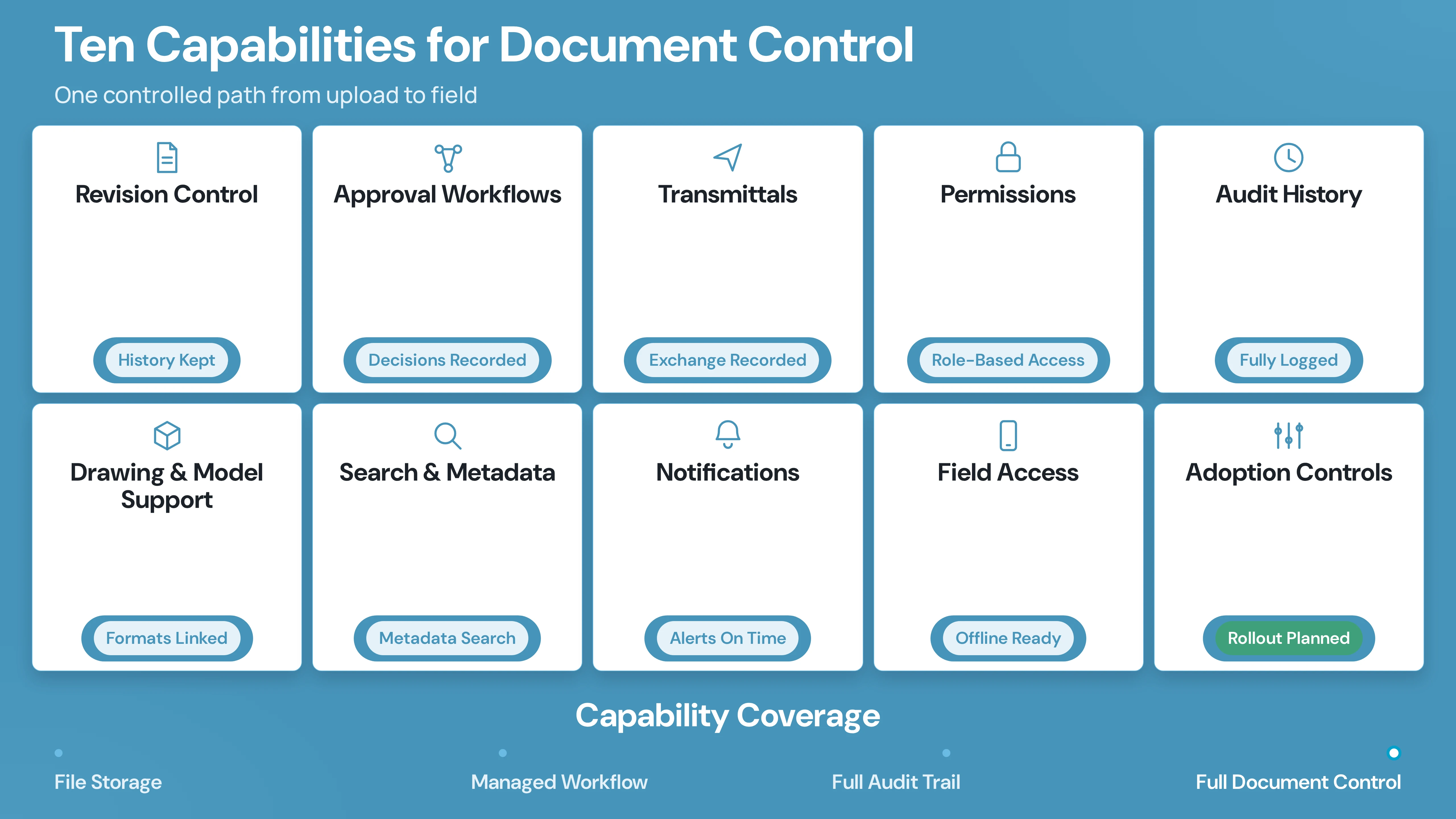
The minimum feature set depends on project complexity, but most construction teams should evaluate the following capabilities:
- Revision control: A clear current issue, retained history, and visible change record.
- Approval workflows: Configurable review paths with owners, deadlines, comments, and decisions.
- Transmittals: Formal information exchange with recipients, status, and traceability.
- Permissions: Role-based access that limits exposure and protects controlled information.
- Audit history: Records of uploads, edits, approvals, sharing, downloads, and administrative changes.
- Drawing and model support: Access to the file types and models that drive the work.
- Search and metadata: Ways to find information without relying on memory of a folder tree.
- Notifications: Timely alerts for new revisions, review assignments, approvals, and deadlines.
- Field access: Mobile access with offline support for sites that cannot rely on continuous connectivity.
- Adoption controls: Naming rules, templates, checklists, and workflows that make the right process easier than the wrong one.
Construction Document Control vs. Construction Document Management
The terms overlap, but they emphasize different jobs.
Construction document management typically refers to the broader practice of storing, organizing, locating, sharing, and collaborating on project files. It may include drawings, specifications, RFIs, submittals, contracts, photos, reports, and other records.
Construction document control focuses more tightly on governance: identifying the current revision, controlling access, routing reviews, recording decisions, distributing approved information, and preserving a traceable history.
A shared drive may store documents. A document control system should help the project team determine which information can be trusted, who approved it, where it was issued, and what changed.
Common Construction Document Control Software Mistakes
1. Buying storage when the problem is workflow
If the team’s failure is missed approvals or superseded drawings, additional storage will not solve the problem. Test the review, notification, and revision workflows first.
2. Choosing a platform no one on the jobsite will use
A system that works in the project office but fails on a phone, tablet, or weak connection will leave the field outside the controlled information process.
3. Treating integrations as a checkbox
An integration matters only if it moves the information your team needs, at the point in the workflow where it matters. Ask to see the handoff, not just the logo wall.
4. Comparing list prices without comparing implementation
Per-user pricing, annual plan pricing, bundled modules, enterprise contracts, implementation services, and storage or project limits can make public price signals difficult to compare. Build a three-year cost model with users, projects, integrations, migration, training, administration, and support.
5. Ignoring the exit plan
Ask how your organization exports documents, metadata, revisions, comments, approvals, transmittals, and audit history if the contract ends. Ownership includes the ability to leave with a usable project record.
How to Choose the Best Construction Document Control Software
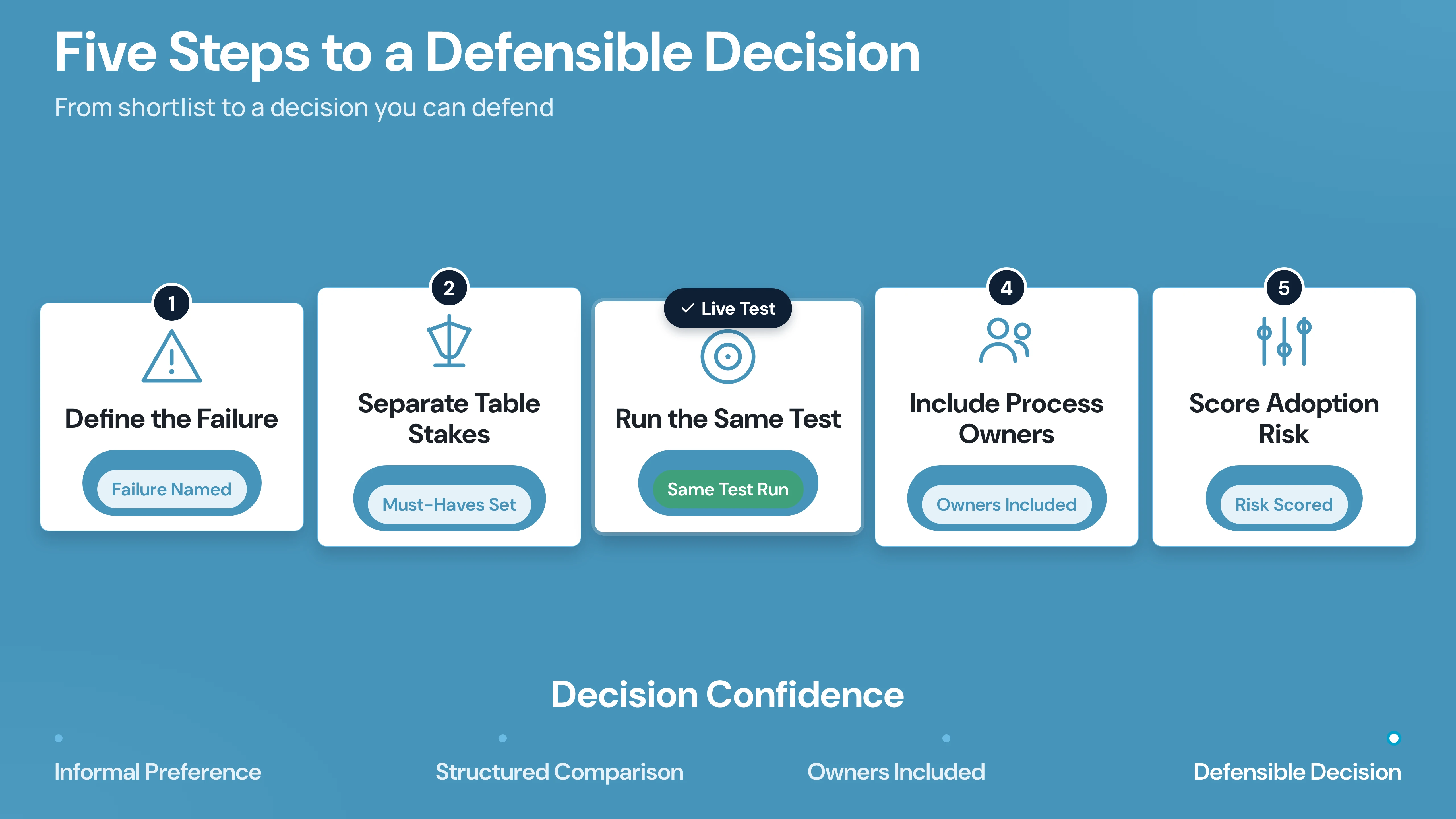
Use this five-step process to move from shortlist to a defensible decision:
Step 1: Define the document-control failure you need to stop
Write down the specific failure: superseded drawings reaching the field, approvals trapped in email, duplicate files in shared drives, missing transmittal records, poor model coordination, or an incomplete project record. Different problems produce different best-fit platforms.
Step 2: Separate table stakes from differentiators
Every shortlisted tool should meet your table stakes for revision history, permissions, search, access, and basic collaboration. The decision should then turn on the differentiator that matters most: CDE governance, BIM coordination, formal project records, field access, PDF review, or engineering work in progress.
Step 3: Run the same workflow test in every demo
Use one real drawing package, one review, one transmittal, one revision, and one permission scenario. Require each vendor to show the complete path from upload to approved issue.
Step 4: Include the people who carry the process
Invite document controllers, VDC/BIM managers, project engineers, superintendents, subcontractor representatives, IT/security, and the economic buyer. A product selected only by procurement or only by a senior executive is unlikely to reflect the real workflow.
Step 5: Score adoption and exit risk alongside features
A strong feature list does not offset a weak rollout. Score configuration effort, training, field usability, permissions administration, migration, integrations, support, export, and the effort required to maintain naming and review discipline.
Final Verdict: Start With the Workflow You Need to Control
The best construction document control software is not the one with the longest feature list. It is the one that controls the failure costing your project time, rework, and confidence in the record.
Choose CUBE when you need a CDE-led workflow across controlled revisions, reviews, approvals, transmittals, naming, permissions, and activity history. Choose Procore for a broader construction-management system. Choose Autodesk Forma or Trimble Connect when design and BIM coordination lead the decision. Choose Oracle Aconex when formal governance and the project record are non-negotiable. Choose Fieldwire when current plans and field access are the urgent problem. Choose Bentley ProjectWise for engineering and infrastructure information management. Choose Bluebeam when PDF review and markups are the bottleneck.
Before you sign, run one real drawing package through upload, revision, review, approval, transmittal, field access, and archive. The platform that makes that chain clear to every stakeholder deserves the next step.
Start with the workflow you need to control. Sign up for CUBE to see how a CDE-led document-control environment handles revisions, approvals, transmittals, and field access from one project record.
Frequently Asked Questions
1. What is the best construction document control software?
There is no single best platform for every project. CUBE is a strong fit for a CDE-led workflow across revisions, approvals, transmittals, permissions, naming, and activity history. Procore fits teams that want document control inside broader construction management. Autodesk Forma fits design- and BIM-heavy workflows. Oracle Aconex fits formal project records and enterprise governance. Trimble Connect fits BIM collaboration. Fieldwire fits field-led plan and drawing access. Bentley ProjectWise fits engineering and infrastructure information management. Bluebeam fits PDF review and markup-heavy work.
2. What is the difference between document control and document management in construction?
Document management covers storing, organizing, finding, sharing, and collaborating on project information. Document control adds governance around revisions, approvals, permissions, formal distribution, decisions, and auditability. Construction teams often need both.
3. What features should construction document control software have?
At minimum, evaluate revision control, review and approval workflows, transmittals, permissions, audit history, drawing and model support, search, notifications, mobile access, and integrations. If your projects are BIM-heavy, also test model coordination, metadata, and design-application workflows.
4. Is Procore a document control system?
Procore’s official document-management page publicly lists automatic revision control, document archiving, drawings, RFIs, workflows, integrations, permissions, and mobile/offline access. It is positioned as part of a broader construction-management platform, so buyers should evaluate the full system and commercial package.
5. Is Autodesk Construction Cloud now Autodesk Forma?
The official Autodesk construction document-management page reviewed for this article is titled Construction Document Management | Autodesk Forma. Because Autodesk naming and packaging can change, confirm the current product name, module, and agreement language before procurement.
6. What is the best document control software for BIM teams?
The answer depends on the BIM workflow. Autodesk Forma, Trimble Connect, Bentley ProjectWise, and CUBE all have public evidence relevant to model or BIM-related collaboration, but they optimize for different environments. Test model coordination, file/version control, permissions, reviews, markups, and downstream handover with your own sample project.
7. How much does construction document control software cost?
Public pricing varies widely and is not normalized across platforms. The public pages reviewed for this article listed CUBE’s Common Data Environment at $399 per user, Trimble Connect at $149 annually for Core Pro and $349 annually for Innovate, and Bentley starting prices from $312 to $10,440 depending on product. Procore, Autodesk Forma, Oracle Aconex, and Bluebeam directed buyers to contact sales or a pricing page on the reviewed pages. Treat these as captured public signals, not like-for-like total-cost estimates.
8. Can document control software replace email and shared drives?
It can replace them as the system of record for controlled project information, but adoption depends on process design. Teams still use email and messaging for alerts and discussion. The document-control platform should own the current revision, review status, approval record, transmittal history, permissions, and project archive.