

Online GLB and glTF Viewer for Design & Construction Teams

Open a glTF model, binary or JSON, without 3D software. Choose your .glb or .gltf and the model opens for you to view.

Upload any .glb or .gltf up to 50 MB
No account required
No additional licenses required
GLB / glTF
No file selected
Waiting for a file
↑

Drop a .glb or .gltf File Here

Drag and drop your file or click the button below to upload it.

Choose GLB or glTF File

.glb or .gltf, up to 50 MB. A .glb carries everything in one file.

60+
Formats CUBE can view in a project, with this page as the public .glb and .gltf route
50 MB
Maximum .glb or .gltf size this page accepts
0 licences
No Blender or other 3D tool needed. No account is required to open the model
14 days
How long a file on this viewer is kept before automatic deletion

How to Use This Online GLB and glTF Viewer

Two steps from a .glb or .gltf export to a model you can review. The file is checked on your device, then it opens inside CUBE.

Step 1 of 2

Choose a .glb or .gltf File

The browser checks the extension and size before anything leaves your device. Maximum size is 50 MB. A .gltf with linked .bin or image files opens without them, so embed them or send a .glb.
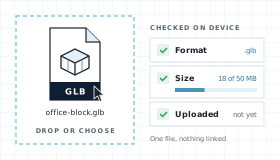
A .glb file dropped into the viewer and checked in the browser for format and size, still on your device
Step 2 of 2

View It in CUBE

The model opens in the CUBE viewer. Pan, zoom, fit. Upgrade to measure the model, share it, raise issues, and run reviews.
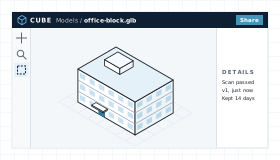
The file open in the CUBE viewer

What This GLB and glTF Viewer Shows in a Model

glTF describes a 3D scene, and GLB packs that scene, its geometry, and its textures into one binary file. Either way, the Online GLB and glTF Viewer opens the model without the software that made it.

The Whole Scene

Nodes, meshes, and materials from the glTF scene, translated and shown in 3D. Pan, zoom, and fit to inspect them.

View Without a Licence

Open the file without Blender or any other 3D tool.

Hand-off Into CDE

Your model is already stored in CUBE, not a throwaway preview. Upgrade and it becomes a controlled document with versions, reviews, and transmittals.

Measure, Share, and Issues

This page is the viewer. Upgrade to measure the model, share it, and raise tracked issues.

GLB and glTF Viewer Workflow, Step by Step

Upload and preview your files, directly in the browser.

From Dropzone to Viewer

Four steps between choosing a file and working on it in CUBE.

01

Choose

Extension lock to .glb and .gltf and size check at 50 MB, both in the browser. Nothing is uploaded yet.

02

Upload and scan

The file uploads for this viewing session, visible only to you. Malware scan runs before translation and fails closed.

03

Translate and view

The model translator used in Spaces renders the model. Pan, zoom, fit, and orbit. Measuring, sharing, and issues need an upgrade.

04

Keep or expire

Files are deleted after 14 days. Upgrading keeps them as controlled project documents.

What a GLB or glTF File Contains

glTF (GL Transmission Format) is an open standard from the Khronos Group for delivering 3D models efficiently. Version 2.0, released in 2017, added the physically based materials that most tools now export. Design teams use it for web viewers, AR, client presentations, and product models, anywhere a model has to load fast without the software that created it.

The format comes in two forms. A .gltf file is JSON that lists scenes, nodes, meshes, and materials, and points to binary buffers and images that can sit in separate files or be embedded. A .glb is Binary glTF: a 12-byte header, a JSON chunk, and a binary chunk in one file. This viewer accepts both, up to 50 MB.

glTF Structure Map

What the JSON describes and the binary data stores, in either form.

SCENES

Scenes and Nodes

Entry points into the model and a tree of nodes with their transforms, cameras, and meshes.

MESHES

Primitives

Drawable geometry with attributes such as position, normal, and texture coordinates.

BUFFERS

Binary Data

Buffers, buffer views, and accessors that point to the bytes for vertices and indices.

MATERIALS

PBR Materials

Metallic-roughness materials with base colour, textures, and the images they use.

ANIMATION

Skins and Motion

Keyframes, morph targets, and skins. They stay in the file, while the Online GLB and glTF Viewer focuses on the model.

.glb Binary Package

Header, JSON, and binary data in one file. Nothing is linked, so what you send is what opens.
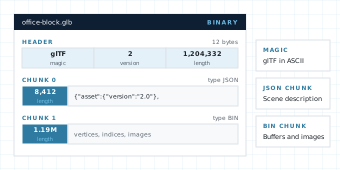
A GLB file laid out as a 12-byte header with magic, version and length, then a JSON chunk with the scene description and a BIN chunk with vertices, indices and images

.gltf JSON Asset

The same scene as readable JSON. Heavy data can be embedded in it or kept in separate .bin and image files, which do not upload with it.
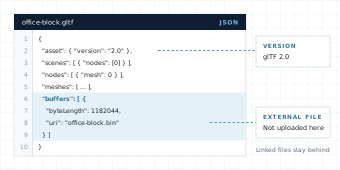
A .gltf file in a text editor: the asset version 2.0, the scene, nodes and meshes, and a buffer that points to a separate office-block.bin file

Common glTF parts the translator expects to read:

asset
scene
nodes
meshes
primitives
accessors
buffers
bufferViews
materials
textures
images
samplers
cameras
skins
animations
extensions

A .gltf that links to separate .bin or image files will be missing them here, and files that need extensions the translator does not support may not load. A complete .glb avoids the first problem. An unreadable file shows a parse error instead of a blank canvas.

GLB and glTF Viewer Compared With Blender and Other Tools

Compare with in-browser parsers that never leave the tab and Blender, the free desktop modeller most people reach for next.

NeedCUBE GLB and glTF ViewerIn-browser parserBlender
Open .glb or .gltf without a licenceYes. No account and no 3D software.Yes. Most parsers read glTF.Yes. Free, but a desktop install.
File leaves the deviceYes. Uploaded for viewing, scanned, and deleted after 14 days.Usually no. The file is parsed in the tab.No. Opens from local disk.
Matches project CDE previewYes. Same production translator.No. A separate engine.No. A separate desktop tool.
Geometry and materialsYes. Pan, zoom, fit, and orbit.Yes. Built for quick previews.Yes, with full 3D tools.
Edit geometryNo. View only.No.Yes. A full modeller.
Save into a controlled projectAlready stored in CUBE. Upgrade to keep and share.No CDE hand-off.No CDE hand-off.

Who Uses a GLB and glTF Viewer on a Construction Project

glTF is how a 3D model travels when the person receiving it should not need special software. On projects that usually means presentations, web viewers, AR, and product models.

Presentation

Architects and Designers

Check a visualisation export before it goes to the client. Look it over without touching the exported model.
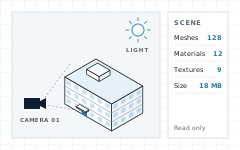
A visualisation scene with a camera, a light and the building model, plus a summary of the scene
On site

Contractors and VDC Teams

Pull up a web-ready model on a site laptop and check what does not match what is being built.
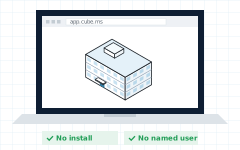
A laptop on site showing the model in a browser, with no install and no named user
Before ordering

Product and Fabrication Teams

Open a manufacturer's model to confirm it loads and looks right before routing it to the design team.
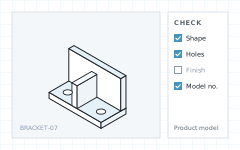
A steel bracket in 3D with one hole marked up and a short review checklist
Sign-off

Owners and Consultants

Look at a model without installing a specialist tool. Upgrade when it should become part of the project record.
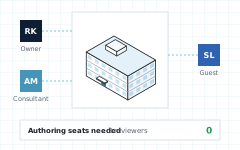

Three reviewers, an owner, a consultant and a guest, marking up one model with no authoring seats

GLB and glTF Viewer FAQ

Do I need Blender or other 3D software to open a GLB or glTF file?

No. CUBE opens .glb and .gltf files in Chrome, Edge, Firefox, or Safari. You do not need Blender, a plugin, or a 3D licence to look at the model.

Is the CUBE GLB and glTF viewer free?

Yes. Viewing on this page is free. Measuring the model or other advanced actions needs an upgrade.

Does this GLB and glTF viewer upload my file?

The browser checks the file first, then uploads it so it can be scanned and translated by CUBE’s production model engine.

What files does the viewer accept?

.glb and .gltf, up to 50 MB. A .gltf that links to separate .bin or image files opens without them, so embed them or upload a .glb. OBJ, FBX, and other formats have their own viewer pages.

What is the difference between GLB and glTF?

They are the same format. glTF stores the scene as JSON and can point to separate files. GLB packs the JSON, geometry, and images into one binary file.

Does the viewer edit the model?

No. Moving objects, changing materials, or saving a new .glb or .gltf is out of scope. Use a 3D tool such as Blender for that.

Which glTF versions can the viewer read?

glTF 2.0 is the current version. CUBE uses the same translator as the rest of CUBE, and if a file cannot be read the viewer shows a parse error rather than a blank canvas.

Notes and Trademarks

Trademark notice. Autodesk®, FBX®, Revit®, and Navisworks® are registered trademarks or trademarks of Autodesk, Inc., and/or its subsidiaries and affiliates in the USA and other countries. glTF and the glTF logo are trademarks of The Khronos Group Inc. Blender is a registered trademark of the Blender Foundation. IFC is an open standard of buildingSMART International. Chrome, Edge, Firefox, and Safari are trademarks of their respective owners. All other product names, logos, and brands are the property of their respective owners and appear on this page only to identify file formats and compatible software. CUBE is not affiliated with, sponsored by, or endorsed by Autodesk, Inc., The Khronos Group Inc., the Blender Foundation, or any other trademark owner named on this page.

Use of this tool. Use of the CUBE GLB and glTF Viewer does not require a CUBE account. It is subject to the CUBE Terms of Use and Privacy Policy. By uploading a file, you confirm that you own the file or are authorised to share it, and that it does not contain material you are not permitted to disclose. Files are used only to generate the preview and are handled as described above.

File retention. Uploaded files are deleted automatically 14 days after upload. You can delete a file yourself at any time before then. Paid plans keep files as controlled project documents.

Preview only. Rendered models are provided for reference. Some geometry, materials, textures, or linked content may not display exactly as in the authoring application. Do not rely on the preview for construction, fabrication, setting out, or measurement without checking the original file. The tool is provided as is, without warranty of any kind.

Availability. This tool is not offered in countries or regions subject to comprehensive U.S. or other applicable trade sanctions, or to persons on restricted-party lists.