

Online NWD Viewer for Design & Construction Teams
Open a published Navisworks® model without the desktop software. Choose your .nwd and the model opens for you to view.
Drop a .nwd File Here
Drag and drop your file or click the button below to upload it.
Choose NWD File.nwd only, up to 50 MB. Published files, not NWF or NWC.
How to Use This Online NWD Viewer
Two steps from a published .nwd to a model you can review. The file is checked on your device, then it opens inside CUBE.
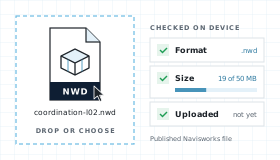
Choose a .nwd File
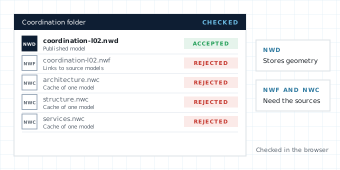
The browser checks the extension and size before anything leaves your device. Maximum size is 50 MB. NWF and NWC files point to other models, so publish an NWD first.
View It in CUBE
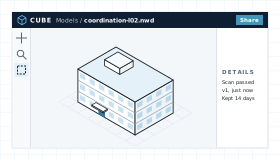
The model opens in the CUBE viewer. Pan, zoom, fit. Upgrade to measure the model, share it, raise issues, and run reviews.
What This NWD Viewer Shows in a Model
An NWD is a published snapshot of a coordination model: every discipline's geometry in one file, frozen at the moment it was published.
Every Discipline in One File
Architecture, structure, and services arrive together because the NWD stores their geometry, not links to it. Pan, zoom, and fit to get around.
View Without a Licence
Open the model without Navisworks® installed.
Hand-off Into CDE
Your model is already stored in CUBE, not a throwaway preview. Upgrade and it becomes a controlled document with versions, reviews, and transmittals.
Measure, Share, and Issues
This page is the viewer. Upgrade to measure the model, share it, and raise tracked issues.
NWD Viewer Workflow, Step by Step
Upload and preview your files, directly in the browser.
From Dropzone to Viewer
Four steps between choosing a file and working on it in CUBE.
Choose
Extension lock to .nwd and size check at 50 MB, both in the browser. Nothing is uploaded yet.
Upload and scan
The file uploads for this viewing session, visible only to you. Malware scan runs before translation and fails closed.
Translate and view
The model translator used in Spaces renders the published snapshot. Pan, zoom, fit, and orbit. Measuring, sharing, and issues need an upgrade.
Keep or expire
Files are deleted after 14 days. Upgrading keeps them as controlled project documents.
What an NWD File Contains
NWD is one of three native formats in Autodesk® Navisworks®, the tool many construction teams use to combine models from every discipline and check them for clashes. NWC files are caches made from single source models, NWF files hold links to those models, and NWD is the published result: one complete file that anyone can open.
Because an NWD stores geometry rather than links, it travels on its own. It can also carry the scene, saved viewpoints and object properties, depending on what the author chose when publishing. This Online NWD Viewer accepts published files under 50 MB.
NWD File Map
What a published Navisworks® file can carry. Publish settings decide how much of it is there.
Stored Geometry
The combined model itself, written into the file instead of linked from source models.
Scene and View
The scene environment and the view that was current when the file was saved.
Saved Viewpoints
Named camera positions, saved with the published model.
Hierarchy and Data
The selection tree and object properties carried over from each source model.
Publish Options
Choices made at publish time, including properties, textures, a password, and an expiry date.
Published NWD Snapshot
An NWD is a complete file. It does not need the source models next to it, which is why it is the format to send outside the coordination team.
Publish Options
When an NWD is published, the author decides whether it keeps properties, textures, and hidden items, and can add a password or an expiry date. Two NWD files from the same model can carry different things.
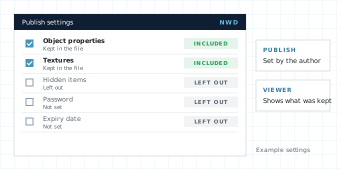
Common content in a published NWD:
If the author left out properties or textures when publishing, they cannot be recovered here. Saved viewpoints and animations stay in the file for Navisworks®, while the Online NWD Viewer focuses on the model itself. An unreadable file shows a parse error instead of a blank canvas.
NWD Viewer Compared With Navisworks® Freedom and Other Tools
Compare with in-browser parsers that never leave the tab and Navisworks® Freedom, the free desktop viewer.
| Need | CUBE NWD Viewer | In-browser parser | Navisworks® Freedom |
|---|---|---|---|
| Open .nwd without a licence | Yes. No account and no Navisworks® licence. | Varies. Few parsers read NWD. | Yes. A free Windows install. |
| File leaves the device | Yes. Uploaded for viewing, scanned, and deleted after 14 days. | Usually no. The file is parsed in the tab. | No. Opens from local disk. |
| Matches project CDE preview | Yes. Same production translator. | No. A separate engine. | No. A separate desktop tool. |
| Published model geometry | Yes. Pan, zoom, fit, and orbit. | Varies. Some data may not draw. | Yes, with saved viewpoints. |
| Edit geometry | No. View only. | No. | No. Freedom is a viewer. |
| Save into a controlled project | Already stored in CUBE. Upgrade to keep and share. | No CDE hand-off. | No CDE hand-off. |
Who Uses an NWD Viewer on a Construction Project
A coordination model only helps if the people in the meeting can open it. Most of them do not have Navisworks® installed.
BIM and VDC Managers
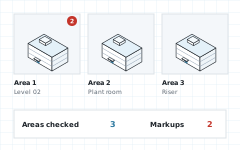
Open the published model, check the areas you flagged, and see what still needs resolving before the next round.
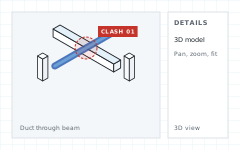
General Contractors
Pull up the combined model on a site laptop before an install, without a Navisworks® seat on every machine.
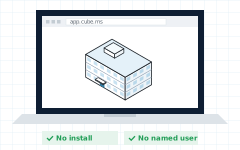
MEP and Specialty Trades
See your services in context with structure and architecture before a coordination meeting, and check the spots you want to raise.
Owners and Consultants
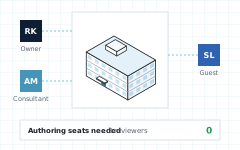
Review a published model without buying authoring seats for every stakeholder. Upgrade when it should become the project record.
Related Viewers in the Same CUBE Family
Each viewer page advertises one extension. If the file is not NWD, use the matching viewer. The Online NWD Viewer will reject .nwf, .nwc, and .rvt before translation.
NWD Viewer FAQ
Do I need Navisworks® to use this NWD viewer?
No. CUBE opens .nwd files in Chrome, Edge, Firefox, or Safari. You do not need Navisworks®, Freedom, a plugin, or an authoring licence to look at the model.
Is the CUBE NWD viewer free?
Yes. Viewing on this page is free. Measuring the model or other advanced actions needs an upgrade.
Does this NWD viewer upload my file?
The browser checks the file first, then uploads it so it can be scanned and translated by CUBE’s production model engine.
What files does the NWD viewer accept?
.nwd only, up to 50 MB. NWF and NWC files depend on source models, so publish an NWD from Navisworks® first. RVT, IFC, and other formats have their own viewer pages.
Will saved viewpoints appear?
They stay in the file, but the Online NWD Viewer is built for the model itself: pan, zoom, and fit. Open the NWD in Navisworks® when you need its saved viewpoints or animations.
Does the NWD viewer edit the model?
No. Changes belong in the source models, followed by a new publish from Navisworks®.
Which NWD versions can the viewer read?
CUBE uses the same translator as the rest of CUBE. Navisworks® lets authors publish to older file versions, and if a file cannot be read the Online NWD Viewer shows a parse error rather than a blank canvas.
Notes and Trademarks
Trademark notice. Autodesk®, Navisworks®, Revit®, AutoCAD®, FBX®, ReCap™, DWG™, and DWF are registered trademarks or trademarks of Autodesk, Inc., and/or its subsidiaries and affiliates in the USA and other countries. IFC is an open standard of buildingSMART International. Chrome, Edge, Firefox, and Safari are trademarks of their respective owners. All other product names, logos, and brands are the property of their respective owners and appear on this page only to identify file formats and compatible software. CUBE is not affiliated with, sponsored by, or endorsed by Autodesk, Inc., or any other trademark owner named on this page.
Use of this tool. Use of the CUBE NWD Viewer does not require a CUBE account. It is subject to the CUBE Terms of Use and Privacy Policy. By uploading a file, you confirm that you own the file or are authorised to share it, and that it does not contain material you are not permitted to disclose. Files are used only to generate the preview and are handled as described above.
File retention. Uploaded files are deleted automatically 14 days after upload. You can delete a file yourself at any time before then. Paid plans keep files as controlled project documents.
Preview only. Rendered models are provided for reference. Some geometry, materials, textures, or linked content may not display exactly as in the authoring application. Do not rely on the preview for construction, fabrication, setting out, or measurement without checking the original file. The tool is provided as is, without warranty of any kind.
Availability. This tool is not offered in countries or regions subject to comprehensive U.S. or other applicable trade sanctions, or to persons on restricted-party lists.

.png)
.png)


.png)


.png)