



Online RVT Viewer for Design & Construction Teams

Open a Revit® project file without the authoring software. Choose your .rvt and the model opens for you to view. No account is required.

Upload any .rvt
No account required
No Revit licence required
RVT
No file selected
Waiting for a file
↑

Drop a .rvt File Here

Drag and drop your file or click the button below to upload it.

Choose RVT File

.rvt only, up to 50 MB. Project files, not families or templates.

60+
Formats CUBE can view in a project, with this page as the public .rvt route
50 MB
Maximum .rvt size this page accepts
0 licences
No Revit® licence and no CUBE account needed to open the model
14 days
How long a file on this viewer is kept before automatic deletion

How to Use This Online RVT Viewer

Two steps from a .rvt in your inbox to a model you can review. The file is checked on your device, then it opens inside CUBE.

Step 1 of 2

Choose a .rvt File

The browser checks the extension and size before anything leaves your device. Maximum size is 50 MB. Family and template files are turned away here.
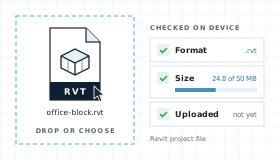
A .rvt file dropped into the viewer and checked in the browser for format and size
Step 2 of 2

View It in CUBE

The model opens in the CUBE viewer. Pan, zoom, fit, and view your model the way you want. Upgrade to measure the model, share it, raise issues, and run reviews.
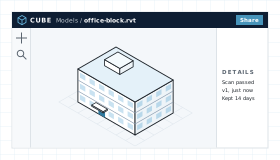
The CUBE viewer with a 3D model open for pan, zoom, and fit

What This RVT Viewer Shows in a Model

An RVT holds a whole building: walls, floors, doors, grids, and levels, all built from families. The Online RVT Viewer opens that model for review without the authoring seat.

The Model, Not a Print

You see the translated 3D model itself, not a PDF of one view. Pan, zoom, and fit to get around it.

View Without a Licence

Open the model without a Revit® seat. Pan, zoom, and fit. Nothing you do here changes the .rvt.

Hand-off Into CDE

Your model is already stored in CUBE, not a throwaway preview. Upgrade and it becomes a controlled document with versions, reviews, and transmittals.

Measure, Share, and Issues

This page is the viewer. Upgrade to measure the model, share it, and raise tracked issues.

RVT Viewer Workflow, Step by Step

Upload and preview your files, directly in the browser.

From Dropzone to Viewer

Four steps between choosing a file and working on it in CUBE.

01

Choose

Extension lock to .rvt and size check at 50 MB, both in the browser. Nothing is uploaded yet.

02

Upload and scan

The file uploads for this viewing session, visible only to you. Malware scan runs before translation and fails closed.

03

Translate and view

The model translator used in Spaces renders the building. Pan, zoom, fit, and orbit. Measuring, sharing, and issues need an upgrade.

04

Keep or expire

Files are deleted after 14 days. Upgrading keeps them as controlled project documents.

What an RVT File Contains

RVT is the project file format of Autodesk® Revit®. Revit began as a parametric building modeller from Revit Technology Corporation, which Autodesk® bought in 2002, and it is now one of the most widely used BIM authoring tools on building projects. An RVT is the live model: change a wall type and every plan, section, and schedule that shows it updates.

The format is not published. Autodesk® documents what a project contains, such as model elements, datum elements, views, and families, but not how it is stored on disk. Each Revit® release saves in its own version, and older releases cannot open newer files. This Online RVT Viewer accepts project files under 50 MB.

RVT Project Map

Revit® describes a project by what it holds, not by a byte layout. These are the parts a reviewer actually meets.

MODEL

Building Elements

Walls, floors, roofs, doors, windows, structure, ducts, and pipes. The physical building.

DATUM

Grids and Levels

Grids, levels, and reference planes that set out the model. Elements are hosted on them or measured from them.

VIEW-SPECIFIC

Annotation

Dimensions, tags, text, and detail items that belong to one view rather than the model.

FAMILIES

Types and Parameters

Every element comes from a family, which carries its geometry and the parameters that drive it.

LINKS

Linked Files

Other RVT, IFC, and CAD files linked for context. They stay outside the project unless they are bound into it.

RVT Project Files

A project file holds the whole model with its views, sheets, and families. It is the only Revit® file type the Online RVT Viewer opens.
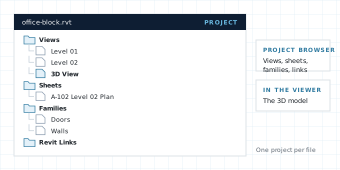
The project browser of a Revit project file, with views, sheets, families and links

Related Revit Files

Families (.rfa), project templates (.rte), and family templates (.rft) are Revit® files too, but they are building blocks, not a building. This page turns them away before anything uploads.
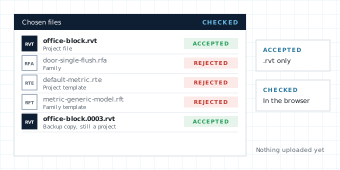
A list of chosen Revit files, with project files accepted and families and templates rejected

Common Revit® elements the translator expects to render:

Walls
Floors
Roofs
Ceilings
Doors
Windows
Stairs
Railings
Columns
Beams
Grids
Levels
Ducts
Pipes
Cable trays
Furniture

Linked models, imported CAD, point clouds, and decal images are separate files, so they may not appear when only the .rvt is uploaded. An unreadable file shows a parse error instead of a blank canvas.

RVT Viewer Compared With Revit® and Other Tools

Compare with in-browser parsers that never leave the tab, Revit® in viewer mode, and a full authoring seat.

NeedCUBE RVT ViewerIn-browser parserRevit® or viewer mode
Open .rvt without a licenceYes. A Revit® licence is not required.Varies. Few parsers read RVT.Viewer mode is free, but Revit® must be installed.
File leaves the deviceYes. Uploaded, scanned, and deleted after 14 days.Usually no. The file is parsed in the tab.No. Opens from local disk.
Matches project CDE previewYes. Same production translator.No. A separate engine.Native, but not the project CDE.
Inspect the 3D modelYes. Pan, zoom, fit, and orbit.Varies by parser and release.Full model, views, and sheets.
Edit geometryNo. View only.No.Yes in Revit®. Viewer mode cannot save.
Save into a controlled projectUpgrade to keep and share.No CDE hand-off.Manual upload after the fact.

Who Uses an RVT Viewer on a Construction Project

A Revit® model is shared far more often than it is edited. Most people who receive one need to look and check.

Before issue

Architects

Look over the model before it is issued to the team, then send it back to whoever is in Revit®.
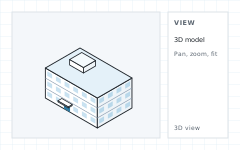
A 3D building model open in the viewer
Coordination

Engineers and BIM Leads

Check a design team's model against your own before the coordination meeting, including where services and structure meet.
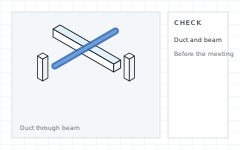
A duct running through a steel beam in the 3D model
On site

Contractors and VDC Teams

Open the model a designer sent on a site laptop, without asking for a Revit® seat for everyone who only needs to look.
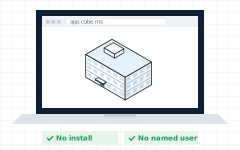
A site laptop showing the model
Sign-off

Owners and Consultants

Review the building without buying Revit® seats for every stakeholder. Upgrade when the model should become the project record.
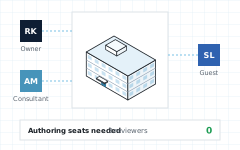

An owner, a consultant, and a guest reviewing one model with no authoring seats

RVT Viewer FAQ

Do I need Revit® to use this RVT viewer?

No. CUBE opens .rvt files in Chrome, Edge, Firefox, or Safari. You do not need Revit®, a plugin, or an authoring licence to look at the model.

Is the CUBE RVT viewer free?

Yes. Viewing a model up to 50 MB is free in the viewer on this page, and no account is required. Measuring the model or any advanced actions needs an upgrade.

Does this RVT viewer upload my file?

The browser checks the file first, then uploads it. CUBE scans it and translates it.

What files does the RVT viewer accept?

.rvt project files only, up to 50 MB. Families (.rfa) and templates (.rte, .rft) are turned away. DWG, NWD, IFC, and other formats have their own viewer pages.

Can I see sheets and views from the Revit® project?

This page opens the 3D model for review with pan, zoom, and fit. Views and sheets stay in the project file, and Revit® remains the place to work with them.

Does the RVT viewer edit the model?

No. Moving walls, changing types, or saving a new RVT is out of scope. Authoring stays in Revit®.

Which Revit® versions can the viewer read?

CUBE uses the same translator as the rest of CUBE. Each Revit® release saves in its own format, so if a file cannot be read the Online RVT Viewer shows a parse error rather than a blank canvas.

Notes and Trademarks

Trademark notice. Autodesk®, Revit®, AutoCAD®, Navisworks®, DWG™, DXF, and DWF are registered trademarks or trademarks of Autodesk, Inc., and/or its subsidiaries and affiliates in the USA and other countries. IFC is an open standard of buildingSMART International. Chrome, Edge, Firefox, and Safari are trademarks of their respective owners. All other product names, logos, and brands are the property of their respective owners and appear on this page only to identify file formats and compatible software. CUBE is not affiliated with, sponsored by, or endorsed by Autodesk, Inc., or any other trademark owner named on this page.

Use of this tool. Use of the CUBE RVT Viewer does not require a CUBE account. It is subject to the CUBE Terms of Use and Privacy Policy. By uploading a file, you confirm that you own the file or are authorised to share it, and that it does not contain material you are not permitted to disclose. Files are used only to generate the preview and are handled as described above.

File retention. Uploaded files are deleted automatically 14 days after upload. You can delete a file yourself at any time before then. Paid plans keep files as controlled project documents.

Preview only. Rendered models are provided for reference. Some geometry, materials, textures, or linked content may not display exactly as in the authoring application. Do not rely on the preview for construction, fabrication, setting out, or measurement without checking the original file. The tool is provided as is, without warranty of any kind.

Availability. This tool is not offered in countries or regions subject to comprehensive U.S. or other applicable trade sanctions, or to persons on restricted-party lists.