



DWG to PDF for Design & Construction Teams

Turn an AutoCAD® drawing into a PDF without the authoring software. Choose your .dwg and CUBE makes the PDF. No account is required.

Any .dwg
No account required
No AutoCAD licence required
DWG
No file selected
Waiting for a file
↑

Drop a .dwg File Here

Drag and drop your drawing or click the button below. This page converts that .dwg into a PDF.

Choose DWG File

.dwg only. Up to 50 MB converts without an account. The PDF is a copy. The drawing is not edited.

1
Input on this page: a .dwg. The output is a PDF of that drawing
50 MB
Largest drawing that converts without an account
0 licences
No AutoCAD® seat and no CUBE account needed to make the PDF
48 hours
How long the drawing and the PDF are kept before automatic deletion

How to Convert DWG to PDF

Three steps from a .dwg in your inbox to a PDF anyone can open. No account needed.

Step 1 of 3

Choose a .dwg File

The browser checks the extension and the size before anything leaves your device. DXF, DWF, and DGN are not converted here. Up to 50 MB converts without an account.
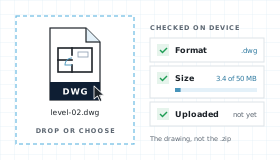
A .dwg file dropped into the viewer and checked in the browser for format and size, still on your device
Step 2 of 3

Let CUBE Convert It

The drawing uploads, is scanned for malware, and each layout becomes a PDF page. You see each step as it happens.
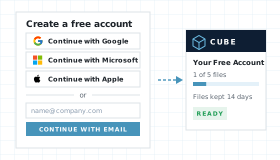
Sign-in options for Google, Microsoft, Apple and work email
Step 3 of 3

Download the PDF

Layouts become pages. Download the PDF from this page. Sign in for free to share a link, open bigger files, or keep the PDF.
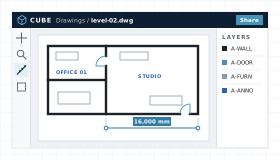
The file open in the CUBE viewer

What the PDF Contains

A plot of the drawing, not a new CAD file. Model space and each paper-space layout become pages.

One PDF of the Drawing

The conversion writes a PDF copy. It does not write a new DWG, and it does not change the file you uploaded.

Layouts Become Pages

Model space and each paper-space layout are included. Fonts, proxy objects, and custom objects can differ from AutoCAD®. Check the original before you issue the set.

Download Without an Account

Conversion on this page does not require a CUBE account or an AutoCAD® licence.

Hand-off Into CDE

The drawing and the PDF are stored for this session. Upgrade and they become controlled documents with versions, reviews, and transmittals.

Conversion Workflow, Step by Step

Upload and convert your drawing, directly in the browser.

From Dropzone to PDF

Four steps between choosing a drawing and downloading the PDF.

01

Choose

Extension lock to .dwg. Up to 50 MB converts without an account. Nothing is uploaded yet.

02

Upload and scan

The drawing uploads for this conversion, visible only to you. Malware scan runs before conversion and fails closed.

03

Convert to PDF

Layouts become pages. The preview opens so you can pan, zoom, and fit before you download.

04

Keep or expire

The drawing and the PDF are deleted after 48 hours. Upgrading keeps them as controlled project documents.

Conversion Compared With Plotting in AutoCAD®

Compare with plotting from an AutoCAD® seat, and with a converter that asks for an account before it returns the PDF.

NeedCUBE DWG to PDFPlot from AutoCAD®A generic converter
Convert without a licenceYes. No AutoCAD® licence and no account.AutoCAD® has to be installed.Varies. An account is common.
What you getA PDF of the layouts in the drawing.Full plot control, including pen tables.A PDF, with less say over the plot.
File leaves the deviceYes. Uploaded, scanned, and deleted after 48 hours.No. Plots from local disk.Often kept on their server.
Edit the DWGNo. The PDF is a copy.Yes.No.
Save into a controlled projectAlready stored in CUBE. Upgrade to keep and share.Manual upload after the fact.No CDE hand-off.

Who Converts a Drawing on a Construction Project

Most people who receive a DWG need a file they can open, print, and send on. They do not need to edit the drawing.

Issue

Architects

Make a PDF of the current drawing before it goes out, without tying up an AutoCAD® seat for the plot.
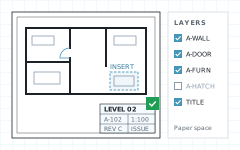
A drawing sheet with the title block checked and the layers list
Site

Contractors

Turn the drawing a designer sent into a PDF the site team can open on a laptop or a phone.
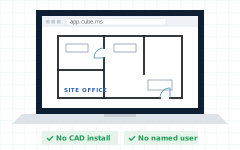
A laptop on site showing the drawing in a browser, with no install and no named user
Review

Consultants

Read the set without a CAD seat, then send it back to whoever holds the DWG.
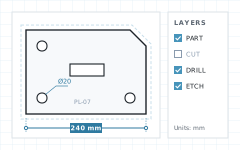
A steel plate part with the cut layer turned off, a 240 mm dimension and a 20 mm hole callout
Record

Owners

Keep a PDF the whole team can open. Upgrade when the drawing and the PDF should stay in the project record.
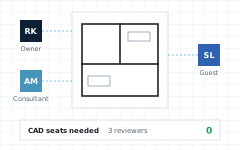

Three reviewers, an owner, a consultant and a guest, marking up one drawing with no CAD seats

Conversion FAQ

Do I need AutoCAD® to convert a DWG to PDF?

No. CUBE converts .dwg files in Chrome, Edge, Firefox, or Safari. You do not need AutoCAD®, a plotter driver, or a CUBE account.

Is conversion free?

Yes. Conversion on this page is free. No account is required. Sharing the PDF and keeping it beyond 48 hours need an upgrade.

Does this page upload my drawing?

The browser checks the file first, then uploads it so it can be scanned and converted. The drawing and the PDF are deleted after 48 hours.

What files does it accept?

.dwg only. Up to 50 MB converts without an account. A PDF is the output, not an input. DXF, DWF, and DGN have viewer pages and are not converted here.

What is in the PDF?

Model space and each paper-space layout become pages. Fonts, proxy graphics, and custom objects can differ from the drawing. Do not issue the PDF for construction without checking the original DWG.

Does the conversion edit the DWG?

No. The PDF is a copy. Moving geometry or saving a new DWG stays in AutoCAD® or another CAD seat.

Notes and Trademarks

Trademark notice. Autodesk®, AutoCAD®, and DWG™ are trademarks of Autodesk, Inc., and/or its subsidiaries and affiliates in the USA and other countries. Chrome, Edge, Firefox, and Safari are trademarks of their respective owners. CUBE is not affiliated with, sponsored by, or endorsed by Autodesk, Inc.

Use of this tool. Use of this page does not require a CUBE account. It is subject to the CUBE Terms of Use and Privacy Policy. By uploading a file, you confirm that you own the file or are authorised to share it. Files are used only to generate the PDF and are handled as described above.

File retention. Uploaded drawings and the PDFs made from them are deleted automatically 48 hours after upload. You can delete a file yourself at any time before then. Paid plans keep files as controlled project documents.

Preview only. The PDF is a plot for reference. Some entities, fonts, or custom objects may not match the authoring application. Do not rely on it for construction, fabrication, or setting out without checking the original DWG.

Availability. This tool is not offered in countries or regions subject to comprehensive U.S. or other applicable trade sanctions, or to persons on restricted-party lists.